
Bedienungsanleitung Oris Artelier Calibre 111 Armbanduhr

Benötigen Sie ein Bedienungsanleitung für Ihren Oris Artelier Calibre 111 Armbanduhr? Unten können Sie das PDF-Bedienungsanleitung kostenlos auf Deutsch ansehen und herunterladen. Für dieses Produkt gibt es derzeit 6 häufig gestellte Fragen, 0 Kommentare und 1 Stimme mit einer durchschnittlichen Produktbewertung von 100/100. Wenn dies nicht das von Ihnen gewünschte Bedienungsanleitung ist, kontaktieren Sie uns bitte.

Ist Ihr Produkt defekt und bietet die Bedienungsanleitung keine Lösung? Gehen Sie zu einem Repair Café, wo es gratis repariert wird.

Bedienungsanleitung

Loading…
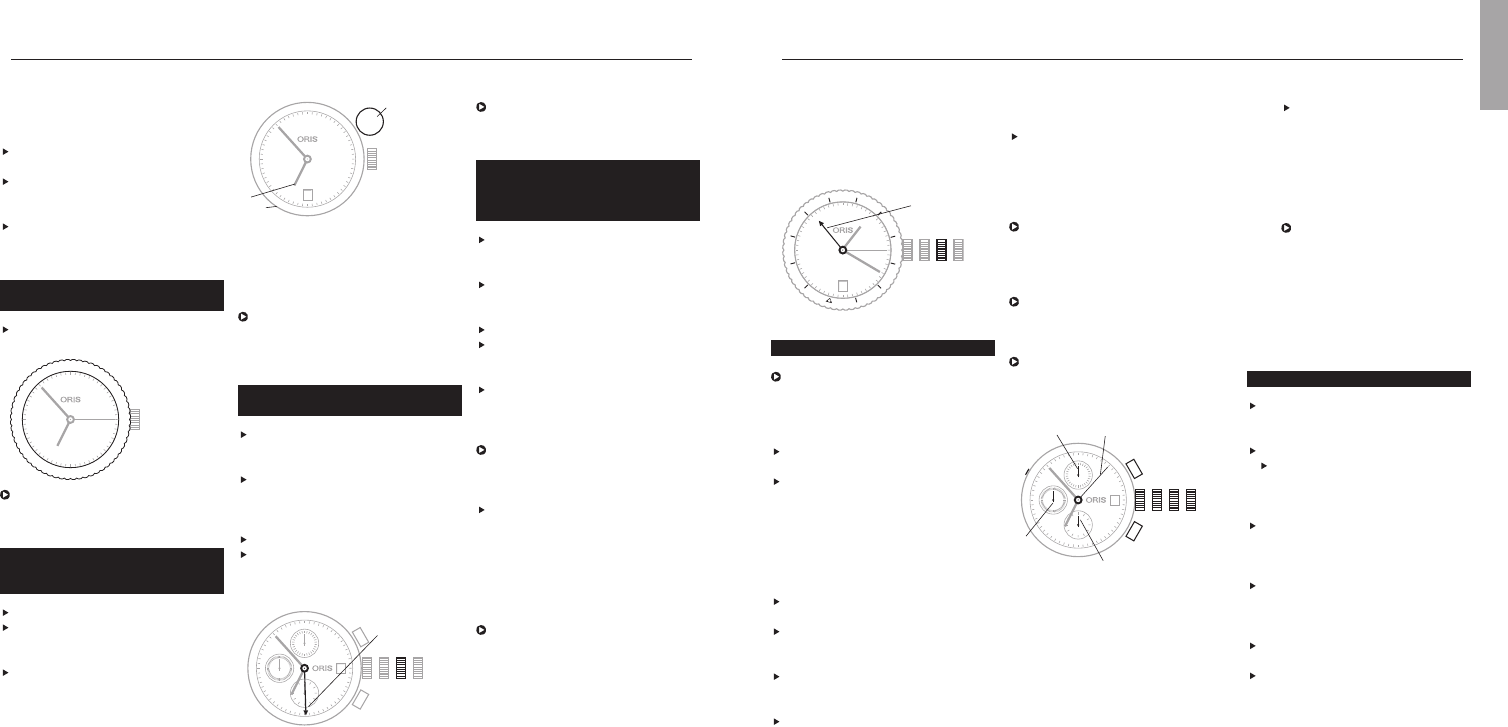
stops the chronograph hand once
again and freezes timing.
Press pusher 5 – the stopped
chronograph hand and the minute
and hour counters are reset to
their starting positions.
Reading chronograph timing:
With the chronograph second
hand (7), the elapsed time can be
read on the dial scale, between
1
/4 second and 60 seconds
maximum.
With the chronograph minute hand
(8), you can read the
elapsed minutes, up to 30 minutes
maximum.
With the chronograph hour hand
(9), you can read the elapsed half-
hours and hours, up to 12 hours
maximum.
Pos. 0 Crown locked, for screw-down
crown or QLC crown
Pos. 1 Winding position
Pos. 2 Date setting
Pos. 3 Time setting
4 Start and stop pusher
5 Reset pusher
6 Vertical pusher for setting date
on movement 676
Press the pusher in using an
appropriate tool or a wooden
toothpick to set the date
7 Chronograph second hand
8 Chronograph minute hand
9 Chronograph hour hand
10 Second hand for normal time
display, running constantly
On some models, the
second hand is deliberately
omitted. In this case, the
chronograph second hand
(7) can be left in motion
permanently, for use as a
second hand for normal time
display.
Complication.
Release the screw-down crown
or QLC crown (if fitted) as per the
instructions in chapter 1.
Pull out the crown to position 2.
Turn the hand forwards. The
moon phase indicator moves its
position
1
/28
th
of a month right
between 22:00 and 23:00.
One day before the current moon
position is reached, take account
of the date change, then set the
time to 05:00.
Press pusher 3 with the
special tool provided, or with a
wooden toothpick, until the
desired date is set.
Press pusher 4 and set the day of
the week.
Set the current time with the
crown – completing another full turn
of the dial for an afternoon time.
on the rotating bezel can now
be read off. New York 08:20,
Cairo 15:20, Moscow 16:20, etc.
This setting does not take into
account daylight saving time.
24 hour
hand (T2)
Chronograph.
The Oris chronograph has a
stop watch function as well as a
time and date display. This is a
very useful function for everyday
use.
Crown and pusher operation, see
chapter: ‘Starting the watch’
Time and date setting, see chapter:
‘Operating Oris watches’
(exception: date setting on move-
ment 676 – see below).
Stop timer and reset all chrono-
graph indicators to their starting
positions:
Press pusher 4 – the chronograph
hand starts running
Press pusher 4 again – this stops
the chronograph hand and freezes
timing.
Press pusher 4 again – the
chronograph hand restarts run-
ning from the previous stop point.
Press pusher 4 once again – this
15
In the above example, it is 11:53
in the 2
nd
time zone.
2
nd
time zone with
additional 24 hr hand and
city markers on the
rotating bezel.
»
Release the screw-down crown
or QLC crown (if fitted) as per the
instructions in chapter 1.
Pull out the crown to position 2,
turn it clockwise and set the desired
time for T2 (e.g. home time).
Press the crown into position 1.
Lock the screw-down crown or QLC
crown (if fitted) as per the instruc-
tions in chapter 1.
Turn the outer bezel with the city
marker until the time in the
desired city (home city) matches
T2 (24 hour hand).
Times in the cities listed on the
rotating bezel can now be read
off. This setting does not take into
account daylight saving time.
To read off the time in these cities
on the rotating bezel again,
assuming that T2 is showing
‘home time’, always align ‘home
city’ on the rotating bezel with
the T2 hand (updated).
Example:
Local time in London (GMT) is
13:20. The 24 hour hand points
to 21:00, home time in Hong
Kong. The rotating bezel was
adjusted so that the 24 hour hand
displays Hong Kong as the home
city. The time in the cities listed
and 06.00, take the bigger
angle between the hour hand and
12 o’clock.)
Press the vertical crown down-
wards to the neutral position.
Align the hour hand with the sun
and read off the cardinal points
on the compass bezel.
See figure in the chapter ‘Watch
as a Compass’.
2
nd
time zone on outer
rotating bezel.
Turn the rotating bezel to the
desired 2
nd
time zone
In the above example, the 2
nd
time zone shows 08:53 or 20:53.
2
nd
time zone indicator
on inner rotating bezel with
vertical crown.
Pull the vertical crown (1) upwards.
Turn the crown clockwise or anti-
clockwise and set the desired 2
nd
time (T2).
Press the vertical crown down-
wards to the neutral position.
Setting and operating Oris watches.
1 Vertical crown
2 T1 (local time)
3 T2 on inner rotating bezel
(e.g. home time)
In the figure above, T1 indicates
06:53 or 18:53 and T2 to 03:53
or 15:53
2
nd
time zone with additional
24 hr hand.
Release the screw-down crown
or QLC crown (if fitted) as per the
instructions in chapter 1.
Pull out the crown to position 2,
turn it anti-clockwise and set the
desired time for T2 (e.g. home
time).
Press the crown into position 1.
Lock the screw-down crown or QLC
crown (if fitted) as per the instruc-
tions in chapter 1.
T2 (e.g.
home time)
English
12
11
10
9
8
7
6
5
4
3
2
1
28
12
11
10
9
8
7
5
4
3
2
1
1
2
3
2828
24
16
14
12
10
8
|
22
|
20
|
18
|
|
|
|
|
|
6
|
4
|
2
|
10 2 3
12
1
2
3
4
5
6
7
8
9
10
11
28
P
A
R
I
S
A
Z
O
R
E
S
R
I
O
D
.
J
.
N
E
W
Y
O
R
K
D
E
N
V
E
R
J
U
N
E
A
U
M
I
D
W
A
Y
N
O
U
M
E
A
T
O
K
Y
O
B
A
N
G
K
O
K
K
A
R
A
C
H
I
M
O
S
C
O
W
L
O
N
D
O
N
S
.
G
E
O
R
G
I
A
C
A
R
A
C
A
S
M
E
X
I
C
O
C
I
T
Y
L
.
A
N
G
E
L
E
S
H
A
W
A
I
I
A
U
C
K
L
A
N
D
S
Y
D
N
E
Y
H
O
N
G
K
O
N
G
D
H
A
K
A
D
U
B
A
I
C
A
I
R
O
1
17
15
13
11
9
7
|
23
|
21
|
19
|
|
|
|
|
|
|
5
|
3
|
10 2 3
28
1023
4
5
6
8
7
9
10
Download Bedienungsanleitung auf Deutsch (PDF, 34.37 MB)
(Denken Sie an die Umwelt und drucken Sie diese Bedienungsanleitung nur aus, wenn es unbedingt nötig ist)

Loading…

Bewertung

Teilen Sie uns mit, was Sie über die Oris Artelier Calibre 111 Armbanduhr denken, indem Sie eine Produktbewertung verfassen. Möchten Sie Ihre Erfahrungen mit diesem Produkt teilen oder eine Frage stellen? Hinterlassen Sie einen Kommentar am Ende dieser Seite!
Sind Sie mit Oris Artelier Calibre 111 Armbanduhr zufrieden?
Ja Nein
100%
0%
1 Bewertung

Diskutieren Sie über dieses Produkt mit

Hier können Sie uns Ihre Meinung zu Oris Artelier Calibre 111 Armbanduhr mitteilen. Wenn Sie eine Frage haben, lesen Sie zunächst das Bedienungsanleitung sorgfältig durch. Die Anforderung eines Bedienungsanleitung kann über unser Kontaktformular erfolgen.

Mehr zu diesem Bedienungsanleitung

Wir verstehen, dass es schön ist, ein gedrucktes Bedienungsanleitung für Ihr Oris Artelier Calibre 111 Armbanduhr zu haben. Sie können das Bedienungsanleitung jederzeit von unserer Website herunterladen und selbst ausdrucken. Wenn Sie ein Originalhandbuch wünschen, empfehlen wir Ihnen, Oris zu kontaktieren. Möglicherweise können sie ein Originalhandbuch bereitstellen. Suchen Sie das Bedienungsanleitung Ihres Oris Artelier Calibre 111 Armbanduhr in einer anderen Sprache? Wählen Sie auf unserer Homepage Ihre bevorzugte Sprache und suchen Sie nach der Modellnummer, um zu sehen, ob wir sie verfügbar haben.

Spezifikationen

Marke Oris
Modell Artelier Calibre 111
Kategorie Armbanduhren
Dateityp PDF
Dateigröße 34.37 MB

Alle Anleitungen für Oris Armbanduhren
Weitere Anleitungen von Armbanduhren

Häufig gestellte Fragen zu Oris Artelier Calibre 111 Armbanduhr

Unser Support-Team sucht nach nützlichen Produktinformationen und beantwortet Ihre häufig gestellten Fragen. Sollte Ihnen ein Fehler bei den häufig gestellten Fragen auffallen, teilen Sie uns dies bitte anhand unseres Kontaktformulars mit.

Eine der Batterien in meinem Gerät ist oxidiert. Kann ich es dennoch sicher verwenden? Verifiziert

Ja, das Gerät kann weiterhin sicher verwendet werden. Entfernen Sie zunächst die oxidierte Batterie. Tun Sie dies niemals ohne Handschutz. Reinigen Sie daraufhin das Batteriefach mit einem Wattestäbchen, das Sie in Essig oder Zitronensaft getränkt haben. Lassen Sie es trocknen und setzen Sie neue Batterien ein.

Das war hilfreich (940) Mehr lesen

Meine mechanische Uhr läuft zu schnell. Was kann ich tun? Verifiziert

Dies kann durch ein Magnetfeld verursacht worden sein. Es kann durch eine Entmagnetisierung vom einem professionellen Uhrmacher gelöst werden.

Das war hilfreich (879) Mehr lesen

Wofür stehen AM und PM? Verifiziert

AM steht für "Ante Meridiem" und bezeichnet die Zeit vor Mittag. PM steht für "Post Meridiem" und bezeichnet die Zeit nach Mittag.

Das war hilfreich (755) Mehr lesen

Was ist ein Chronograph? Verifiziert

Ein Chronograph ist wörtlich ein „Zeit-Schreiber“. Der Begriff wird verwendet, um Uhren zu beschreiben, die die Tageszeit anzeigen und einen bestimmten Zeitraum messen, wie eine Stoppuhr.

Das war hilfreich (660) Mehr lesen

Was ist GMT? Verifiziert

GMT steht für "Greenwich Mean Time" (manchmal auch UTC genannt, was für "Coordinated Universal Time" steht). Es ist die Zeit für den Längengrad 0, der durch Greenwich bei London verläuft.

Das war hilfreich (500) Mehr lesen

Was ist ein Quarzwerk? Verifiziert

Uhren und Armbanduhren mit einem Quarzwerk werden von einer Batterie betrieben. Diese sendet elektrischen Strom durch Quarzkristalle und bringt sie dadurch zum vibrieren. Diese Vibrationen werden an das Uhrwerk weitergegeben. Da die Vibrationen eine feststehende Frequenz haben, sind Uhren mit Quarzwerk extrem genau.

Das war hilfreich (482) Mehr lesen


Bedienungsanleitung Oris Artelier Calibre 111 Armbanduhr

Verwandte Produkte

Verwandte Kategorien

×
Download