Bedienungsanleitung Oris Artelier Calibre 111 Armbanduhr

Benötigen Sie ein Bedienungsanleitung für Ihren Oris Artelier Calibre 111 Armbanduhr? Unten können Sie das PDF-Bedienungsanleitung kostenlos auf Deutsch ansehen und herunterladen. Für dieses Produkt gibt es derzeit 6 häufig gestellte Fragen, 0 Kommentare und 1 Stimme mit einer durchschnittlichen Produktbewertung von 100/100. Wenn dies nicht das von Ihnen gewünschte Bedienungsanleitung ist, kontaktieren Sie uns bitte.

Ist Ihr Produkt defekt und bietet die Bedienungsanleitung keine Lösung? Gehen Sie zu einem Repair Café, wo es gratis repariert wird.

Bedienungsanleitung

Loading…
Setting T1 (local time):
Press the + or – pusher once for
each hour’s difference from T2
(home time).
The date can be corrected forwards
or backwards (Oris patent filed)
if setting the time with the + or –
pusher and passing midnight.
Worldtimer with 3
rd
time
zone and compass.
C
As well as the functions described
in the previous ‘Oris Worldtimer’
chapter, this watch has a
separately adjustable inner rota-
ting bezel for an additional time
zone, and the cardinal points of
a compass. This watch is ideal
for people who need a constant
display of 3 time zones, e.g.
pilots, frequent flyers, international
business people, etc.
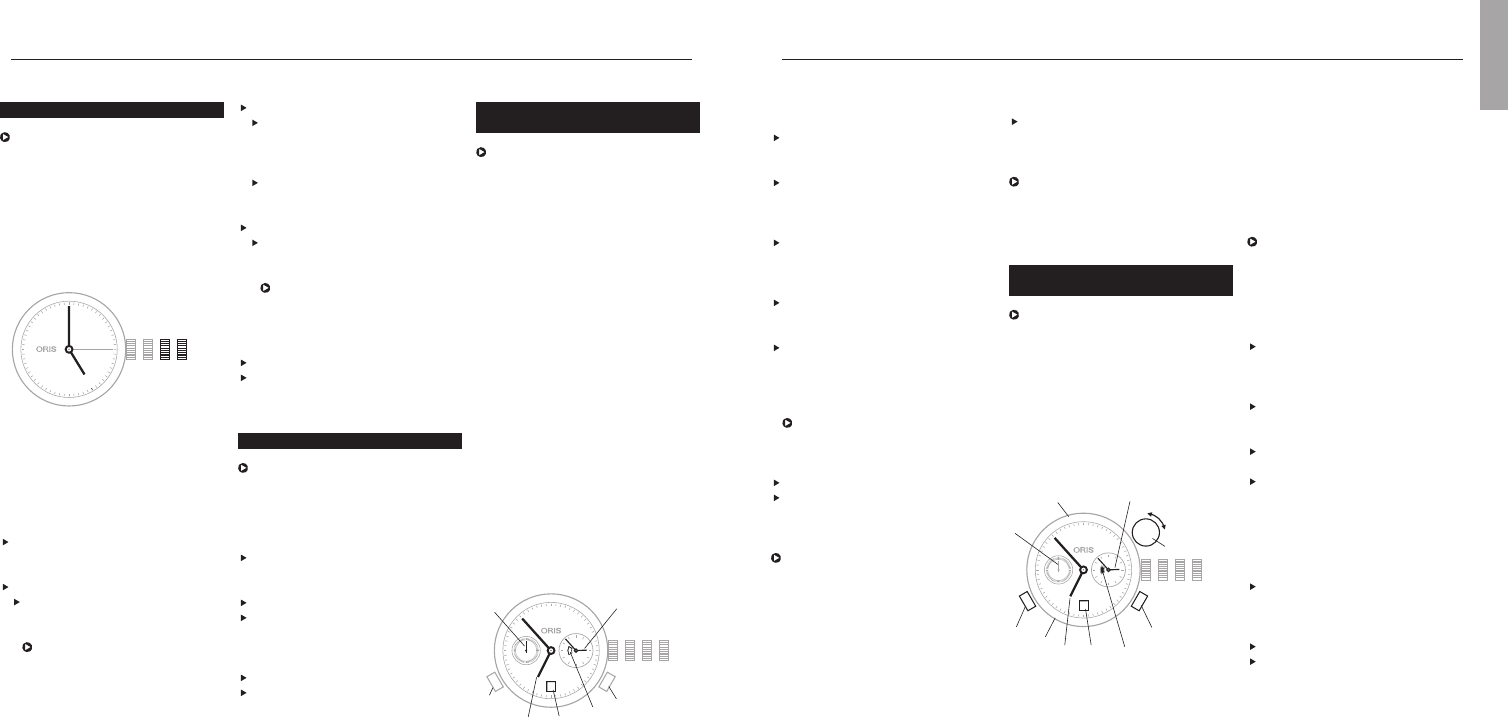
T1 Time at starting location
T2 Home time or GMT
T3 Time at destination location
4 Compass graduation
5 Small second
6 Day/night display
7 Date
8 – pusher T1
9 + pusher T1
10 Vertical crown for setting of T3
and compass
On the figure above
T1 indicates 06:53 or 18:53
T2 02:53
T3 09:53 or 21:53
Synchronising T1 and T2,
setting the time and date:
Proceed as described in
‘Worldtimer’ chapter.
Setting T3:
Determine T3 i.e. the time at
destination and/or time difference
from departure location.
Pull the vertical crown (10)
upwards.
Turn the vertical crown (10) clock-
wise or anti-clockwise and set
the corresponding + or – time
difference, i.e. that between
12:00 in T3 (time at destination)
and 12:00 in T1 (time at starting
point).
Press the vertical crown down-
wards to the neutral position.
Setting the compass:
Remove watch from wrist.
Pull the vertical crown upwards
and set south on the compass
rotating bezel on the bisector (i.e.
mid-point) between the hour hand
and 12 o’clock. (Between 18.00
Synchronising times, setting the
time and date:
Release the screw-down crown
or QLC crown (if fitted) as per the
instructions in chapter 1.
Pull out the crown to position 3,
turn it anti-clockwise and set T2 to
05:00. The day/night display
appears dark.
Using the + pusher, set T1 to
05:00 too, i.e. the date must
change between 01:00 and
03:00.
Press the crown into position 2,
turn it anti-clockwise and set the
date.
Pull out the crown again to posi-
tion 3 and set the current time,
completing another full turn of the
dial for an afternoon time.
The watch is stopped in this
position and can be restarted at
any time, by pressing the crown
into position 1.
Press the crown into position 1.
Lock the screw-down crown or QLC
crown (if fitted) as per the instruc-
tions in chapter 1.
It takes about 10 minutes until T1
and T2 start running simultaneously.
The tolerance can be up to one
minute.
13
Worldtimer.
C
The Oris Worldtimer has two
separate time zone displays: T1
local time and T2 home time. Both
displays have their own hour and
minute hands. The minute hands
of T1 and T2 run simultaneously.
The hour hand on T1 can be
adjusted forward or backward an
hour at a time or very rapidly by
pressing the two pushers. In rapid
adjustment, the date can be
moved forward or backward
between 23:00 and 03:00 (Oris
patent filed). T2 also has a
day/night indicator.
Pos. 0 Crown locked with screw-down
crown or crown with Oris
Quick Lock system (QLC)
Pos. 1 Winding position
Pos. 2 Setting the date
Pos. 3 Setting the time
4 T1 (local time)
5 T2 (home time)
6 Small second
7 Day/night indicator
8 Date
9 – pusher for T1
10 + pusher for T1
Date, day of the week and time.
This instruction applies to most
movements produced for Oris
watches, with date and day of the
week window display or date and
day of the week hand indicators.
Exceptions such as the Oris
Complication or Oris Chronograph
(movement 676) are described in
the sections for the corresponding
types of movement.
Pos. 0 Crown locked, for screw-down
crowns and for crowns with
Oris Quick Lock system
Pos. 1 Winding position
Pos. 2 Date and day of the week
setting
Pos. 3 Setting the time
Release the screw-down crown
or QLC crown (if fitted) as per the
instructions in chapter 1.
Pull out the crown to position 3.
Turn the hands forward until the
date changes, and 05:00 the
next day is indicated.
The rapid date and day correc-
tions cannot be performed
between 21:00 and 03:00
because the mechanism is
meshed for the change and
damage may occur.
Setting and operating Oris watches.
Push the crown back into position 2.
Depending on the movement
type, turn the crown clockwise or
anti-clockwise and then set the
current date.
If a day of the week display
is provided, turn the crown
anti-clockwise and set the day.
Pull out the crown to position 3.
Set the time – completing
another full turn of the dial for
an afternoon time.
The watch is stopped in this
position and can for example
be restarted at a time signal,
by pressing the crown into
position 1.
Press the crown into position 1.
Lock the screw-down crown or
QLC crown (if fitted) as per the
instructions in chapter 1.
Setting the date.
After months with fewer than
31 days, the date must be set
forward manually to the first day
of the following month via rapid
correction (crown in position 2).
Release the screw-down crown
or QLC crown (if fitted) as per the
instructions in chapter 1.
Pull out the crown to position 2.
Depending on the movement type,
turn the crown clockwise or anti-
clockwise and then set to the
desired date.
Press the crown into position 1.
Lock the screw-down crown or QLC
crown (if fitted) as per the instruc-
tions in chapter 1.
English
1023
28
12
11
10
9
8
7
6
5
4
3
2
1
N
330
300
W
240
210
S
150
120
E
60
30
T1
T2
4
6
7
10
8
9
T3
5
28
4
5
6
7
8
1023
9
10
Download Bedienungsanleitung auf Deutsch (PDF, 34.37 MB)
(Denken Sie an die Umwelt und drucken Sie diese Bedienungsanleitung nur aus, wenn es unbedingt nötig ist)

Loading…

Bewertung

Teilen Sie uns mit, was Sie über die Oris Artelier Calibre 111 Armbanduhr denken, indem Sie eine Produktbewertung verfassen. Möchten Sie Ihre Erfahrungen mit diesem Produkt teilen oder eine Frage stellen? Hinterlassen Sie einen Kommentar am Ende dieser Seite!
Sind Sie mit Oris Artelier Calibre 111 Armbanduhr zufrieden?
Ja Nein
100%
0%
1 Bewertung

Diskutieren Sie über dieses Produkt mit

Hier können Sie uns Ihre Meinung zu Oris Artelier Calibre 111 Armbanduhr mitteilen. Wenn Sie eine Frage haben, lesen Sie zunächst das Bedienungsanleitung sorgfältig durch. Die Anforderung eines Bedienungsanleitung kann über unser Kontaktformular erfolgen.

Mehr zu diesem Bedienungsanleitung

Wir verstehen, dass es schön ist, ein gedrucktes Bedienungsanleitung für Ihr Oris Artelier Calibre 111 Armbanduhr zu haben. Sie können das Bedienungsanleitung jederzeit von unserer Website herunterladen und selbst ausdrucken. Wenn Sie ein Originalhandbuch wünschen, empfehlen wir Ihnen, Oris zu kontaktieren. Möglicherweise können sie ein Originalhandbuch bereitstellen. Suchen Sie das Bedienungsanleitung Ihres Oris Artelier Calibre 111 Armbanduhr in einer anderen Sprache? Wählen Sie auf unserer Homepage Ihre bevorzugte Sprache und suchen Sie nach der Modellnummer, um zu sehen, ob wir sie verfügbar haben.

Spezifikationen

Marke Oris
Modell Artelier Calibre 111
Kategorie Armbanduhren
Dateityp PDF
Dateigröße 34.37 MB

Alle Anleitungen für Oris Armbanduhren
Weitere Anleitungen von Armbanduhren

Häufig gestellte Fragen zu Oris Artelier Calibre 111 Armbanduhr

Unser Support-Team sucht nach nützlichen Produktinformationen und beantwortet Ihre häufig gestellten Fragen. Sollte Ihnen ein Fehler bei den häufig gestellten Fragen auffallen, teilen Sie uns dies bitte anhand unseres Kontaktformulars mit.

Eine der Batterien in meinem Gerät ist oxidiert. Kann ich es dennoch sicher verwenden? Verifiziert

Ja, das Gerät kann weiterhin sicher verwendet werden. Entfernen Sie zunächst die oxidierte Batterie. Tun Sie dies niemals ohne Handschutz. Reinigen Sie daraufhin das Batteriefach mit einem Wattestäbchen, das Sie in Essig oder Zitronensaft getränkt haben. Lassen Sie es trocknen und setzen Sie neue Batterien ein.

Das war hilfreich (940) Mehr lesen

Meine mechanische Uhr läuft zu schnell. Was kann ich tun? Verifiziert

Dies kann durch ein Magnetfeld verursacht worden sein. Es kann durch eine Entmagnetisierung vom einem professionellen Uhrmacher gelöst werden.

Das war hilfreich (879) Mehr lesen

Wofür stehen AM und PM? Verifiziert

AM steht für "Ante Meridiem" und bezeichnet die Zeit vor Mittag. PM steht für "Post Meridiem" und bezeichnet die Zeit nach Mittag.

Das war hilfreich (755) Mehr lesen

Was ist ein Chronograph? Verifiziert

Ein Chronograph ist wörtlich ein „Zeit-Schreiber“. Der Begriff wird verwendet, um Uhren zu beschreiben, die die Tageszeit anzeigen und einen bestimmten Zeitraum messen, wie eine Stoppuhr.

Das war hilfreich (660) Mehr lesen

Was ist GMT? Verifiziert

GMT steht für "Greenwich Mean Time" (manchmal auch UTC genannt, was für "Coordinated Universal Time" steht). Es ist die Zeit für den Längengrad 0, der durch Greenwich bei London verläuft.

Das war hilfreich (500) Mehr lesen

Was ist ein Quarzwerk? Verifiziert

Uhren und Armbanduhren mit einem Quarzwerk werden von einer Batterie betrieben. Diese sendet elektrischen Strom durch Quarzkristalle und bringt sie dadurch zum vibrieren. Diese Vibrationen werden an das Uhrwerk weitergegeben. Da die Vibrationen eine feststehende Frequenz haben, sind Uhren mit Quarzwerk extrem genau.

Das war hilfreich (482) Mehr lesen


Bedienungsanleitung Oris Artelier Calibre 111 Armbanduhr

Verwandte Produkte

Verwandte Kategorien

×
Download