Bedienungsanleitung Karlsson KA6124BK Uhr

Benötigen Sie ein Bedienungsanleitung für Ihren Karlsson KA6124BK Uhr? Unten können Sie das PDF-Bedienungsanleitung kostenlos auf Deutsch ansehen und herunterladen. Für dieses Produkt gibt es derzeit 3 häufig gestellte Fragen, 0 Kommentare und 0 Stimmen. Wenn dies nicht das von Ihnen gewünschte Bedienungsanleitung ist, kontaktieren Sie uns bitte.

Ist Ihr Produkt defekt und bietet die Bedienungsanleitung keine Lösung? Gehen Sie zu einem Repair Café, wo es gratis repariert wird.

Bedienungsanleitung

Loading…

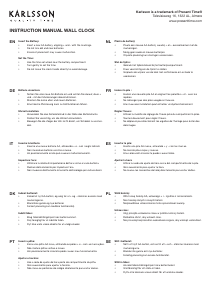
Instruction manual Alarm clock Riqueza | KA6124
OPERATING INSTRUCTIONS
Thank you for your purchase of this LED Cuckoo Alarm Clock.
Please read the following instructions and warnings carefully
before use to ensure the safe and satisfactory operation of this
product.
INSTRUCTIONS FOR USE
FUNCTIONS
Time and Calendar (Year, Month, and Date)
Snooze Cuckoo Alarm
Temperature (in selectable °C/°F format)
Hourly Cuckoo Chime
CONNECTING THE CLOCK
Connect the cable to a 5V adaptor (not included) and the ‘Type C’
DC-5V (5) jack. The time will start from “12:00”.
SETTING THE TIME AND CALENDAR
In the normal time display, press the SET (1) button. The hour
digits will ash. Press the UP (6) or DOWN (7) button to set the
hour. Ensure that AM or PM is set correctly. When PM is selected
in 12-hour format, a ‘PM’ LED (on the top left corner of the time
display) will light up.
Press the SET (1) button again; the minute digits will ash. Press
UP (6) or DOWN (7) to set the minutes. Continue to set the values
in the following sequence: hour, minute, year, month date. Finally,
press SET (1) or MODE (2) to return to the time display.
SETTING THE ALARM
Press and hold the SET (1) button for 3 seconds; the hour digits
will ash. Press UP (6) or DOWN (7) to set the alarm hour, ensuring
AM/PM is correct.
Press SET (1); the minute digits will ash. Use UP (6) or DOWN (7)
to set the alarm minutes.
Press SET (1); “AL --” will ash. Press UP (6) or DOWN (7) to select
“AL on” or “AL --”. “AL on” activates the alarm; “AL --” turns it off.
Press SET (1) or MODE (2) to save the settings and return to the
time display.
TURNING THE SNOOZE ALARM ON/OFF
Press and hold the SET (1) button for 3 seconds, then press it
twice more until “AL --” ashes. Press UP (6) or DOWN (7) to
select “AL on”. Press SET (1) or MODE (2) to return to the time dis-
play. An alarm LED icon (above the colon) will light up to indicate
the alarm is activated. When the alarm sounds, the cuckoo sound
will play from the SPEAKER (8) and the bird will light up.
Press any button (except TEST) on the back of the clock to stop
the alarm temporarily. The alarm will sound again after the snooze
interval. After four snooze cycles, the snooze function will stop
automatically. The default snooze interval is 5 minutes.
If no button is pressed, the alarm sounds once for 14 seconds and
then stops.
OPERATING INSTRUCTIONS
Instrucons for use
1. Funcons
1) Time and Calendar (Year, Month, and Date)
2) Snooze Cuckoo Alarm
3) Temperature (in selectable C/F format)
4) Hourly Cuckoo Chime
2. Connect the cable to a 5V adapter (not included) and the ‘Type C’ DC-5V (5) jack. Time starts from12:00” o’clock.
3. Set the me and calendar
1) In the normal  display, press SET (1) buon, hour digits ash. Press UP (6) or DOWN (7) buon to set the
hour. Take care to set AM or PMcorrectly. When the PM me
is set under 12-hour format, aPM LED
icon (on the top le corner of
2) Press SET (1) buon, minute digits ash. Press UP (6) or DOWN (7) buon to set the minute. Connue to set in
the sequence as: hour -> minute -> year -> month -> date. At last, press SET (1) or MODE (2) 
ill return to the me display.
4. Set the alarm
1) Press and hold SET (1)UP (6) or DOWN (7)

2) Press SET (1)UP (6) or DOWN (7)
3) Press SET (1)UP (6) or DOWN (7)

4) Press SET (1) or MODE (2)
5. Turn the Snooze Alarm ON/OFF
Press and hold SET (1)UP (6) or
DOWN (7) SET (1) or MODE (2)

SPEAKER (8)



Thank you for your purchase of this LED Cuckoo Alarm Clock. Please read the folloing instrucons and arnings
carefully before use to ensure safe and sasfactory operaon of this product.


3) Press and hold SET (1)UP (6) or
DOWN (7), then press SET (1) or MODE (2)

6. Hourly Cuckoo Chime


UP (6) 
at 7:00 am). Press UP (6) or DOWN (7)
MODE (2)

UP (6)SET (1)
UP (6) or DOWN (7) to select “HC --”. “HC on” means Hourly Chime sound is on, “HC --”
Press SET (1) or MODE (2)


7. Temerature Display
The display alternates beteen me and temperature.ress DOWN (7) buon to select
Celsius or Fahrenheit.
UP (6)


MODE (2)
MODE (2)





MODE (2)UP (6) or DOWN
(7)MODE (2)

12. Back-up Cell
CR2032 buon c
ell (not included) is a backeep me ongoing in the eent of blackout or other poer
failure.CELL
compartment (9)
13. TEST (4) 

14. RESET hole (3)
If the clock is dead (the display does not moe) during seng or orking, please use a slim but blunt object (like ball
pen pointer, toothpick etc.) to press this hole, the clock ill return to the inialdisplay.
Warnings:
1. Keep this product aay from any liquids.
2. Please use a so cloth or a paper toel to clean the clock.
3. Do n
ot use any corrosie cleanser or chemical soluons on the clock.
4. Please keep the instrucons paper ell for future use.
5. This product is not a toy. Keep aay from children and animals.
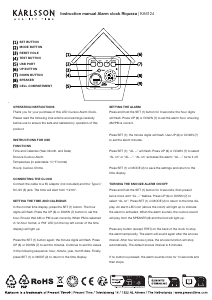
SET BUTTON
MODE BUTTON
RESET HOLE
TEST BUTTON
USB PORT
UP BUTTON
DOWN BUTTON
SPEAKER
CELL COMPARTMENT

Download Bedienungsanleitung auf Deutsch (PDF, 3.29 MB)
(Denken Sie an die Umwelt und drucken Sie diese Bedienungsanleitung nur aus, wenn es unbedingt nötig ist)

Loading…

Bewertung

Teilen Sie uns mit, was Sie über die Karlsson KA6124BK Uhr denken, indem Sie eine Produktbewertung verfassen. Möchten Sie Ihre Erfahrungen mit diesem Produkt teilen oder eine Frage stellen? Hinterlassen Sie einen Kommentar am Ende dieser Seite!
Sind Sie mit Karlsson KA6124BK Uhr zufrieden?
Ja Nein
Seien Sie die erste Person, die dieses Produkt bewertet
0 Bewertungen

Diskutieren Sie über dieses Produkt mit

Hier können Sie uns Ihre Meinung zu Karlsson KA6124BK Uhr mitteilen. Wenn Sie eine Frage haben, lesen Sie zunächst das Bedienungsanleitung sorgfältig durch. Die Anforderung eines Bedienungsanleitung kann über unser Kontaktformular erfolgen.

Mehr zu diesem Bedienungsanleitung

Wir verstehen, dass es schön ist, ein gedrucktes Bedienungsanleitung für Ihr Karlsson KA6124BK Uhr zu haben. Sie können das Bedienungsanleitung jederzeit von unserer Website herunterladen und selbst ausdrucken. Wenn Sie ein Originalhandbuch wünschen, empfehlen wir Ihnen, Karlsson zu kontaktieren. Möglicherweise können sie ein Originalhandbuch bereitstellen. Suchen Sie das Bedienungsanleitung Ihres Karlsson KA6124BK Uhr in einer anderen Sprache? Wählen Sie auf unserer Homepage Ihre bevorzugte Sprache und suchen Sie nach der Modellnummer, um zu sehen, ob wir sie verfügbar haben.

Spezifikationen

Marke Karlsson
Modell KA6124BK
Kategorie Uhren
Dateityp PDF
Dateigröße 3.29 MB

Alle Anleitungen für Karlsson Uhren
Weitere Anleitungen von Uhren

Häufig gestellte Fragen zu Karlsson KA6124BK Uhr

Unser Support-Team sucht nach nützlichen Produktinformationen und beantwortet Ihre häufig gestellten Fragen. Sollte Ihnen ein Fehler bei den häufig gestellten Fragen auffallen, teilen Sie uns dies bitte anhand unseres Kontaktformulars mit.

Was ist ein Quarzwerk? Verifiziert

Uhren und Armbanduhren mit einem Quarzwerk werden von einer Batterie betrieben. Diese sendet elektrischen Strom durch Quarzkristalle und bringt sie dadurch zum vibrieren. Diese Vibrationen werden an das Uhrwerk weitergegeben. Da die Vibrationen eine feststehende Frequenz haben, sind Uhren mit Quarzwerk extrem genau.

Das war hilfreich (94) Mehr lesen

Was ist GMT? Verifiziert

GMT steht für "Greenwich Mean Time" (manchmal auch UTC genannt, was für "Coordinated Universal Time" steht). Es ist die Zeit für den Längengrad 0, der durch Greenwich bei London verläuft.

Das war hilfreich (80) Mehr lesen

Was ist ein Chronograph? Verifiziert

Ein Chronograph ist wörtlich ein „Zeit-Schreiber“. Der Begriff wird verwendet, um Uhren zu beschreiben, die die Tageszeit anzeigen und einen bestimmten Zeitraum messen, wie eine Stoppuhr.

Das war hilfreich (59) Mehr lesen
Bedienungsanleitung Karlsson KA6124BK Uhr

Verwandte Produkte

Verwandte Kategorien

×
Download