Setting mode
Setting time
Press and hold the button “SET” in the step counter mode.1.
“SETUP”willlightupandthenumber“12”/“24”willashonthesub-informationdisplay.Press2.
the button “+/RESET” to switch the clock mode to 12-Hr or 24-Hr.
Press the button “SET” to save the setting.3.
Thenaclockwillshowonthesub-informationdisplay.Thehouroftheclockwillash.Pressthe4.
button “+/RESET” to adjust the value.
Press the button “SET” to save the change.5.
Then adjust the minute of the clock with the button “+/RESET”.6.
Press the button “SET” to save the change.7.
Setting the stride length
Aftersettingtime,anumberwillashontheinformationscreen.Theunit“cm”willlightup.You1.
are now setting the stride length. Use the button “+/RESET” to enter your stride length.
Press the button “SET” to save the change.2.
Setting the weight
Aftersettingthestridelength,anumberwillashontheinformationscreen.Theunit“kg”will1.
light up. You are now setting the weight. Use the button “+/RESET” to enter your weight.
Press the button “SET” to save the change.2.
Setting the targets step
After setting the weight, the target indicator and the mode indicator “STEP” will light up. On the 1.
information screen, either “ON” or “OFF” will appear. You are now setting the target steps. The
word “ON” or “OFF” is indicating the current status of the function.
Press the button “+/RESET” to turn on / off the function.2.
Pressthebutton“SET”toconrm.3.
If the function is switched to “ON”, you will set the target steps value. Press the •
button “+/RESET” to adjust the value, press the button “SET” to shift the digit to
theleft.Aftersettingallvedigits,from1to99999step(s),itwillreturntoprevious
screen. Press the button “MODE” to leave the setting of the target -step.
If the function is switched to “OFF”, you will leave the setting of the target steps.•
Setting the target distance
After setting the target steps, the target indicator and the mode indicator “DIST” will light up. On 1.
the information screen, either “ON” or “OFF” will appear. You are now setting the target distance.
The word “ON” or “OFF” is indicating the current status of the function.
Press the button “+/RESET” to turn on / off the function.2.
Pressthebutton“SET”toconrm.3.
If the function is switched to “ON”, you will set the target distance. Press the button •
“+/RESET” to adjust the value, press the button “SET” to shift the digit to the left.
Aftersettingallvedigits,from1to999.99km,itwillreturntopreviousscreen.
Press the button “MODE” to leave the setting of the target -distance.
If the function is switched to “OFF”, you will leave the setting of the target distance.•
Setting the target calories
After setting the target distance, the target indicator and the mode indicator “KCAL” will light 1.
up. On the information screen, either “ON” or “OFF” will appear. You are now setting the target
calories. The word “ON” or “OFF” is indicating the current status of the function.
Press the button “+/RESET” to turn on / off the function.2.
Pressthebutton“SET”toconrm.3.
If the function is switched to “ON”, you will set the target calories. Press the button •
“+/RESET” to adjust the value, press the button “SET” to shift the digit to the left.
Aftersettingallvedigits,from1to99999,itwillreturntopreviousscreen.Press
the button “MODE” to leave the setting of the target -distance.
If the function is switched to “OFF”, you will leave the setting of the target distance.•
Leave the setting mode
After setting the target calories, you will leave the setting mode. You will leave the setting mode if
you idle the pedometer for ten seconds.
Walking distance mode
Press the button “ MODE” until the mode indicator shows “DIST” and the “DAYS RECORD” is 1.
dimmed.. The current time is shown on the sub-information display.
Clip the pedometer on the waist, around the neck, or using a adjustable strip. For more accuracy 2.
performance, keep the pedometer close to your body and reduce the length of the string holding
it.
Walk or run, the pedometer is now calculating your walking distance. 3.
Itstartscountingafterninecontinuoussteps.Thedistancefromtherstninestepsare
not counted until the tenth step is made. The walking distance is calculated base on
your stride length and it is is shown in the information display. The walking distance is
shown in kilometre.The stepping speed should be between 0.88 step/s to 3.3 steps/s.
Calorie burnt mode
Press the button “ MODE” until the mode indicator shows “KCAL” and the “DAYS RECORD” is 1.
dimmed.. The current time is shown on the sub-information display.
Clip the pedometer on the waist, around the neck, or using a adjustable strip. For more accuracy 2.
performance, keep the pedometer close to your body and reduce the length of the string holding it.
Walk or run, the pedometer is now calculating your calories burnt. 3.
Itstartscountingafterninecontinuoussteps.Thedistancefromtherstninestepsare
not counted until the tenth step is made. The calories is calculated base on your stride
length and your body weight and it is is shown in the information display. The calories
burnt is shown in kilocalorie. The stepping speed should be between 0.88 step/s to
3.3 steps/s.
Memory mode
Press the button “ MODE” until and the “DAYS RECORD” lights up. The record date is shown on 1.
the sub-information display. The pedometer can shows records of the past seven days.
Press the button “+/RESET” to view the records from another day.2.
Press the button “SET” to view the records from step counter mode, walking distance mode and 3.
calorie burnt mode.
Reset the record
Press and hold the button “+/RESET” in step counter mode, walking distance mode or calorie burnt
mode until the reading is set to zero. The reset function does no affect the record of the day nor
the previous days.
Target meeting
If any of the targets is set, the target indicator will light up. Beep sound will be emitted for threes
seconds when any of the targets is met.
Reset the device
Insert a pin or any sharp object through the pinhole and depress the switch inside to reset the device
to factory default. Note that all the records and settings will be reset.
Disposal7.
General
In order to preserve, protect and improve the quality of environment, protect human
health and utilise natural resources prudently and rationally, the user should return
unserviceable product to relevant facilities in accordance with statutory regulations.
The crossed-out wheeled bin indicates the product needs to be disposed separately and
not as municipal waste.
Batteries / rechargeable batteries
The user is legally obliged (battery regulation) to return used batteries and rechargeable
batteries. Disposing used batteries in the household waste is prohibited! Batteries/
rechargeable batteries containing hazardous substances are marked with the crossed-
out wheeled bin. The symbol indicates that the product is forbidden to be disposed via
the domestic refuse. The chemical symbols for the respective hazardous substances
are Cd = Cadmium, Hg = Mercury, Pb = Lead.
You can return used batteries/ rechargeable batteries free of charge to any collecting point
of your local authority, our stores or where batteries/ rechargeable batteries are sold.
Consequently you comply with your legal obligations and contribute to environmental protection!
Technical data8.
Operating voltage: 3 V/DC, button cell type CR2025
Measurement range: 0 – 99999 (step counter)
0 – 999.99 km (walking distance)
0 – 99999 kcal (calorie burnt)
Setting range: 30 – 213 cm (stride length)
20 – 227 kg (weight)
Record period: 7 days
Dimensions (W x H x D): 76 x 30 x 10 mm
Weight: 20 g
These operating instructions are published by Conrad Electronic SE,
Klaus-Conrad-Straße 1, D-92240 Hirschau/Germany.
All rights including translation reserved. Reproduction by any method, e.g.
photocopy,microlming,orthecaptureinelectronicdataprocessingsystems
require the prior written approval by the editor. Reprinting, also in part, is prohibited.
Theoperatinginstructionsreectthecurrenttechnicalspecicationsattimeofprint.
Wereservetherighttochangethetechnicalorphysicalspecications.
© 2011 by Conrad Electronic SE.
V5_0411_02-HL



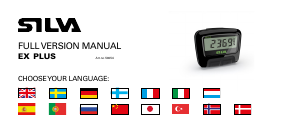
Diskutieren Sie über dieses Produkt mit
Hier können Sie uns Ihre Meinung zu Conrad PDG001 Schrittzähler mitteilen. Wenn Sie eine Frage haben, lesen Sie zunächst das Bedienungsanleitung sorgfältig durch. Die Anforderung eines Bedienungsanleitung kann über unser Kontaktformular erfolgen.