Pedometer 3D, PDG001
Version 04/11
Item no. 86 04 64
Intended use1.
This pedometer counts and stores the number of steps (0 to 99,999 steps), the covered distance
(distance measurements 0 to 999.99 km) and the calories burnt (0 to 99,999) hereby. The pedometer
can record information up to seven days, it has a target alert function and clock function. This makes
this pedometer ideally suited for athletes, as well as for students, housewives, etc. This product is
not suitable for commercial, industrial or medical use. Contact with moisture must be avoided at all
times! The product is powered by a button cell battery CR2025.
For safety and approval purposes (CE), you must not rebuild and/or modify this product. If you
use the product for purposes other than those described above, the product may be damaged. In
addition,improperusecancausehazardssuchasshortcircuiting,re,electricshocketc.Readthe
instructions carefully and keep them. Make this product available to third parties only together with
its operating instructions.
Delivery content 2.
Pedometer•
Button cell battery•
Operating instructions•
Safety instructions3.
Read the operating instructions carefully and especially observe the safety
information. If you do not follow the safety instructions and information on
proper handling in this manual, we assume no liability for any resulting personal
injury or damage to property. Such cases will invalidate the warranty/guarantee.
Persons / Product
The device is not a toy. Keep it out of the reach of children and pets.•
Do not leave packaging material lying around carelessly. These may become dangerous playing •
material for children.
Protect the product from extreme temperatures, direct sunlight, strong jolts, high humidity, •
moisture,ammablegases,vapoursandsolvents.
Do not place the product under any mechanical stress.•
If it is no longer possible to operate the product safely, take it out of operation and protect it from •
any accidental use. Safe operation can no longer be guaranteed if the product:
is visibly damaged, -
is no longer working properly, -
has been stored for extended periods in poor ambient conditions or -
has been subjected to any serious transport-related stresses. -
Please handle the product carefully. Jolts, impacts or a fall even from a low height can damage •
the product.
Battery
Correct polarity must be observed while inserting the battery.•
The battery should be removed from the device if it is not used for a long period of time to avoid •
damage through leaking. Leaking or damaged batteries might cause acid burns when in contact
with skin, therefore use suitable protective gloves to handle corrupted batteries.
Batteries must be kept out of reach of children. Do not leave the battery lying around, as there is •
risk, that children or pets swallow it.
Batteries must not be dismantled, short-circuited or thrown into re. Never recharge non-•
rechargeable batteries. There is a risk of explosion!
Miscellaneous
Consult an expert when in doubt about operation, safety or connection of the device.•
Maintenance,modicationsandrepairsaretobeperformedexclusivelybyanexpertorata•
qualiedshop.
If you have questions which remain unanswered by these operating instructions, contact our •
technical support service or other technical personnel.
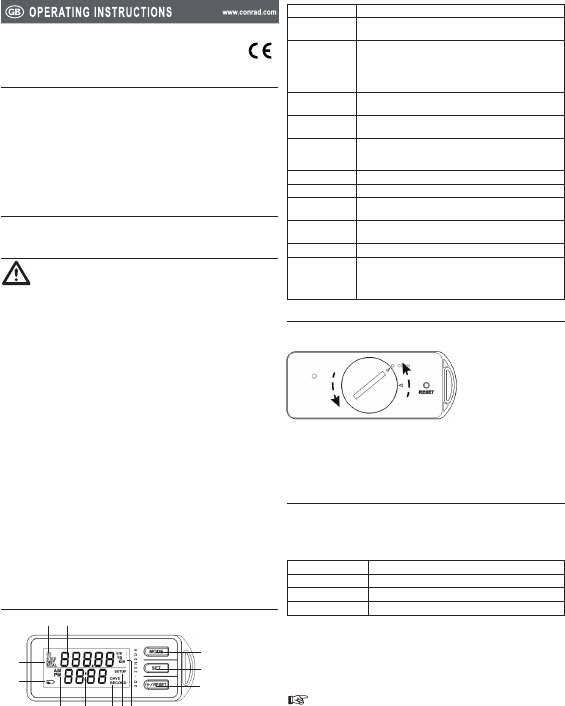
Operating elements4.
Target indicator1. Indicates the target function is enabled or not.
Information 2.
display
Displays steps, distance and calories burnt or the major value in setting
mode.
Button “MODE”3. Switch between modes:
Step counter mode•
Walking distance mode•
Calorie burnt mode•
Memory mode•
Button “SET”4. Switch to setting mode and set the time, stride length, weight and
target.
Button “+/Reset”5. Adjust value in setting mode.•
Reset the step, distance and calorie burnt record.•
Units6. cm (Stride length unit)•
kg (Weight unit)•
km (Distance unit)•
“SETUP”7. When it is on, it indicates the device is in setup mode.
“DAYS RECORD”8. When it is on, it indicates the operation mode is in memory mode.
Sub-information 9.
display
Shows the clock or the record date.
AM/PM10. Indicates the current time is in the morning / evening when the device
is in 12-hr mode.
Battery indicator11. Shows the battery level.
Mode indicator12. Shows the current operation mode:
“STEP” (either in step counter mode or in memory mode)•
“DIST” (either in walking distance mode or in memory mode)•
“KCAL” (either in calorie burnt mode or in memory mode)•
Battery insertion / replacement5.
The low battery icon will light up when the battery level is low, change the battery.1.
Turn the battery compartment cover in a anti-clockwise direction with a coin until the arrow 2.
points at “OPEN”.
Remove the battery cover.3.
Insert / replace a button cell battery while observing the correct polarity, the positive side must 4.
face upwards.
Close the battery compartment with the cover.5.
Lock the battery compartment by turning the battery compartment cover in a clockwise direction 6.
until the arrow points at the arrow mark.
Operation6.
Wake the device
The display turns off when it is idle for three minutes. Move the unit or press any key to wake it up.
Mode switching
Press the button “MODE” to switch between the modes.
Step counter mode Count your steps and shows the current time.
Walking distance mode Shows your walked distance.
Calorie burnt mode Calculate the calorie burnt.
Memory mode Display the records of the past seven days.
Step counter mode
Press the button “MODE” until the mode indicator shows “STEP” and the “DAYS RECORD” is 1.
dimmed. The current time is shown on the sub-information display.
Clip the pedometer on the waist, around the neck, or using a adjustable strip. For more accuracy 2.
performance, keep the pedometer close to your body and reduce the length of the string holding it.
Walk or run, the pedometer is now counting your steps. 3.
Itstartscountingafterninecontinuoussteps.Therstninestepsarenotcounteduntil
the tenth step is made. The number of steps is shown in the information display. The
stepping speed should be between 0.88 step/s to 3.3 steps/s.



Diskutieren Sie über dieses Produkt mit
Hier können Sie uns Ihre Meinung zu Conrad PDG001 Schrittzähler mitteilen. Wenn Sie eine Frage haben, lesen Sie zunächst das Bedienungsanleitung sorgfältig durch. Die Anforderung eines Bedienungsanleitung kann über unser Kontaktformular erfolgen.