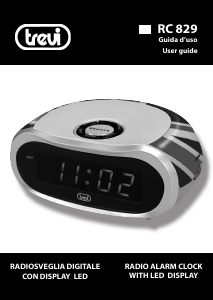
Bedienungsanleitung Trevi RC 829 Uhrenradio

Benötigen Sie ein Bedienungsanleitung für Ihren Trevi RC 829 Uhrenradio? Unten können Sie das PDF-Bedienungsanleitung kostenlos auf Deutsch ansehen und herunterladen. Für dieses Produkt gibt es derzeit 3 häufig gestellte Fragen, 0 Kommentare und 0 Stimmen. Wenn dies nicht das von Ihnen gewünschte Bedienungsanleitung ist, kontaktieren Sie uns bitte.

Ist Ihr Produkt defekt und bietet die Bedienungsanleitung keine Lösung? Gehen Sie zu einem Repair Café, wo es gratis repariert wird.

Bedienungsanleitung

Loading…

RC 829
4_
ENGLISH
TOOLTIP
1. AUTO/ON/OFF selector, radio on/off /
alarm activation
2. BUZZ/VOLUME control
3. Alarm indicator
4. LED display
5. TIME button, time adjustment
6. ALARM button, alarm adjustment
7. SLEEP button, scheduled shutdown
8. SNOOZE button, temporary alarm off
9. AL.OFF button, alarm on/off
10. HOUR button, increase in hours
11. MIN button, increase in minutes
12. AM/FM selector
13. Tuning control
14. Backup battery compartment
POWER SUPPLY
Plug the cord into any 230V-50Hz AC home
outlet. The entire display (4) will ash until
the time won’t set.
CLOCK SETTING
1. Press and hold the TIME button (5) and
simultaneously press the HOUR key (10)
to set the hour.
2. Press and hold the TIME button (5) and
simultaneously press the MIN key (11) to
set the minutes.
RADIO
1. Move the AUTO/ON/OFF (1) selector to
ON to switch on the radio.
2. Adjust the volume using the
BUZZ/VOLUME control (2).
3. Select the desired modulation using the
AM/FM selector (12).
4. Tune to the radio station using the
tuning control (13).
ALARM SETTING
1. Press and hold the ALARM button (6)
and simultaneously press the HOUR
button (10) to set the hour of alarm.
2. Press and hold the ALARM button (6)
and simultaneously press the MIN
button (11) to set the minutes of alarm.
RADIO ALARM
1. Tune to the radio station and adjust the
volume as described in section RADIO.
2. Move the AUTO/ON/OFF (1) selector to
AUTO position to activate the alarm. The
display will turn on the alarm indicator
(3).
ALARM WITH BUZZER
1. Move the BUZZ/VOLUME control (2) on
BUZZ.
2. Move the AUTO/ON/OFF (1) selector to
AUTO position to activate the alarm. The
display will turn on the alarm indicator
(3).
SNOOZE FUNCTION AND DISABLE
ALARM
1. During the alarm sound, press the
SNOOZE button (8) to temporarily stop
the alarm. After 9 minutes the alarm will
continue to sound.
2. During the alarm sound, press the
AL.OFF button (9) to stop the alarm. The
alarm will remain active and will play 24
hours later.
3. Move the AUTO/ON/OFF selector (1) to
the OFF position to turn off the alarm.
The display will turn off the alarm indi-
cator (3).
SLEEP FUNCTION
The SLEEP button (7) allows to program to
turn off the radio for up to 1 hour and 59
minutes. This adjustment is carried out with
the radio off.
1. Move the AUTO/ON/OFF (1) selector to
OFF.
2. Press and hold the SLEEP button (7) and
simultaneously press the HOUR key (10)
to set the hour.
3. Press and hold the SLEEP button (7) and
simultaneously press the MIN key (11) to
set the minutes.
4. Press the SNOOZE button (8) to switch
off the function SLEEP prematurely.
BATTERY BACK-UP
To keep the clock function and alarm
recording even during a momentary man,
lacking electricity, insert a 9V battery into
the battery compartment (14) on the
bottom of the appliance. We considered the
pre-replace this battery every 6 months.
If in case of interruption of the electrical
appliance on a monsters wrong time and
ashing replace the 9V battery.
TECHNICAL CHARACTERISTICS
Power Supply:
............................AC 230V-50Hz
Power consumption: ...............5W
Download Bedienungsanleitung auf Deutsch (PDF, 0.52 MB)
(Denken Sie an die Umwelt und drucken Sie diese Bedienungsanleitung nur aus, wenn es unbedingt nötig ist)

Loading…

Bewertung

Teilen Sie uns mit, was Sie über die Trevi RC 829 Uhrenradio denken, indem Sie eine Produktbewertung verfassen. Möchten Sie Ihre Erfahrungen mit diesem Produkt teilen oder eine Frage stellen? Hinterlassen Sie einen Kommentar am Ende dieser Seite!
Sind Sie mit Trevi RC 829 Uhrenradio zufrieden?
Ja Nein
Seien Sie die erste Person, die dieses Produkt bewertet
0 Bewertungen

Diskutieren Sie über dieses Produkt mit

Hier können Sie uns Ihre Meinung zu Trevi RC 829 Uhrenradio mitteilen. Wenn Sie eine Frage haben, lesen Sie zunächst das Bedienungsanleitung sorgfältig durch. Die Anforderung eines Bedienungsanleitung kann über unser Kontaktformular erfolgen.

Mehr zu diesem Bedienungsanleitung

Wir verstehen, dass es schön ist, ein gedrucktes Bedienungsanleitung für Ihr Trevi RC 829 Uhrenradio zu haben. Sie können das Bedienungsanleitung jederzeit von unserer Website herunterladen und selbst ausdrucken. Wenn Sie ein Originalhandbuch wünschen, empfehlen wir Ihnen, Trevi zu kontaktieren. Möglicherweise können sie ein Originalhandbuch bereitstellen. Suchen Sie das Bedienungsanleitung Ihres Trevi RC 829 Uhrenradio in einer anderen Sprache? Wählen Sie auf unserer Homepage Ihre bevorzugte Sprache und suchen Sie nach der Modellnummer, um zu sehen, ob wir sie verfügbar haben.

Spezifikationen

Marke Trevi
Modell RC 829
Kategorie Uhrenradios
Dateityp PDF
Dateigröße 0.52 MB

Alle Anleitungen für Trevi Uhrenradios
Weitere Anleitungen von Uhrenradios

Häufig gestellte Fragen zu Trevi RC 829 Uhrenradio

Unser Support-Team sucht nach nützlichen Produktinformationen und beantwortet Ihre häufig gestellten Fragen. Sollte Ihnen ein Fehler bei den häufig gestellten Fragen auffallen, teilen Sie uns dies bitte anhand unseres Kontaktformulars mit.

Wofür stehen AM und PM? Verifiziert

AM steht für "Ante Meridiem" und bezeichnet die Zeit vor Mittag. PM steht für "Post Meridiem" und bezeichnet die Zeit nach Mittag.

Das war hilfreich (293) Mehr lesen

Was ist GMT? Verifiziert

GMT steht für "Greenwich Mean Time" (manchmal auch UTC genannt, was für "Coordinated Universal Time" steht). Es ist die Zeit für den Längengrad 0, der durch Greenwich bei London verläuft.

Das war hilfreich (168) Mehr lesen

Worin besteht der Unterschied zwischen FM und AM? Verifiziert

FM und AM sind beides Modulationsarten, die zur Übertragung eines Signals verwendet werden. FM steht für "Frequency Modulation" und AM für "Amplitude Modulation". AM ist die älteste Form der Modulation. Der größte Unterschied ist, dass das FM-Signal viel stärker ist als das AM-Signal.

Das war hilfreich (167) Mehr lesen
Bedienungsanleitung Trevi RC 829 Uhrenradio

Verwandte Produkte

Verwandte Kategorien

×
Download