must be recycled in accordance with Directive
2006/66/EC and its amendments. Return the
batteries/rechargeable batteries and/or the
product to a collection site.
Disposal
The packaging is made entirely of recyclable materials,
which you may dispose of at local recycling facilities.
b
a
Observe the marking of the packaging ma-
terials for waste separation, which are
marked with abbreviations (a) and numbers
(b) with following meaning: 1–7: plastics/20–22: pa-
per and fibreboard/80–98: composite materials.
Contact your local refuse disposal author-
ity for more details of how to dispose of
your worn-out product.
Cleaning and care
CAUTION! RISK OF BURNS!
Before cleaning, unplug the USB-C
cable
8
and wait until the product
has cooled down.
Do not clean the product with corrosive or abrasive
cleaning agents.
Dust the product with a soft, dry cloth.
Tough dirt can be wiped off with a slightly damp
cloth.
Disposal of the rechargeable
battery
As a consumer, you are legally obligated to return
all batteries/rechargeable batteries to a local col-
lection site, regardless if they contain harmful sub-
stances,
to ensure environmentally-friendly disposal.
Faulty or drained batteries/rechargeable batteries
Problem Cause Solution
No paper
comes out
during print-
ing.
The roll
of label paper
7
has been
inserted
incorrectly.
Insert the roll of
label paper
7
once again.
Poor print
quality.
Low battery. Fully charge the
product.
Poor print
quality.
Dirt on print
head due to
deposits.
Open the product
and clean the print
head with a cotton
swab dipped in al-
cohol. Make sure
that the print head
is dry before start-
ing to print.
Problem Cause Solution
The LED
indicator
2
lights up in
red.
Cover
3a
is
open.
Make certain that
the cover
3a
is
properly closed.
Fault. Hold down the
ON/OFF button
1
and the product
will restart (hard
reboot).
The product
does not
switch on.
Low battery. Press and hold the
ON/OFF button
1
for a second.
The product
does not
switch on.
The ON/OFF
button
1
was
not pressed
down for long
enough.
Press and hold the
ON/OFF button
1
for a second.
After initial coupling, the product connects to your
device automatically.
Follow the instructions in the app when printing.
If you want to cut off a printed label from the roll of
label paper
7
then push the slide switch
5
to-
wards the paper feed
4
after printing is complete.
Troubleshooting
Problem Cause Solution
The LED
indicator
2
lights up in
red.
Paper shortage.
Insert a new roll of
label paper.
Product has
overheated.
Switch off the
product and allow
it to cool down.
You can download the app by scanning the cor-
responding QR code.
Switch on the product via the ON/OFF button
1
and activate Bluetooth on your device.
Move the slide switch
5
away from the paper
feed
4
to open it (see Fig. D).
Press the ON/OFF button
1
twice and the prod-
uct prints out a QR code.
Open the app and click on “Not connected”.
Click “Scan to insert”, then scan the QR code
to connect your device to the product.
NOTE: Do not search for the product in your
device’s Bluetooth settings.
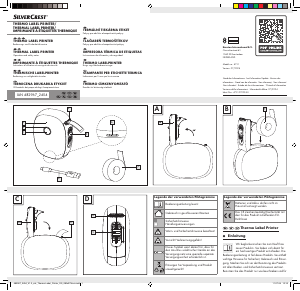
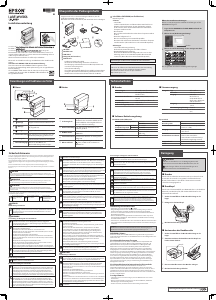
Inserting roll of label paper
Open the product by flipping open the cover
3a
(see Fig. A).
Place a roll of label paper
7
into the product
(see Fig. B).
Close the cover
3a
so that a little of the label paper
emerges from the paper feed
4
(see Fig. C).
Use
LED indicator
2
:
LED flashes red: flat battery/low battery
LED lights up in red: battery is being charged up/
paper shortage/overheating/
open cover
LED lights up in green: battery is fully charged/
product is in use
LED lights up in blue: Bluetooth connection is
established
order to avoid hazards. When disposing of the
product, it should be noted that this product con-
tains a rechargeable battery.
Preparation
We recommend fully charging the product before
using it for the first time.
Charging
Use the USB-C cable
8
supplied to connect
the product directly to a power source (e.g. a
laptop), or use a 5V USB power adapter (not
included) to connect to the mains power supply.
The charging time is roughly between 80 and
120 minutes.
You can print during the charging process.
Risk of leakage of batteries/rechargeable
batteries
Avoid extreme environmental conditions and tem-
peratures, which could affect batteries/recharge-
able batteries, e.g. radiators/direct sunlight.
If batteries/rechargeable batteries have leaked,
avoid contact with skin, eyes and mucous mem-
branes with the chemicals! Flush immediately the
affected areas with fresh water and seek medical
attention!
WEAR PROTECTIVE GLOVES!
Leaked or damaged batteries/recharge-
able batteries can cause burns on con-
tact with the skin. Wear suitable protective gloves
at all times if such an event occurs.
This product has a built-in rechargeable battery
which cannot be replaced by the user. The removal
or replacement of the rechargeable battery may
only be carried out by the manufacturer or his cus-
tomer service or by a similarly qualified person in
Safety instructions for
batteries/rechargeable
batteries
DANGER TO LIFE! Keep batteries/rechargeable
batteries out of reach of children. If accidentally
swallowed seek immediate medical attention.
DANGER OF EXPLOSION! Never
recharge non-rechargeable batteries. Do
not short-circuit batteries/rechargeable
batteries and/or open them. Overheating, fire or
bursting can be the result.
Never throw batteries/rechargeable batteries into
fire or water.
Do not exert mechanical loads to batteries/recharge-
able
batteries.
Always have the product repaired by authorised
specialised companies or customer service. Im-
proper repairs may result in considerable risks
for the user. This will also void the warranty.
Never use the product with a defective USB-C
cable. There is a risk of electric shock.
If you use a USB power adapter for charging,
please follow the corresponding safety notices
in the operating instructions.
The product is only suitable for indoor use.
Do not use the product if it has been dropped or
is damaged. Have the product inspected and if
necessary repaired by a qualified professional.
Do not store or use the product near water.
Do not immerse the product in water.
Do not allow moisture to come in contact with
electrical parts.
suffocation hazard. Children frequently underes-
timate the dangers. Always keep children away
from the product.
Do not leave the product or packaging material
lying unattended. Plastic foil/bags, plastic parts
etc. can turn into dangerous toys for children.
This product is not intended for use by children or
persons with reduced physical, sensory or mental
capacities or lacking experience and knowledge.
This product may be used by children aged 14 years
and up, as well as by persons with limited physical,
sensory or mental capacities or lacking experience
and knowledge, if they are supervised by a person
responsible for their safety or they have been in-
structed in the safe use of the product and under-
stand the associated risks. Otherwise there is a risk
of operating error and injuries.
Check the product for visible external damage
before use. Never use a damaged product.
There is a risk of electric shock.
482967_2404_V1.0_silv_Thermo-Label_Printer_OS_280x270mm.indd 5482967_2404_V1.0_silv_Thermo-Label_Printer_OS_280x270mm.indd 5 11.07.24 12:1611.07.24 12:16


Diskutieren Sie über dieses Produkt mit
Hier können Sie uns Ihre Meinung zu SilverCrest IAN 482967 Etikettendrucker mitteilen. Wenn Sie eine Frage haben, lesen Sie zunächst das Bedienungsanleitung sorgfältig durch. Die Anforderung eines Bedienungsanleitung kann über unser Kontaktformular erfolgen.