Bedienungsanleitung SilverCrest IAN 279329 Kopfhörer

Benötigen Sie ein Bedienungsanleitung für Ihren SilverCrest IAN 279329 Kopfhörer? Unten können Sie das PDF-Bedienungsanleitung kostenlos auf Deutsch ansehen und herunterladen. Für dieses Produkt gibt es derzeit 7 häufig gestellte Fragen, 0 Kommentare und 0 Stimmen. Wenn dies nicht das von Ihnen gewünschte Bedienungsanleitung ist, kontaktieren Sie uns bitte.

Ist Ihr Produkt defekt und bietet die Bedienungsanleitung keine Lösung? Gehen Sie zu einem Repair Café, wo es gratis repariert wird.

Bedienungsanleitung

Loading…
06/2016 – V 1.4
Congratulations on purchasing your new
device. You have chosen a quality
product.
These operating instructions are part of
the product. They contain important
information about the safety, use and
disposal of the device. Familiarise
yourself with all the operating instructions
and safety information before using this
product. Only use the product as
described and for the uses indicated. If
you give the product to someone else,
always pass on all the documentation.
Intended use
These headphones are a consumer
electronics device, intended for playing
music. They can also be used as a
headset with a smartphone. They may
only be connected to audio devices that
have a 3.5 mm jack socket for
headphones. They may only be used for
private purposes and are not for industrial
or commercial use. The headphones
should also not be used in tropical
climates. The manufacturer will not be
liable for any damage or faults arising as
a result of unauthorised modification of
the headphones. Please observe the
national regulations and/or laws of the
country in which the headphones are
used.
Package contents
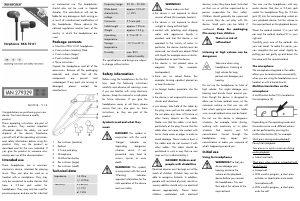
SilverCrest SKA 10 A1 headphones
2 ear cushions (medium) fitted
2 ear cushions (large)
2 ear cushions (small)
These instructions
Unpack the headphones and all of the
accessories. Remove all the packaging
materials and check that all the
components are present and
undamaged. If any parts are missing or
damaged, please contact the
manufacturer.
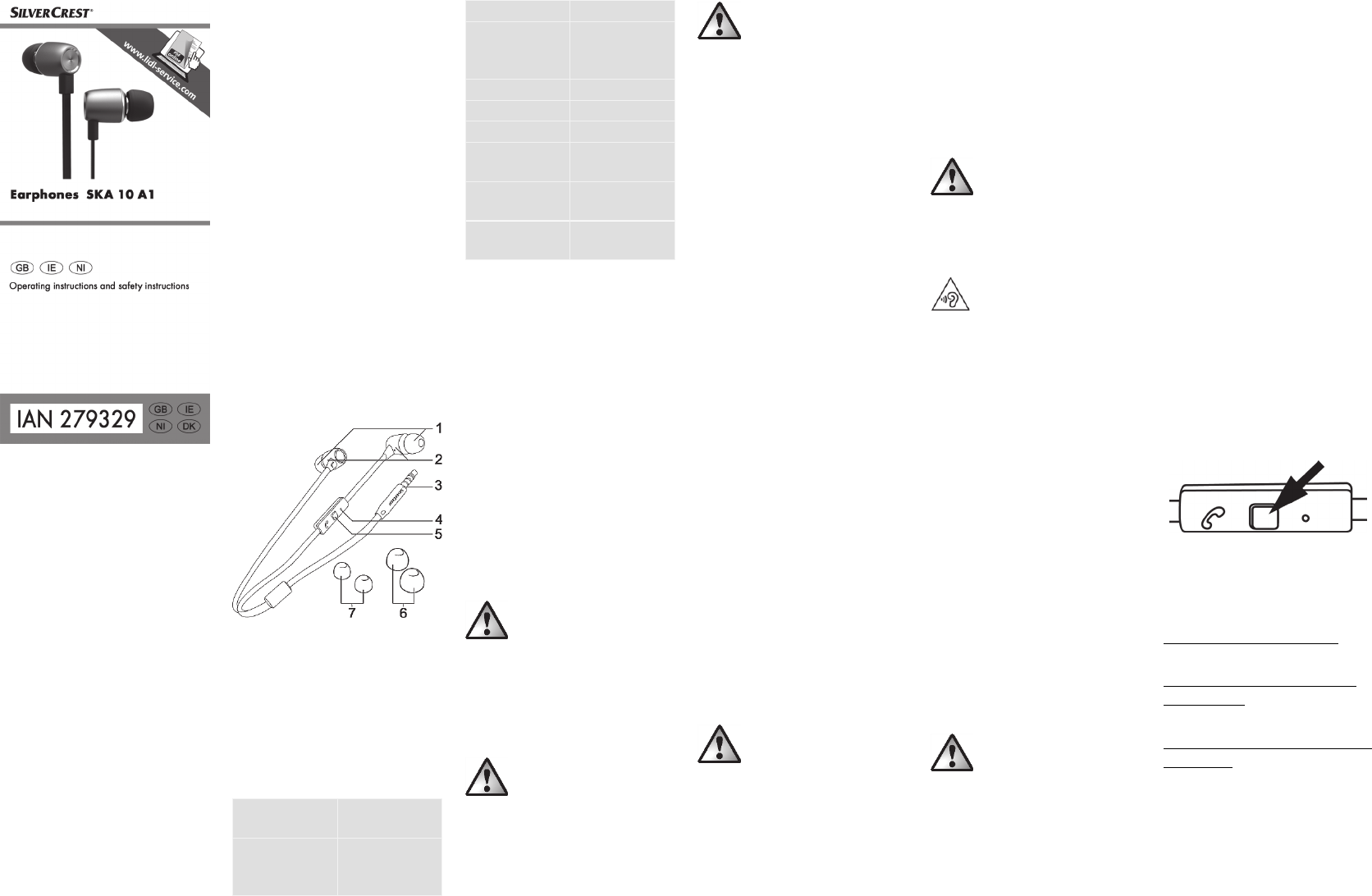
1 Ear cushions (medium)
2 Earbud
3 3.5 mm jack plug
4 Microphone
5 Multifunction button
6 Ear cushions (large)
7 Ear cushions (small)
Technical data
Impedance 16 Ohm
+/- 4 Ohm
Sensitivity 95 dB (A)
+/- 10%
at 1 kHz
Frequency range 20 Hz – 20 kHz
Wide band
characteristic
voltage
approx. 100 mV
+/- 20%
Connector 3.5 mm jack
Cable length approx. 125 cm
Weight approx. 13.5 g
Operating
temperature
5°C to 35°C
Storage
temperature
-10°C to 50°C
Humidity max. 85%
relative humidity
The specifications and design are subject
to change without notice.
Safety information
Before using the headphones for the first
time, read the following instructions
carefully and observe all warnings, even
if you are familiar with using electronic
devices. Keep this manual in a safe place
for future reference. If you give the
headphones away or sell them, please
ensure that you also pass on these
instructions, as they are part of the
product.
Symbols used and what they
mean
DANGER! This symbol, in
conjunction with the word
‘Danger’, indicates an
impending dangerous
situation which, if not
prevented, may lead to
serious injuries or even
death.
WARNING! This symbol,
in conjunction with the word
‘Warning’, indicates
important information for the
safe operation of the device
and user safety.
WARNING!
Please make sure that:
the device is not exposed to direct
sources of heat (for example, heaters)
the device is not exposed to direct
sunlight or strong artificial light
contact with splashing and dripping
water and aggressive liquids is
avoided, and that the device is not
operated in the vicinity of water. In
particular, the device should never be
immersed, nor should any objects filled
with liquid, for example vases or drinks,
be placed on or near the device.
the device is not placed close to
magnetic fields (for example,
loudspeakers)
there are no naked flames (for
example, burning candles) placed on
or near the device
no foreign bodies penetrate into the
device
the device is not exposed to excessive
shocks and vibrations.
you always take hold of the cable by
the plug; never pull on the cable itself.
Do not place any items of furniture or
other heavy objects on the cable.
Make sure that the cable is not bent,
particularly at the plug. Ensure that the
cable does not come into contact with
hot or sharp areas or edges in order to
avoid damage. Never make a knot in
the cable and do not connect it with
other cables. The cable should be
positioned in such a way that no one
steps on it or is obstructed by it.
DANGER! Children and
people with disabilities
Electrical devices must be kept out of the
reach of children. Children may not be
able to recognise hazards. In addition,
people with restricted physical, mental or
sensory abilities should only use electrical
devices appropriately. Never leave
children unattended with electrical
devices, unless they have been instructed
on their use or will be supervised by a
person responsible for their safety.
Children should generally be supervised
to ensure they do not play with this
device. Small parts can be lethal if
swallowed. Keep the packaging
film away from children.
There is a risk of
suffocation!
Listening at high volume can be
dangerous
Take care when using
headphones. Listening at
high volume for long
periods can damage your
hearing.
Do not use the headphones to listen at
high volume. You might damage your
hearing and disturb those around you.
Even though the device is designed to
allow you to hear ambient noise, set the
maximum volume so that you can still
hear what’s going on around you. Make
sure unusual ambient noise can be heard.
Do not use the device in dangerous
situations, for example when driving,
working with machinery or in other
situations that require your full
concentration. Sound through the
headphones may impair your
concentration or make you unaware of
what’s happening around you.
Initial use
Using the headphones
WARNING! So that you
do not damage your
hearing, minimise the
volume on the playback
device before you connect
the headphones. You can
then adjust the volume to the
required level.
You can use the headphones with any
audio device that has a 3.5 mm jack
socket for headphones.Plug the 3.5 mm
jack (3) into the corresponding socket on
your playback device. Set the volume to
the required level on the playback device.
Wear the earbud marked ‘L’ in your left
ear and the earbud marked ‘R’ in your
right ear.
Carefully push one of the earbuds into
your ear canal. To make this easier, you
can straighten the ear canal slightly by
pulling your ear gently up and down. Do
the same with the second earbud.
The microphone
The microphone integrated in the cable
allows you to communicate conveniently
when you are using the headphones as a
headset or with a hands-free kit.
Multifunction button on the
microphone
A multifunction button (5) is located on
the microphone (4).
Depending on the operating mode and
the audio source used, different actions
can be performed by pressing the
multifunction button (5), for example:
Short press during audio playback:
Pause/start playback.
Two presses in quick succession during
audio playback:
Select next track.
Short press when using as a headset/with
hands-free kit:
Accept call.
With a call in progress, a short press
activates or deactivates mute mode
(microphone off).
With a call in progress, a short press
ends the call.
Download Bedienungsanleitung auf Deutsch (PDF, 0.83 MB)
(Denken Sie an die Umwelt und drucken Sie diese Bedienungsanleitung nur aus, wenn es unbedingt nötig ist)

Loading…

Bewertung

Teilen Sie uns mit, was Sie über die SilverCrest IAN 279329 Kopfhörer denken, indem Sie eine Produktbewertung verfassen. Möchten Sie Ihre Erfahrungen mit diesem Produkt teilen oder eine Frage stellen? Hinterlassen Sie einen Kommentar am Ende dieser Seite!
Sind Sie mit SilverCrest IAN 279329 Kopfhörer zufrieden?
Ja Nein
Seien Sie die erste Person, die dieses Produkt bewertet
0 Bewertungen

Diskutieren Sie über dieses Produkt mit

Hier können Sie uns Ihre Meinung zu SilverCrest IAN 279329 Kopfhörer mitteilen. Wenn Sie eine Frage haben, lesen Sie zunächst das Bedienungsanleitung sorgfältig durch. Die Anforderung eines Bedienungsanleitung kann über unser Kontaktformular erfolgen.

Mehr zu diesem Bedienungsanleitung

Wir verstehen, dass es schön ist, ein gedrucktes Bedienungsanleitung für Ihr SilverCrest IAN 279329 Kopfhörer zu haben. Sie können das Bedienungsanleitung jederzeit von unserer Website herunterladen und selbst ausdrucken. Wenn Sie ein Originalhandbuch wünschen, empfehlen wir Ihnen, SilverCrest zu kontaktieren. Möglicherweise können sie ein Originalhandbuch bereitstellen. Suchen Sie das Bedienungsanleitung Ihres SilverCrest IAN 279329 Kopfhörer in einer anderen Sprache? Wählen Sie auf unserer Homepage Ihre bevorzugte Sprache und suchen Sie nach der Modellnummer, um zu sehen, ob wir sie verfügbar haben.

Spezifikationen

Marke SilverCrest
Modell IAN 279329
Kategorie Kopfhörer
Dateityp PDF
Dateigröße 0.83 MB

Alle Anleitungen für SilverCrest Kopfhörer
Weitere Anleitungen von Kopfhörer

Häufig gestellte Fragen zu SilverCrest IAN 279329 Kopfhörer

Unser Support-Team sucht nach nützlichen Produktinformationen und beantwortet Ihre häufig gestellten Fragen. Sollte Ihnen ein Fehler bei den häufig gestellten Fragen auffallen, teilen Sie uns dies bitte anhand unseres Kontaktformulars mit.

Wie lautet die Modellnummer meines Produkts von SilverCrest? Verifiziert

Obwohl ein paar Produkte von SilverCrest eine alternative Modellnummer haben, verfügen alle Produkte über eine IAN-Nummer, mit welcher das Produkt identifiziert werden kann.

Das war hilfreich (3761) Mehr lesen

Wenn ich einen Kopfhörer an mein Gerät anschließe, funktioniert er nicht ordnungsgemäß. Was kann ich tun? Verifiziert

Es kann sein, dass sich Schmutz in der Öffnung angesammelt hat, an die der Kopfhörer angeschlossen wird. Dadurch wird kein richtiger Kontakt hergestellt. Druckluft ist die beste Methode, um es zu säubern. Im Zweifelsfall können Sie dies durch einen Spezialisten durchführen lassen.

Das war hilfreich (1160) Mehr lesen

Wann ist meine Musik zu laut? Verifiziert

Lautstärken über 80 Dezibel (dB) können zu Hörschäden führen. Töne über 120 dB schaden dem Gehör sofort. Wie ernst der Schaden ist, hängt davon ab, wie oft und wie lange die Lautstärke vorherrscht.

Das war hilfreich (1049) Mehr lesen

Was bedeutet Noise Cancelling? Verifiziert

Noise Cancelling ist eine Technik, die hauptsächlich in Kopfhörern verwendet wird. Antischall (auch aktive Lärmkompensation) wird eingesetzt, um störende Umgebungsgeräusche zu reduzieren oder zu eliminieren.

Das war hilfreich (640) Mehr lesen

Funktioniert Bluetooth durch Wände und Decken? Verifiziert

Ein Bluetooth-Signal kann durch Wände und Decken empfangen werden, es sei denn diese bestehen aus Metall. Je nach Dicke und Material der Wand kann das Signal schwächer werden.

Das war hilfreich (252) Mehr lesen

Welcher maximale Geräuschpegel ist für Kinder sicher? Verifiziert

Kinder erleiden schneller einen Gehörschaden als Erwachsene. Daher ist es wichtig, Kinder niemals einem Geräuschpegel von mehr als 85 dB auszusetzen. Bei Kopfhörern gibt es spezielle Modelle für Kinder. Bei Lautsprechern oder in anderen Situationen sollten Sie darauf achten, dass der Geräuschpegel diesen Wert nicht überschreitet.

Das war hilfreich (181) Mehr lesen

Kann ich das Kabel nach Gebrauch um das Gerät wickeln? Verifiziert

Es ist besser, dies nicht zu tun, da es zu Beschädigung des Kabels führen kann. Am besten wickeln Sie das Kabel so auf, wie das Produkt verpackt wurde.

Das war hilfreich (181) Mehr lesen
Bedienungsanleitung SilverCrest IAN 279329 Kopfhörer

Verwandte Produkte

Verwandte Kategorien

×
Download