Bedienungsanleitung Vivanco UR 850 LCD Fernbedienung

Benötigen Sie ein Bedienungsanleitung für Ihren Vivanco UR 850 LCD Fernbedienung? Unten können Sie das PDF-Bedienungsanleitung kostenlos auf Deutsch ansehen und herunterladen. Für dieses Produkt gibt es derzeit 6 häufig gestellte Fragen, 2 Kommentare und 1 Stimme mit einer durchschnittlichen Produktbewertung von 100/100. Wenn dies nicht das von Ihnen gewünschte Bedienungsanleitung ist, kontaktieren Sie uns bitte.

Ist Ihr Produkt defekt und bietet die Bedienungsanleitung keine Lösung? Gehen Sie zu einem Repair Café, wo es gratis repariert wird.

Bedienungsanleitung

Loading…
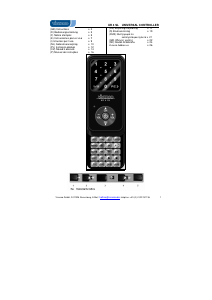
UR 850 LCD Universal Controller
Vivanco GmbH, Ewige Weide 15, D-22926 Ahrensburg, e-Mail: [email protected] 1
(GB) Operating Instructions
Vivanco UR 850 LCD remote control for
practically all TV, audio, video and other
infrared-controllable devices
Inserting the batteries
Open the battery compartment on the back of the
device, push the flap down lightly and insert 2 AA
alkaline batteries. Make sure that the polarity on the
batteries and in the battery compartment correspond
(thick spring = cell at bottom = -) and then close the
lid carefully. – Use undamaged batteries only.
Adapting to devices
In order to control your devices you must adapt or
set the remote control to them. There are two ways
of doing so: direct control code entry or code
search.
If the UR 850 LCD does not understand you it
displays ERROR and you can then repeat the entry.
Direct control code entry
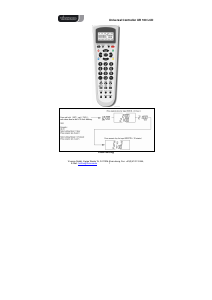
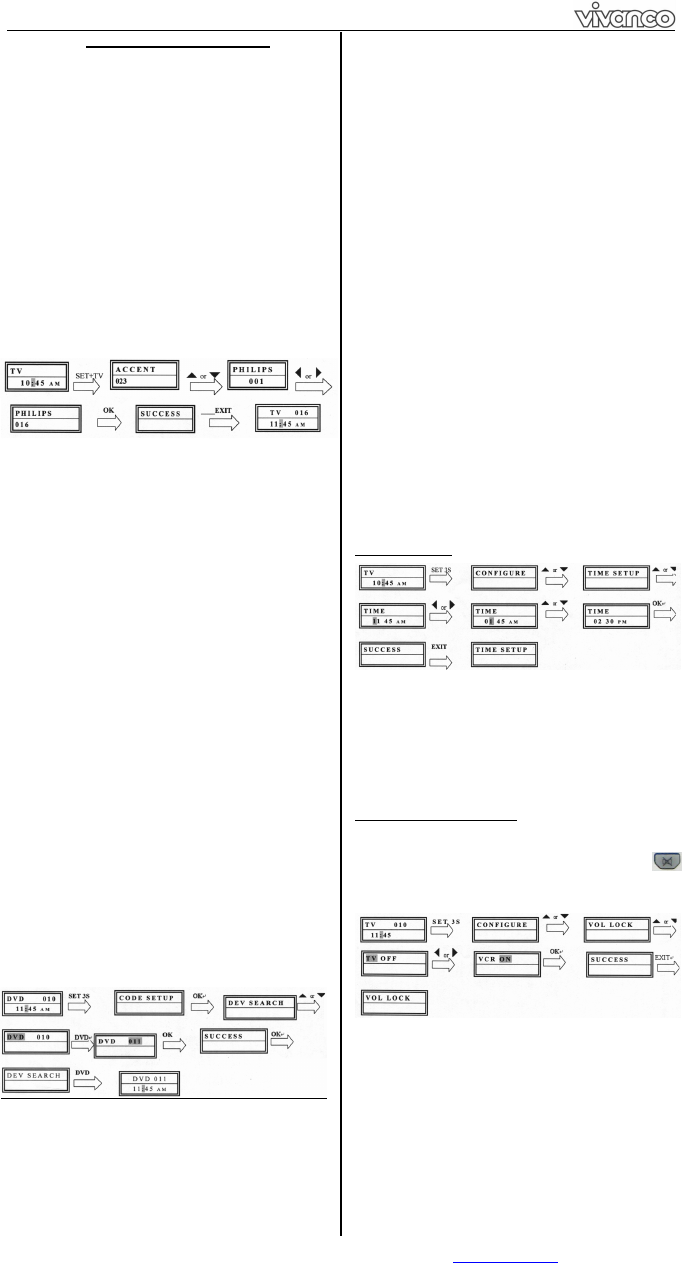
Example: setting the remote control for a Philips TV
set:
1. Switch on your device, e.g. the TV, set to any
station.
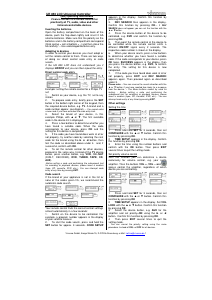
2. To prepare code entry, briefly press the SET
button in the bottom right corner of the keypad, then
the required device button, e.g. TV. A brand and a
code number appear, see diagram.
– You cannot enter
a new code if you have activated the code entry lock.
3. Select the brand of your device, in this
example Philips, with or . The first available
code in the device list is displayed.
4. Press a few buttons to determine whether you
have found a suitable code. When the code
corresponds to your device, press OK and the
setting for this device is completed.
5. If the code you have found does work at all or
not properly, try another code by selecting the next
code for the brand using the or button, then
test the code as described above under 4. and, if
successful, confirm with OK.
6. To set the remote control for other devices,
proceed in the same way. Instead of the TV device
button, press another button, e.g. VCR, CBL/SAT
(DVB-T, DECODER), DVD, TUNER, TAPE, CD,
AUX).
-Before setting a code and performing the subsequent test
for recording or playback devices, please insert a medium
(tape, CD, cassette, DVD, etc.).- You can interrupt code
entry at any time by pressing EXIT.
Code search
If the brand of your appliance is not in the list or
none of the codes given fits, we recommend the
automatic code search.
Your remote control finds the correct control settings
almost automatically in a few seconds:
1. Switch on the device to be controlled. For
example, a program number appears in the display
of your satellite receiver.
2. To start the code search, press and hold the
SET button for approx. 3 seconds. CODE SETUP
appears in the display. Confirm this function by
pressing OK.
3. DEV SEARCH then appears in the display.
Confirm this function by pressing OK.
If DEV
SEARCH does not appear you can set the function with the
or button.
4. Press the device button of the device to be
controlled, e.g. DVD and confirm the function by
pressing OK.
5. Then point the remote control at the device to
be controlled while the remote control emits a
different ON/OFF signal every 2 seconds. The
respective code number is shown in the display.
6. When your device reacts, press a few buttons
to determine whether you have found a suitable
code. If the code corresponds to your device, press
OK twice. SUCCESS appears in the display, then
you press the device button, e.g. DVD, to confirm
the entry. The setting for this device is now
completed.
7. If the code you have found does work at all or
not properly, press EXIT and DEV SEARCH
appears again. Then proceed again as described
under 3.
Please note: - You can reverse the search direction with the
or button if you have reacted too slowly to a response
from the device. – The Menu buttons cannot by used for
testing. - Before setting a code and performing the
subsequent test for recording or playback devices, please
insert a medium (tape, CD, cassette, DVD, etc.).- You can
interrupt code entry at any time by pressing EXIT.
Other settings
Setting the time
1 Press and hold SET for 3 seconds, then set
CONFIGURE with the or button. Confirm this
function by pressing OK.
2 TIME SETUP appears in the display. Confirm
this function by pressing OK.
3 Enter the time using the number buttons and
confirm with the OK button. Then press EXIT
several times to quit the setting mode.
Set priority volume control
With this function you can determine a device
exclusively for volume control, e.g. your audio
amplifier. Then the buttons VOL +, VOL and
always control the amplifier, regardless of which
device you are controlling.
1 Press and hold SET for 3 seconds, then set
CONFIGURE with the or button. Confirm this
function by pressing OK
2 TIME SETUP appears in the display. Set VOL
LOCK with the or button. Confirm this function
by pressing OK.
3 Select the device button, e.g. AUX for the
amplifier and set priority=ON using the or
button. Confirm this function by pressing OK.
4 Then press EXIT several times to quit the
setting mode.
- You can cancel the priority setting using the same
procedure. Instead of ON, set OFF for all devices.
Download Bedienungsanleitung auf Deutsch (PDF, 2.71 MB)
(Denken Sie an die Umwelt und drucken Sie diese Bedienungsanleitung nur aus, wenn es unbedingt nötig ist)

Loading…

Bewertung

Teilen Sie uns mit, was Sie über die Vivanco UR 850 LCD Fernbedienung denken, indem Sie eine Produktbewertung verfassen. Möchten Sie Ihre Erfahrungen mit diesem Produkt teilen oder eine Frage stellen? Hinterlassen Sie einen Kommentar am Ende dieser Seite!
Sind Sie mit Vivanco UR 850 LCD Fernbedienung zufrieden?
Ja Nein
100%
0%
1 Bewertung

Diskutieren Sie über dieses Produkt mit

Hier können Sie uns Ihre Meinung zu Vivanco UR 850 LCD Fernbedienung mitteilen. Wenn Sie eine Frage haben, lesen Sie zunächst das Bedienungsanleitung sorgfältig durch. Die Anforderung eines Bedienungsanleitung kann über unser Kontaktformular erfolgen.

Minusvata 13-01-2020
Hallo, ich versuche, einen Code von meinem LG einzugeben und es funktioniert bei mir nicht, ich habe mehrere ausprobiert, gibt es eine Möglichkeit, das herauszufinden?

Antworten | Das war hilfreich (1) (Übersetzt von Google)
Minusvata 03-04-2021
Ich kann mich mit meinem loewe verbinden, aber ich kann nur die Kanäle wechseln, die anderen Funktionen verbinden sich nicht

Antworten | Das war hilfreich (1) (Übersetzt von Google)

Mehr zu diesem Bedienungsanleitung

Wir verstehen, dass es schön ist, ein gedrucktes Bedienungsanleitung für Ihr Vivanco UR 850 LCD Fernbedienung zu haben. Sie können das Bedienungsanleitung jederzeit von unserer Website herunterladen und selbst ausdrucken. Wenn Sie ein Originalhandbuch wünschen, empfehlen wir Ihnen, Vivanco zu kontaktieren. Möglicherweise können sie ein Originalhandbuch bereitstellen. Suchen Sie das Bedienungsanleitung Ihres Vivanco UR 850 LCD Fernbedienung in einer anderen Sprache? Wählen Sie auf unserer Homepage Ihre bevorzugte Sprache und suchen Sie nach der Modellnummer, um zu sehen, ob wir sie verfügbar haben.

Spezifikationen

Marke Vivanco
Modell UR 850 LCD
Kategorie Fernbedienungen
Dateityp PDF
Dateigröße 2.71 MB

Alle Anleitungen für Vivanco Fernbedienungen
Weitere Anleitungen von Fernbedienungen

Häufig gestellte Fragen zu Vivanco UR 850 LCD Fernbedienung

Unser Support-Team sucht nach nützlichen Produktinformationen und beantwortet Ihre häufig gestellten Fragen. Sollte Ihnen ein Fehler bei den häufig gestellten Fragen auffallen, teilen Sie uns dies bitte anhand unseres Kontaktformulars mit.

Wie verbinde ich eine Universalfernbedienung mit meinem Fernseher? Verifiziert

Um Ihre Universalfernbedienung mit Ihrem Fernseher zu verbinden, benötigen Sie die Modellnummer und den Marken Namen der Fernbedienung und des Fernsehers. Im Handbuch der Fernbedienung befindet sich eine Liste mit den Codes für die jeweiligen Marken und Modellnummern.

Das war hilfreich (7986) Mehr lesen

Wieso hat es auf der Fernbedienung Buchstaben neben den Zahlen? Verifiziert

Bei gewissen Fernseher-Einstellungen müssen Sie möglicherweise Buchstaben eingeben. Gewöhnlich gibt es pro Taste drei Buchstaben oder andere Zeichen. Wenn Sie Buchstaben eingeben müssen, können Sie die entsprechende Taste einmal/zweimal/dreimal drücken, für den ersten/zweiten/dritten Buchstaben. Dies ermöglicht die Texteingabe mit einem Minimum an Tasten.

Das war hilfreich (682) Mehr lesen

Funktioniert meine Fernbedienung auch bei anderen Fernsehgeräten/Modellen der gleichen Marke? Verifiziert

Häufig funktioniert eine TV-Fernbedienung auch bei ähnlichen Modellen der gleichen Marke. Es ist jedoch ungewöhnlich, dass sie bei allen Modellen dieser Marke funktioniert. Universalfernbedienungen sind dazu besser geeignet.

Das war hilfreich (524) Mehr lesen

Wie hoch ist die durchschnittliche Reichweite einer Infrarot-Fernbedienung? Verifiziert

Eine durchschnittliche Infrarot-Fernbedienung reicht etwa 3 bis 6 Meter weit. Je weiter das Gerät entfernt ist, desto schwieriger wird es, auf dieses zu zielen.

Das war hilfreich (412) Mehr lesen

Eine der Batterien in meinem Gerät ist oxidiert. Kann ich es dennoch sicher verwenden? Verifiziert

Ja, das Gerät kann weiterhin sicher verwendet werden. Entfernen Sie zunächst die oxidierte Batterie. Tun Sie dies niemals ohne Handschutz. Reinigen Sie daraufhin das Batteriefach mit einem Wattestäbchen, das Sie in Essig oder Zitronensaft getränkt haben. Lassen Sie es trocknen und setzen Sie neue Batterien ein.

Das war hilfreich (371) Mehr lesen

Kann ich eine austauschbare Batterie langfristig in einem Gerät lassen? Verifiziert

Wenn das Gerät in Gebrauch ist, können Batterien langfristig im Gerät bleiben. Wenn ein Gerät langfristig gelagert wird, ist es ratsam, die Batterien zu entfernen, um Oxidation vorzubeugen.

Das war hilfreich (271) Mehr lesen
Bedienungsanleitung Vivanco UR 850 LCD Fernbedienung

Verwandte Produkte

Verwandte Kategorien

×
Download