Bedienungsanleitung Toshiba RAS-3M18SAV-E Klimagerät

Benötigen Sie ein Bedienungsanleitung für Ihren Toshiba RAS-3M18SAV-E Klimagerät? Unten können Sie das PDF-Bedienungsanleitung kostenlos auf Deutsch ansehen und herunterladen. Für dieses Produkt gibt es derzeit 8 häufig gestellte Fragen, 0 Kommentare und 0 Stimmen. Wenn dies nicht das von Ihnen gewünschte Bedienungsanleitung ist, kontaktieren Sie uns bitte.

Ist Ihr Produkt defekt und bietet die Bedienungsanleitung keine Lösung? Gehen Sie zu einem Repair Café, wo es gratis repariert wird.

Bedienungsanleitung

Loading…
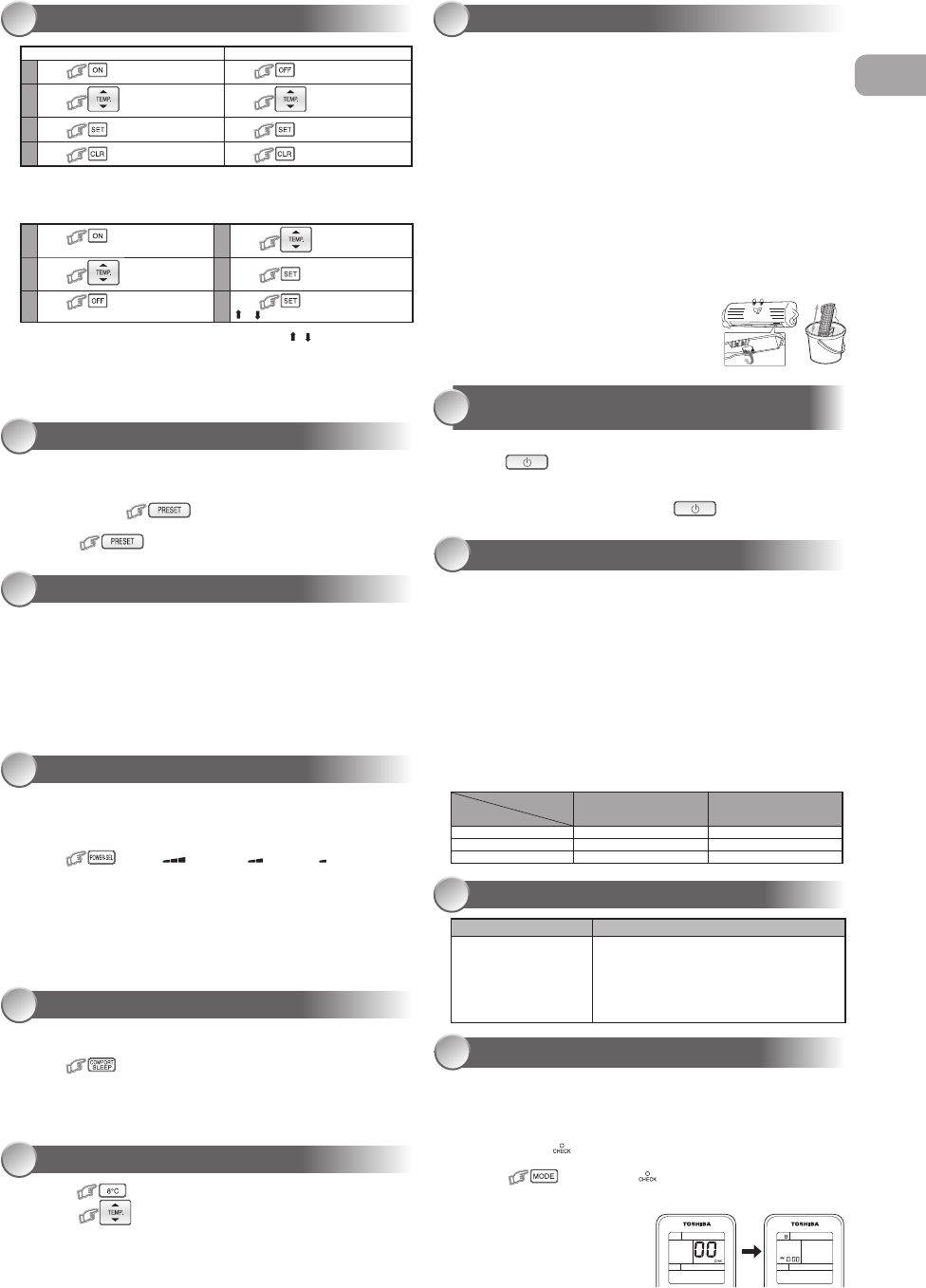
TIMER OPERATION
13
Daily timer allows the user to set both the ON & OFF timers and will be
activated on a daily basis.
Setting Daily Timer
Setting the ON Timer Setting the OFF Timer
1
Press for enter ON timer setting
Press
for enter OFF timer setting
2
Press for select desired ON
timer.
Press for select desired OFF
timer.
3
Press for set timer. Press for set timer.
4
Press for cancel timer. Press for cancel timer.
1
Press for enter ON timer
setting
4
Press for select desired OFF
timer.
2
Press for select desired
ON timer.
5
Press .
3
Press for enter OFF timer
setting
6
Press again during the
( or ) blink.
During the daily timer is activating, both arrows ( , ) are indicated.
Note:
Keep the remote control in accessible transmission to the indoor unit;
otherwise, the time lag up to 15 minutes will occur.
The setting will be saved for the next same operation.
PRESET OPERATION
14
Set your preferred operation for future use. The setting will be memorized by
the unit for future operation (except air ow direction).
1. Select your preferred operation.
2. Press and hold for 3 seconds to memorize the setting.
The P mark displays.
3. Press
: Operate the preset operation.
AUTO RESTART OPERATION
15
To automatically restart the conditioner after the power failure (Power of the
unit must be on.)
Setting
1. Press and hold the RESET button on the indoor unit for 3 seconds to set the
operation. (3 beep sound and OPERATION lamp blink 5 time/sec for 5 seconds)
2. Press and hold the RESET button on the indoor unit for 3 seconds to cancel the
operation. (3 beep sound but OPERATION lamp does not blink)
In case of ON timer or OFF timer are set, AUTO RESTART OPERATION does
not activate.
To save energy while sleeping, automatically control air ow and
automatically turn OFF.
Press
: Select 1, 3, 5 or 9 hrs for OFF timer operation.
Note: The cooling operation, the set temperature will increase automatically
1 degree/hour for 2 hours (maximum 2 degrees increase). For heating
operation, the set temperature will decrease.
POWER-SELECTION OPERATION (Optional)
16
COMFORT SLEEP OPERATION
17
SELF CLEANING OPERATION
(COOL AND DRY OPERATION ONLY)
20
OPERATION AND PERFORMANCE
21
1. Three-minute protection feature: To prevent the unit from being activated for 3
minutes when suddenly restarted or switched to ON.
2. Preheating operation: Warm up the unit for 5 minutes before the heating
operation starts.
3. Warm air control: When the room temperature reaches the set temperature, the
fan speed is automatically reduced and the outdoor unit will stop.
4. Automatic defrosting: Fans will stop during defrost operation.
5. Heating capacity: Heat is absorbed from outdoors and released into the room.
When the outdoor temperature is too low, use another recommended heating
apparatus in combination with the air conditioner.
6. Consideration for accumulated snow: Select the position for outdoor unit where
it will not be subjected to snow drifts, accumulation of leaves or other seasonal
debris.
7. Some minor cracking sound may occur when unit operating. This is normal
because the cracking sound may be caused by expansion/contraction of plastic.
Note: Item 2 to 6 for Heating model
Air conditioner operating conditions
Temp.
Operation
Outdoor Temperature Room Temperature
Heating –15°C ~ 24°C Less than 28°C
Cooling –10°C ~ 46°C 21°C ~ 32°C
Dry –10°C ~ 46°C 17°C ~ 32°C
The unit does not operate. Cooling or Heating is abnormally low.
The power main switch is
turned off.
The circuit breaker is activated
to cut off the power supply.
Stoppage of electric current
ON timer is set.
The lters are blocked with dust.
The temperature has been set improperly.
The windows or doors are opened.
The air inlet or outlet of the outdoor unit is blocked.
The fan speed is too low.
The operation mode is FAN or DRY.
POWER SELECT FUNCTION is set at 75% or 50%.
TROUBLESHOOTING (CHECK POINT)
22
REMOTE CONTROL A-B SELECTION
23
To separate using of remote control for each indoor unit in case of 2 air
conditioner are installed nearly.
Remote Control B Setup.
1. Press RESET button on the indoor unit to turn the air conditioner ON.
2. Point the remote control at the indoor unit.
3. Push and hold button on the Remote Control by the tip of the pencil.
“00” will be shown on the display.
4. Press
during pushing . “B” will show on the display and
“00” will disappear and the air conditioner will turn OFF. The Remote
Control B is memorized.
Note:
1. Repeat above step to reset
Remote Control to be A.
2. Remote Control A has not “A”
display.
3. Default setting of Remote Control
from factory is A.
1.
Press button to change to 8°C set temperature heating operation.
2. Press to adjust setting temperature from 5°C to 13°C.
Note: 8°C will operate in Heating mode only. If Air conditioner performs in
cooling operation (including automatic cooling) or dry operation it will
change to heating operating.
When using a multi-system outdoor unit is connected, 8°C operation
can not be used.
8°C OPERATION (Optional)
18
0
Firstly, turn off the circuit breaker.
Filter Reset (Some models only)
FILTER lamp lights on; the lter must be cleaned.
To turn off the lamp, push the RESET button on the indoor unit or the FILTER button on
the remote control.
Indoor Unit and Remote Control
Clean the indoor unit and the remote control with a wet cloth when needed.
No benzine, thinner, polishing powder or chemically-treated duster.
Cleaning the air ionizer (Once every six months)
1. Turn off air conditioner using remote control and power supply.
2. Fully open the vertical air ow louvers by hand.
3. Use a toothbrush to rub the ends of metal pin three or four times.
Note: Do not use cotton swabs or other objects with uff.
Cleaning the plasma air puri er unit (About every 1000 hours performed)
1. Turn off air conditioner using remote control and power supply.
2. Take out the air inlet grille (See detail in installation manual).
3. Take out the plasma air puri er by grasp the handle, and the pull it out.
4. Soak in hot water at 40°C to 50°C for about 10 to 15 minutes and rub up, down,
left, right and rub surface gently with a sponge.
5. Allow to dry thoroughly in the shade.
6. Attach the plasma air puri er by grasp the handle
and insert into the right and left guide rails.
7. Press both ends of the plasma air puri er until the
protrusions on both sides of the plasma air puri er
are completely inserted.
8. Attach the air lter, and then close the air inlet grille.
MAINTENANCE
19
To protect bad smell caused by the humidity in the indoor unit.
1. If the
button is pressed once during “Cool” or “Dry” mode,
the fan will continue to run for other 30 minutes, then it will turn off
automatically. This will reduce the moisture in the indoor unit.
2. To stop the unit immediately, press the more 2 times within 30
seconds.
This function is used when its circuit breaker is shared with other electrical
appliances. It limits the maximum current/ power consumption to 100%, 75%
or 50%. The lower the percentage, the higher the saving and also the longer
the compressor lifetime.
Press
: Select: (for 100%), (for 75%), (for 50%)
When the level is selected, PWR-SEL level ashes on LCD display for
3 seconds. In case of 75% and 50% level, number “75” or “50” also
ashes for 2 seconds.
Due to the reason that POWER SELECT FUNCTION limits the
maximum current, inadequate capacity may occur.
Note: When using a multi-system outdoor unit is connected,
POWER-SELECTION operation can not be used.
EN
Download Bedienungsanleitung auf Deutsch (PDF, 2.56 MB)
(Denken Sie an die Umwelt und drucken Sie diese Bedienungsanleitung nur aus, wenn es unbedingt nötig ist)

Loading…

Bewertung

Teilen Sie uns mit, was Sie über die Toshiba RAS-3M18SAV-E Klimagerät denken, indem Sie eine Produktbewertung verfassen. Möchten Sie Ihre Erfahrungen mit diesem Produkt teilen oder eine Frage stellen? Hinterlassen Sie einen Kommentar am Ende dieser Seite!
Sind Sie mit Toshiba RAS-3M18SAV-E Klimagerät zufrieden?
Ja Nein
Seien Sie die erste Person, die dieses Produkt bewertet
0 Bewertungen

Diskutieren Sie über dieses Produkt mit

Hier können Sie uns Ihre Meinung zu Toshiba RAS-3M18SAV-E Klimagerät mitteilen. Wenn Sie eine Frage haben, lesen Sie zunächst das Bedienungsanleitung sorgfältig durch. Die Anforderung eines Bedienungsanleitung kann über unser Kontaktformular erfolgen.

Mehr zu diesem Bedienungsanleitung

Wir verstehen, dass es schön ist, ein gedrucktes Bedienungsanleitung für Ihr Toshiba RAS-3M18SAV-E Klimagerät zu haben. Sie können das Bedienungsanleitung jederzeit von unserer Website herunterladen und selbst ausdrucken. Wenn Sie ein Originalhandbuch wünschen, empfehlen wir Ihnen, Toshiba zu kontaktieren. Möglicherweise können sie ein Originalhandbuch bereitstellen. Suchen Sie das Bedienungsanleitung Ihres Toshiba RAS-3M18SAV-E Klimagerät in einer anderen Sprache? Wählen Sie auf unserer Homepage Ihre bevorzugte Sprache und suchen Sie nach der Modellnummer, um zu sehen, ob wir sie verfügbar haben.

Spezifikationen

Marke Toshiba
Modell RAS-3M18SAV-E
Kategorie Klimageräte
Dateityp PDF
Dateigröße 2.56 MB

Alle Anleitungen für Toshiba Klimageräte
Weitere Anleitungen von Klimageräte

Häufig gestellte Fragen zu Toshiba RAS-3M18SAV-E Klimagerät

Unser Support-Team sucht nach nützlichen Produktinformationen und beantwortet Ihre häufig gestellten Fragen. Sollte Ihnen ein Fehler bei den häufig gestellten Fragen auffallen, teilen Sie uns dies bitte anhand unseres Kontaktformulars mit.

Wie oft sollte ich die Filter in meiner Klimaanlage reinigen bzw. ersetzen? Verifiziert

Es wird empfohlen, dass Sie die Filter Ihrer Klimaanlage 4 Mal im Jahr überprüfen. Stark verschmutzte Filter können je nach Typ mit dem Staubsauger gereinigt oder gewaschen werden. Bei der Wartung sollte ein Fachmann entscheiden, ob es an der Zeit ist, die Filter auszutauschen.

Das war hilfreich (3024) Mehr lesen

Wofür steht BTU? Verifiziert

BTU steht für "Brtitish thermal unit". Diese Einheit beschreibt die Kühlleistung des Geräts.

Das war hilfreich (1146) Mehr lesen

Hat jede Klimaanlage auch die Funktion eines Luftentfeuchters? Verifiziert

Die kalte Luft, die durch eine Klimaanlage erzeugt wird, hat oft eine relativ geringe Luftfeuchtigkeit. Die Wirkung ist jedoch geringer als wenn ein richtiger Luftentfeuchter benutzt wird. Einige Klimaanlagen verfügen über eine besondere Funktion zur Luftentfeuchtung.

Das war hilfreich (909) Mehr lesen

Was ist R-410A? Verifiziert

R-410A ist ein Kühlmittel, das in Geräten verwendet wird, die auf bis zu 0°C herunterkühlen, wie Kühlschränke und Klimaanlagen. Es ersetzt ältere Kühlmittel und schadet der Ozonschicht nicht.

Das war hilfreich (646) Mehr lesen

An welchem Ort sollte der Innenteil einer Split-Klimaanlage idealerweise angebracht werden? Verifiziert

Dies ist ortsabhängig. Allgemein können jedoch die folgenden Regeln befolgt werden: Stellen Sie sicher, dass der Luftstrom durch nichts behindert wird. Stellen Sie sicher, dass der Ort für Wartungsarbeiten zugänglich ist. Bringen Sie die Einheit mindestens 2 Meter über dem Boden an.

Das war hilfreich (458) Mehr lesen

Kann ich meine mobile Klimaanlage in einen Schrank stellen, damit man sie nicht sieht? Verifiziert

Nein, auf keinen Fall. Eine mobile Klimaanlage braucht Platz für Luftstrom und -einlass. Auf kleinem Raum kann das Gerät überhitzen.

Das war hilfreich (447) Mehr lesen

Beeinträchtigt eine Klimaanlage die Luftqualität? Verifiziert

Wenn die Klimaanlage ordnungsgemäß gewartet wird, beeinträchtigt sie die Luftqualität nicht. Wenn jedoch beispielsweise ein Filter über einen längeren Zeitraum nicht ausgetauscht oder die Klimaanalage anderweitig nicht korrekt gewartet wurde, kann die Klimaanlage schmutzige Luft produzieren.

Das war hilfreich (447) Mehr lesen

Welche Lebensdauer hat meine Toshiba-Klimaanlage? Verifiziert

Die Lebensdauer ist vom Modell, Nutzung und Wartung abhängig, unter normalen Umständen beträgt die Lebensdauer laut Toshiba 12-15 Jahre.

Das war hilfreich (56) Mehr lesen
Bedienungsanleitung Toshiba RAS-3M18SAV-E Klimagerät

Verwandte Produkte

Verwandte Kategorien

×
Download