I I
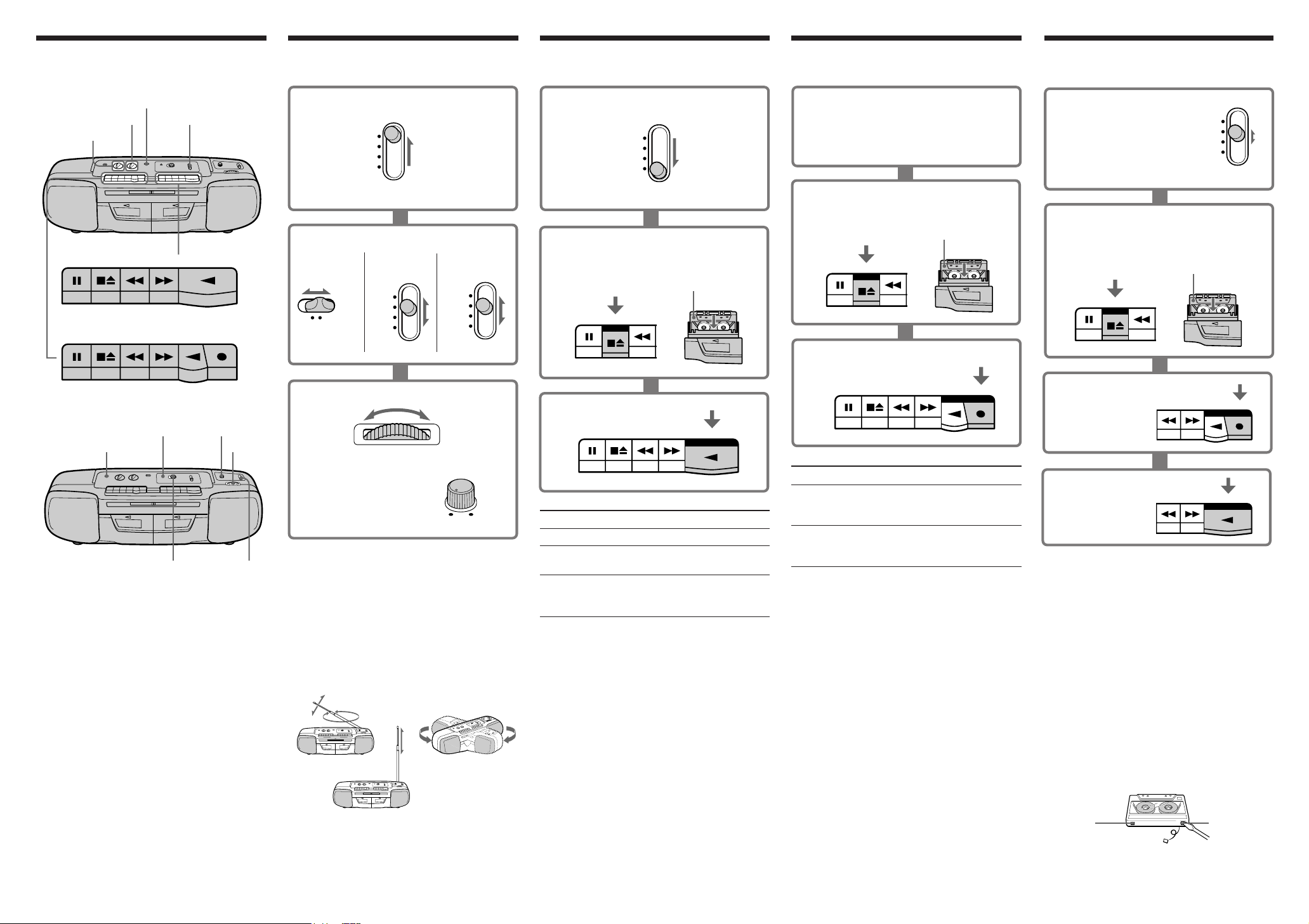
To stop dubbing
Press p6 on deck A and B.
Tips
•For best results, use the mains lead.
•Do not set the FUNCTION during dubbing as this
causes excessive wow and flutter.
•Adjusting the volume will not affect the recording
level.
•When the tape in deck A ends first, deck B will also
stop recording. When the tape in deck B ends first,
deck A will contiune to play.
Notes on cassettes
•Break off the cassette tab from side A or B to
prevent accidental recording. If you want to reuse
the tape for recording, cover the tab hole with
adhesive tape.
•The use of cassettes with more than 90 minutes of
play time is not recommended except for long,
continuous recording or playback.
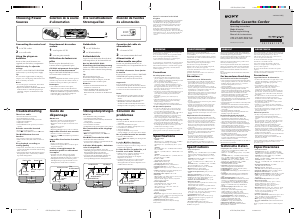
Location of controls Listening to the radio Playing a tape Recording (deck B)
1 Set FUNCTION to RADIO.
To record from the radio
Tune to the station you want.
To record from the built-in microphone
Set FUNCTION to TAPE/RADIO OFF.
1
Use TYPE I (normal) tape only.Use TYPE I (normal) tape only.
1 Set FUNCTION to TAPE/RADIO
OFF.
RADIO
FUNCTION
HIGH
NORMAL
TAPE
DUBBING
3 Tune to the station you want.
2 Set BAND to the band you want.
CFS-W338S/W338L
only: To tune in an
SW band, use FINE
TUNE for better SW
reception.
CFS-W338L
CFS-W338S
CFS-W338
BAND
FM AM
FM
BAND
SW1
SW2
MW
FM
BAND
SW
MW
LW
TUNING
FINE TUNE
3 Press 9 PLAY.
With the side you want to
play on facing forward.
2 Insert a recorded tape into deck A or B.
To
Stop playback
Fast-forward or
rewind the tape
Pause playback
Press
p6
0 or )
For the side facing forward.
P
Press this button again to
resume playback .
2 Insert a blank tape into deck B.
With the side you want to
record on facing forward.
3 Press r REC on deck B.
Press
p6
When the tape ends, the
recording stops.
P
Press this button again to
resume recording.
To
Stop recording
Pause recording
To turn off the radio
Set FUNCTION to TAPE/RADIO OFF.
To improve broadcast reception
Reorient the aerial for FM. Reorient the player
itself for AM (CFS-W338 only) or MW (CFS-
W338S/W338L only) or LW(CFS-W338L only).
For SW (CFS-W338S/W338L only), pull the aerial
vertically.
Tips
•If the FM broadcast is noisy, set the FM MODE (at
the top) to mono and the radio will play in
monaural (CFS-W338/W338L only).
•To listen through headphones, connect the
headphones to PHONES.
•For best results, move the player away from the TV.
FM
AM/MW/LW
SW
Tips
•For best results, use the mains lead.
•Adjusting the volume or the tone will not affect the
recording level.
•If the MW or LW programme makes a whistling
sound, set FM MODE/ISS(Interference Suppress
Switch) (at the top) to the position that more
decreases the noise (CFS-W338L only).
Notes
•While recording from the built-in microphone, you
cannot monitor the sound through the headphones.
•Do not press 0, ) or 9 on deck A during
recording as this causes excessive wow and flutter.
Side A
Tab for
side A
Tab for
side B
PAUSE
STOP/EJECT
FF REW PLAY REC
PAUSE
STOP/EJECT
FF REW PLAY
VOLUME
TONE
MIC
FUNCTION
DECK A
DECK B
PHONES
OPR/BATT
FM MODE/ISS**
FM MODE***
FINE TUNE*
TUNING
BAND
PAUSE
STOP/EJECT
FF REW PLAY REC
* CFS-W338S/W338L only
** CFS-W338L only
*** CFS-W338 only
FUNCTION
TAPE
RADIO OFF
PAUSE
STOP/EJECT
FF REW PLAY
PAUSE
STOP/EJECT
FF
m
Tip
When you play both decks, you will only hear deck
B.
Note
Do not press 0, ) or 9 on the other deck
during playback as this causes excessive wow and
flutter.
Dubbing (deck A to B)
1 To dub at high speed
Set FUNCTION to
DUBBING•HIGH.
To dub at normal speed
Set FUNCTION to
DUBBING•NORMAL.
Use TYPE I (normal) tape only.
2 Insert a recorded tape into deck A,
and a blank tape into deck B.
With the side you want to
record on facing forward.
3 Press r REC
on deck B.
4 Press 9 PLAY
on deck A.
FUNCTION
HIGH
NORMAL
DUBBING
PAUSE
STOP/EJECT
FF
m
FF REW PLAY REC
FF REW PLAY


Diskutieren Sie über dieses Produkt mit
Hier können Sie uns Ihre Meinung zu Sony CFS-W338S Stereoanlage mitteilen. Wenn Sie eine Frage haben, lesen Sie zunächst das Bedienungsanleitung sorgfältig durch. Die Anforderung eines Bedienungsanleitung kann über unser Kontaktformular erfolgen.