Bedienungsanleitung Sony CFD-910 Stereoanlage

Benötigen Sie ein Bedienungsanleitung für Ihren Sony CFD-910 Stereoanlage? Unten können Sie das PDF-Bedienungsanleitung kostenlos auf Deutsch ansehen und herunterladen. Für dieses Produkt gibt es derzeit 0 häufig gestellte Fragen, 0 Kommentare und 0 Stimmen. Wenn dies nicht das von Ihnen gewünschte Bedienungsanleitung ist, kontaktieren Sie uns bitte.

Ist Ihr Produkt defekt und bietet die Bedienungsanleitung keine Lösung? Gehen Sie zu einem Repair Café, wo es gratis repariert wird.

Bedienungsanleitung

Loading…
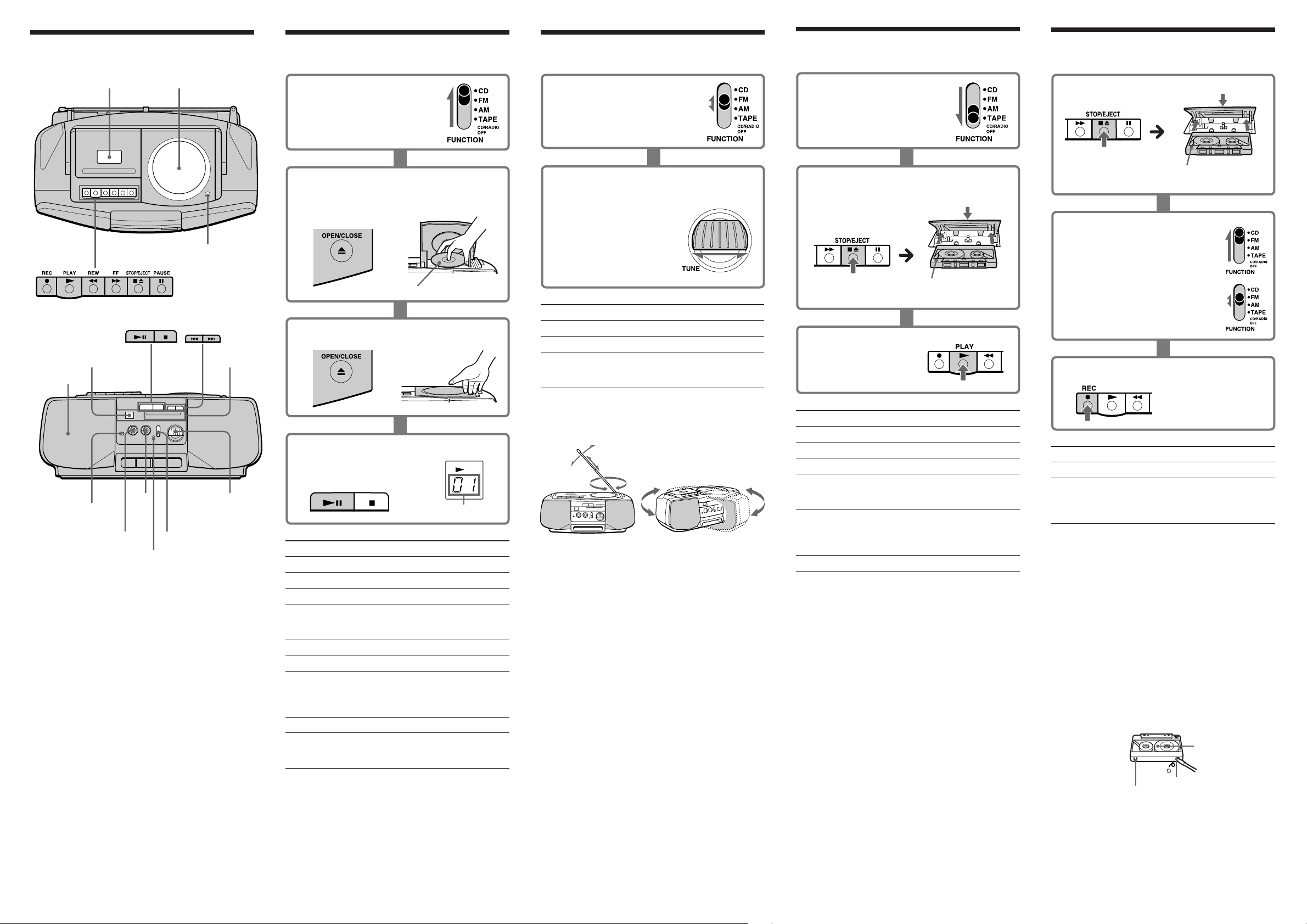
Location of controls
Tape compartment
CD compartment
6 OPEN/CLOSE
Speaker
Display window
VOLUME
TONE
FUNCTION
TUNE
2 (headphones)
OPR/BATT
Playing a CD
1 Set FUNCTION to CD.
Listening to the radio
Playing a tape
1 Set FUNCTION to TAPE
(CD/RADIO OFF).
Use TYPE I (normal) tape only.
To Do this
Adjust the volume Turn VOLUME.
Adjust the tone Turn TONE.
Stop playback Press p6 .
Fast-forward or rewind the Press ) or 0 for
tape the side facing
upward
Pause playback Press P.
Press the button again
to resume play after
pause.
Eject the cassette. Press p6.
Recording
Use TYPE I (normal) tape only.
With the side you want to
record on facing upward.
2 Press 6OPEN/CLOSE down to open
the CD compartment and place a CD
on the CD compartment.
With the label side up
3 Close the compartment.
4 Press ^.
The player plays all
the tracks once.
Display
Track number
To Do this
Adjust the volume Turn VOLUME.
Adjust the tone Turn TONE.
Stop playback Press p.
Pause playback Press ^.
Press again to resume
play after pause.
Go to the next track Press +.
Go back to the previous track Press =.
Locate a point while listening Press + (forward) or
to the sound = (backward) while
playing and hold down
until you find the point.
Remove the CD
Press 6 OPEN/CLOSE.
Turn off the player Set FUNCTION to
TAPE (CD/RADIO
OFF).
1 Set FUNCTION to FM or AM.
For FM For AM
2 Turn TUNE to tune in a radio staton.
If the received FM stereo is too weak, the
reception becomes monaural.
To Do this
Adjust the volume Turn VOLUME.
Adjust the tone Turn TONE.
Turn off the radio Set FUNCTION to
TAPE (CD/RADIO
OFF).
To improve broadcast reception
Reorient the antenna for FM. Reorient the player itself
for AM.
2 Press p6 to open the tape compartment
and insert a recorded tape. Close the
compartment.
With the side you want to
play on facing upward.
3 Press (.
1 Insert a blank tape.
2 Select the program source you
want to record.
To record from the CD player, set
FUNCTION to CD and insert a CD.
To record from the radio, set
FUNCTION to FM or AM and tune
in the station you want.
3 Press r (( is depressed automatically.)
To Press
Stop recording p6
Pause recording P
Press the button again
to resume recording
after pause.
Tips
Adjusting the volume or the tone will not affect the
recording level.
If the AM program makes a whistling sound after you’ve
pressed r in step 3, set the FM MODE/ISS (Interference
Suppress Switch) at the rear to the position that most
decreases the noise (only for the models equipped with
FM MODE/ISS selector at the rear).
For best results, use the AC power as a power source for
recording.
To erase a recording, proceed as follows:
1 Set FUNCTION to TAPE (CD/RADIO OFF).
2 Press r.
Notes on cassettes
Break off the cassette tab from side A or B to prevent
accidental recording. If you want to reuse the tape for
recording, cover the broken tab with adhesive tape.
The use of a cassette with more than 90 minutes of play
time is not recommended except for long, continuous
recording or playback.
Dial scale
Tip
To receive an FM stereo program (only for the models
equipped with FM MODE/ISS selector at the rear)
Set the FM MODE/ISS selector at the rear to STEREO. If the
FM broadcast is noisy, set the selector to MONO and the
radio will play in monaural.
Side A
Tab for side B
Tab for side A
Download Bedienungsanleitung auf Deutsch (PDF, 0.25 MB)
(Denken Sie an die Umwelt und drucken Sie diese Bedienungsanleitung nur aus, wenn es unbedingt nötig ist)

Loading…

Bewertung

Teilen Sie uns mit, was Sie über die Sony CFD-910 Stereoanlage denken, indem Sie eine Produktbewertung verfassen. Möchten Sie Ihre Erfahrungen mit diesem Produkt teilen oder eine Frage stellen? Hinterlassen Sie einen Kommentar am Ende dieser Seite!
Sind Sie mit Sony CFD-910 Stereoanlage zufrieden?
Ja Nein
Seien Sie die erste Person, die dieses Produkt bewertet
0 Bewertungen

Diskutieren Sie über dieses Produkt mit

Hier können Sie uns Ihre Meinung zu Sony CFD-910 Stereoanlage mitteilen. Wenn Sie eine Frage haben, lesen Sie zunächst das Bedienungsanleitung sorgfältig durch. Die Anforderung eines Bedienungsanleitung kann über unser Kontaktformular erfolgen.

Mehr zu diesem Bedienungsanleitung

Wir verstehen, dass es schön ist, ein gedrucktes Bedienungsanleitung für Ihr Sony CFD-910 Stereoanlage zu haben. Sie können das Bedienungsanleitung jederzeit von unserer Website herunterladen und selbst ausdrucken. Wenn Sie ein Originalhandbuch wünschen, empfehlen wir Ihnen, Sony zu kontaktieren. Möglicherweise können sie ein Originalhandbuch bereitstellen. Suchen Sie das Bedienungsanleitung Ihres Sony CFD-910 Stereoanlage in einer anderen Sprache? Wählen Sie auf unserer Homepage Ihre bevorzugte Sprache und suchen Sie nach der Modellnummer, um zu sehen, ob wir sie verfügbar haben.

Spezifikationen

Marke Sony
Modell CFD-910
Kategorie Stereoanlage
Dateityp PDF
Dateigröße 0.25 MB

Alle Anleitungen für Sony Stereoanlage
Weitere Anleitungen von Stereoanlage
Bedienungsanleitung Sony CFD-910 Stereoanlage

Verwandte Produkte

Verwandte Kategorien

×
Download