2
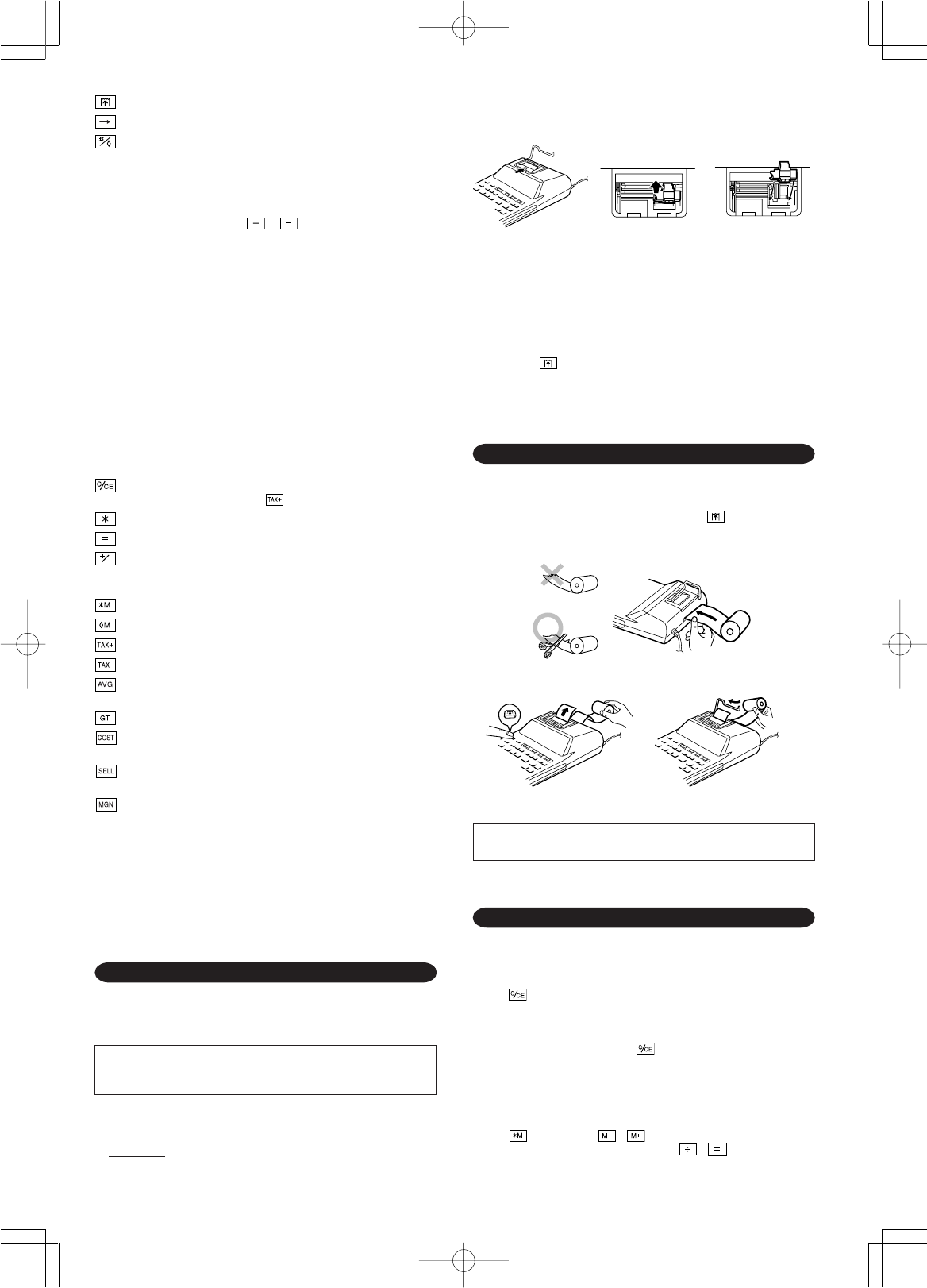
PAPER FEED KEY
LAST DIGIT CORRECTION KEY
NON-ADD / SUBTOTAL KEY:
Non-add – When this key is pressed right after an entry of a number in
the Print mode, the entry is printed on the left-hand side with the symbol
“#”. This key is used to print out numbers not subjects to calculation
such as code, date, etc.
Subtotal – Used to get subtotal(s) of additions and/or subtractions.
When pressed following the or key, the subtotal is printed with
the symbol “
◊
” and the calculation may be continued.
By pressing this key even in the Non-print mode, the displayed
number is printed without any symbol.
• When the POWER SWITCH; PRINT / ITEM COUNT MODE
SELECTOR is set “•”, “P” or “P•IC” position, and Date or Clock is
displayed, press this key to print the displayed contents, including “#”
symbol, from the left side of the paper roll.
Example:
Date printing
#15 • 09 • 2005 • • • • • •
(when the date is 15 September, 2005)
Clock printing
#10 • 30 • • • • • • • • • • •
(when the time is 10:30 a.m.)
#18 • 25 • • • • • • • • • • •
(when the time is 6:25 p.m.)
• When the Date / Clock printing is complete, the Calculation mode is
restored.
CLEAR / CLEAR ENTRY KEY:
Press this key twice, followed by , to print the set tax rate.
TOTAL KEY
EQUAL KEY
CHANGE SIGN KEY:
Changes the algebraic sign of a number (i.e., positive to negative or
negative to positive).
RECALL AND CLEAR MEMORY KEY
RECALL MEMORY KEY
TAX-INCLUDING KEY
PRE-TAX KEY
AVERAGE KEY:
Used to calculate the average.
GRAND TOTAL KEY
COST PRICE ENTRY KEY:
Press this key to enter the cost price.
SELLING PRICE ENTRY KEY:
Press this key to enter the selling price.
MARGIN ENTRY KEY:
Press this key to enter the margin.
DISPLAY SYMBOLS:
M:Appears when a number is in the memory.
–:Appears when a number is negative.
• : Appears when a number is in the grand total memory.
E:Appears when an overflow or other error is detected.
INK ROLLER REPLACEMENT
If printing is blurry even when the ink roller is in the proper position, replace
the roller.
Ink roller: Type EA-772R
WARNING
APPLYING INK TO WORN INK ROLLER OR USE OF UNAPPROVED INK
ROLLER MAY CAUSE SERIOUS DAMAGE TO PRINTER.
1) Set the power switch to OFF.
2) Remove the printer cover. (Fig. 1)
3) Hold the top of the ink roller and remove the roller by pulling it toward you and
then upward. (Fig. 2)
Fig. 1 Fig. 2 Fig. 3
PAPER ROLL REPLACEMENT
Never insert paper roll if torn. Doing so will cause paper to jam.
Always cut leading edge with scissors first.
1) Insert the leading edge of the paper roll into the opening. (Fig. 1)
2) Turn the power on and feed the paper by pressing . (Fig. 2)
3) Lift the attached metal paper holder up and insert the paper roll to the paper
holder. (Fig. 3)
Fig. 1
Fig. 3Fig. 2
4) Install the new ink roller in the correct position. Make sure that the roller is
securely in place. (Fig. 3)
5) Put back the printer cover.
Cleaning the printing mechanism
If the print becomes dull after long time usage, clean the printing wheel
according to the following procedures:
1) Remove the printer cover and the ink roller.
2) Install the paper roll and feed it until it comes out of the front of the printing
mechanism.
3) Put a small brush (like a tooth brush) lightly to the printing wheel and clean it
by pressing .
4) Put back the ink roller and the printer cover.
Note: • Do not rotate the printing mechanism manually, this may damage the
printer.
DO NOT PULL PAPER BACKWARDS AS THIS MAY CAUSE DAMAGE
TO PRINTING MECHANISM.
ERRORS
There are several situations which will cause an overflow or an error condition.
When this occurs, “E” will be displayed. The contents of the memory at the
time of the error are retained.
If an “0䡠E” is displayed at the time of the error, “– – – – – – –” will be printed in
red and must be used to clear the calculator.
Also, in rare cases, printing may stop midway and the indication “E” appear on
the display. This is not a malfunction but is caused when the calculator is
exposed to strong electromagnetic noise or static electricity from an external
source. Should this occur, press the key and then repeat the calculation
from the beginning.
Error conditions:
1. When the integer portion of an answer exceeds 12 digits.
2. When the integer portion of the contents of the memory or grand total memory
exceeds 12 digits.
(Ex. 999999999999 1 )
3. When any number is divided by zero. (Ex. 5 0 )
EL-2901PIII(AXO)-Eng 05.9.16, 9:14 AMPage 2 AdobePageMaker6.5J/PPC


Diskutieren Sie über dieses Produkt mit
Hier können Sie uns Ihre Meinung zu Sharp EL-2901PIII Druckende rechner mitteilen. Wenn Sie eine Frage haben, lesen Sie zunächst das Bedienungsanleitung sorgfältig durch. Die Anforderung eines Bedienungsanleitung kann über unser Kontaktformular erfolgen.