• Laser radiation can be dangerous, if the laser beam or its reection enters
unprotected eyes. Therefore, before using the laser equipment, familiarise yourself
with the statutory regulations and instructions for operating such a laser device.
• Never look into the laser beam and never point it at people or animals. Laser
radiation can seriously damage your eyes.
• If laser radiation enters your eyes, close your eyes immediately and move your
head away from the beam.
• If your eyes have been irritated by laser radiation, do not continue to carry out
tasks with safety implications, such as working with machines, working from
great heights or close to high voltage. Also, do not operate any vehicles until the
irritation has completely subsided.
• Do not point the laser beam at mirrors or other reective surfaces. The uncontrolled,
reected beam may strike people or animals.
• Never open the device. Setting or maintenance tasks must only be executed by a
trained specialist familiar with potential hazards. Improperly executed adjustments
might result in dangerous laser radiation.
• Caution - if operation settings or procedures other than those described in these
instructions are used, it could lead to exposure to dangerous radiation.
• Warning! This is a Class A device. This device may cause radio interference in
living quarters; in this case, appropriate measures may be required of the operator.
• Consult an expert when in doubt about operation, safety or connection of the
device.
• Maintenance, modications and repairs are to be performed exclusively by an
expert or at a qualied shop.
• If you have questions which remain unanswered by these operating instructions,
contact our technical support service or other technical personnel.
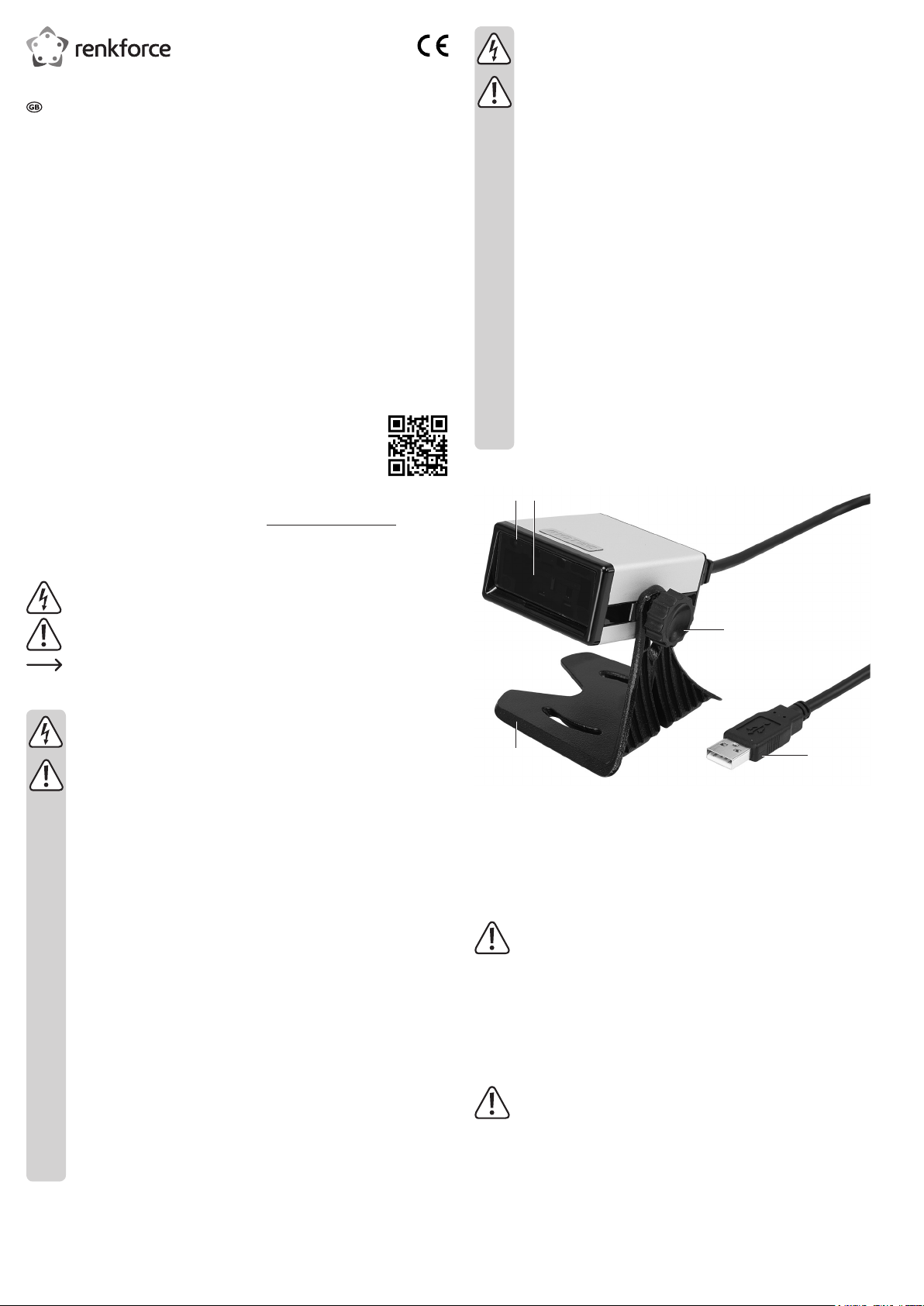
Operating elements
1
5
4
3
2
1 LED control indicator
2 Reader unit / Laser aperture
3 Screw
4 USB plug
5 Stand
Installation
Exercise caution when setting down the product. Despite the rubber feet, the device
may cause scratching on surfaces due to the feet’s corners.
1. Place the toothed lock washer on the screw (3).
2. Align one of the two openings on the arm of the stand (5) with the screw hole on the side of
the barcode scanner.
3. Fasten the barcode scanner to the stand (5) using the provided screw (3). Turn the screw
clockwise to fasten.
Operation
Risk of injury!
Never point the laser (2) at persons or animals. Lasers are dangerous.
Before using the barcode scanner, review the information on scanner settings under “Settings”.
1. Remove the protective foil from the reader unit (2).
2. Connect the USB plug (4) to a USB port on your computer.
3. On your PC, open a document you want to scan the barcode to. The barcode will be
inserted at the cursor’s position.
Operating instructions
Laser Barcode Scanner 1D + Stand
Item no. 407978
Intended use
Use this barcode scanner to quickly and reliably scan common barcodes such as UPC or EAN.
The scanned codes can be immediately inserted into documents and forms on a connected
computer. The barcode scanner is ideal for use in businesses, warehouses or ofces.
It is intended for indoor use only. Do not use it outdoors. Contact with moisture, e.g. in
bathrooms, must be avoided under all circumstances.
For safety and approval purposes, you must not rebuild and/or modify this product. If you use
the product for purposes other than those described above, the product may be damaged.
In addition, improper use can cause hazards such as short circuiting, re, electric shock etc.
Read the instructions carefully and keep them. Make this product available to third parties only
together with its operating instructions.
This product complies with the statutory national and European requirements. All company
names and product names are trademarks of their respective owners. All rights reserved.
Delivery content
• Laser barcode scanner
• Brief instructions
• Operating instructions
Latest operating instructions
Download the latest operating instructions via the link www.conrad.com/downloads or scan the
QR code shown. Follow the instructions on the website.
Explanation of symbols
The lightning symbol inside a triangle is used when there is a potential risk of
personal injury, such as electric shock.
An exclamation mark in a triangle indicates important instructions in this operating
manual that absolutely have to be observed.
The arrow symbol indicates specic tips and advice on operation.
Safety instructions
Read the operating instructions carefully and especially observe the safety
information. If you do not follow the safety instructions and information
on proper handling in this manual, we assume no liability for any resulting
personal injury or damage to property. Such cases will invalidate the warranty/
guarantee.
a) General
• The device is not a toy. Keep it out of the reach of children and pets.
• Do not leave packaging material lying around carelessly. This may become
dangerous playing material for children.
• Protect the product from extreme temperatures, direct sunlight, strong jolts, high
humidity, moisture, ammable gases, vapours and solvents.
• Do not place the product under any mechanical stress.
• If it is no longer possible to operate the product safely, take it out of operation and
protect it from any accidental use. Safe operation can no longer be guaranteed
if the product:
- is visibly damaged,
- is no longer working properly,
- has been stored for extended periods in poor ambient conditions or
- has been subjected to any serious transport-related stresses.
• Please handle the product carefully. Jolts, impacts or a fall even from a low height
can damage the product.
• Also observe the safety and operating instructions of any other devices which are
connected to the product.
• When operating the laser equipment, always make sure that the laser beam is
directed so that no one is in the projection area and that unintentionally reected
beams (e.g., from reective objects) cannot be directed into areas where people
are present.
• The product is equipped with a class 1 laser.





Diskutieren Sie über dieses Produkt mit
Hier können Sie uns Ihre Meinung zu Renkforce 407978 Barcode-Lesegerät mitteilen. Wenn Sie eine Frage haben, lesen Sie zunächst das Bedienungsanleitung sorgfältig durch. Die Anforderung eines Bedienungsanleitung kann über unser Kontaktformular erfolgen.