Bedienungsanleitung Pioneer AVH-X8800BT Autoradio

Benötigen Sie ein Bedienungsanleitung für Ihren Pioneer AVH-X8800BT Autoradio? Unten können Sie das PDF-Bedienungsanleitung kostenlos auf Deutsch ansehen und herunterladen. Für dieses Produkt gibt es derzeit 4 häufig gestellte Fragen, 0 Kommentare und 0 Stimmen. Wenn dies nicht das von Ihnen gewünschte Bedienungsanleitung ist, kontaktieren Sie uns bitte.

Ist Ihr Produkt defekt und bietet die Bedienungsanleitung keine Lösung? Gehen Sie zu einem Repair Café, wo es gratis repariert wird.

Bedienungsanleitung

Loading…
3
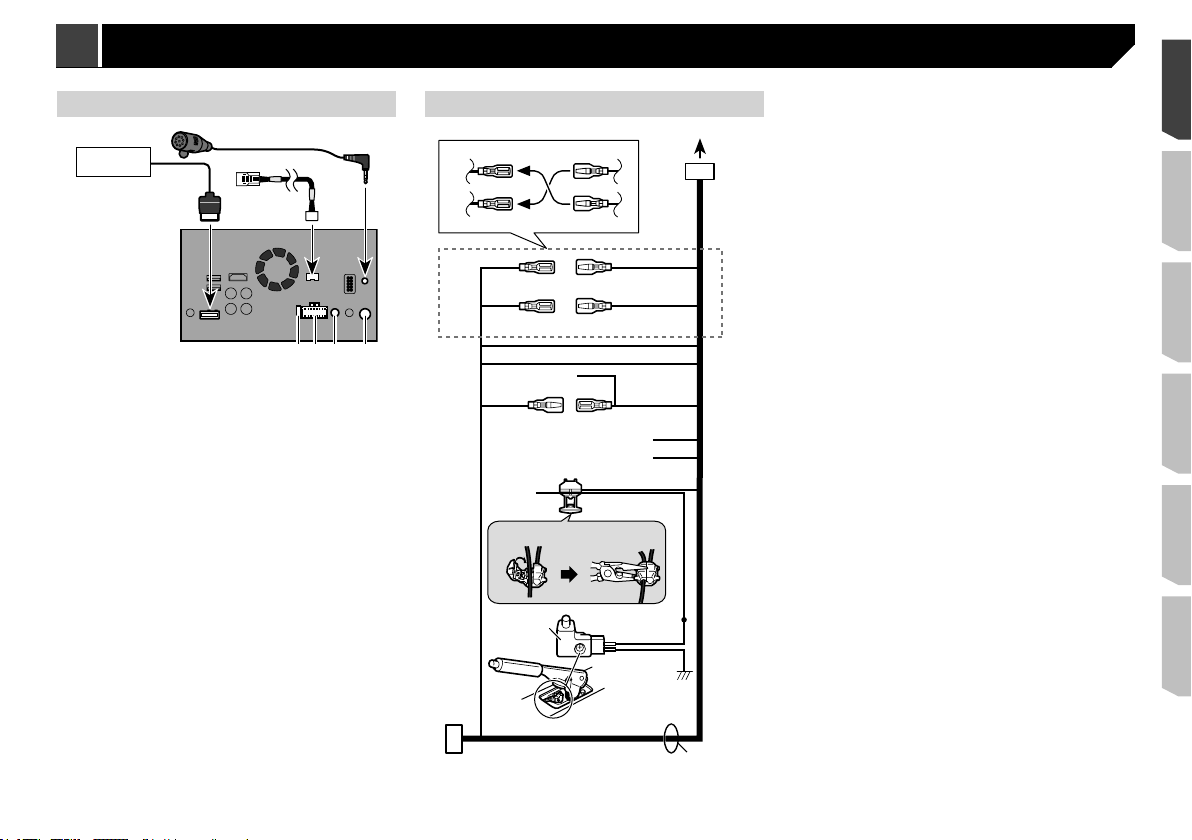
Rear panel (main terminals)
9
8
7
1
432
6
5
1 This product
2 Fuse (10 A)
3 Power supply
4 Wired remote input
Hard-wired remote control adapter can be connected (sold
separately).
5
Aerial jack
6 Vehicle Bus conversion cable 15.8 cm
Please refer to the instruction manual for the Vehicle Bus
adapter (sold separately).
7
Microphone 3 m
8 RGB cable (supplied with Navigation system)
9 Pioneer navigation system
Please contact your dealer to inquire about the connectable
navigation unit.
Power cord
1. 2.
1
3
2*
2
4
1*
5
4*
6
3*
b (6*)
8
9
a (5*)
7
c
d
e
f
g
lk
h
j
i
1 To power supply
2 Depending on the kind of vehicle, the function of 2* and 4*
may be different. In this case, be sure to connect 1* to 4*
and 3* to 2*.
3
Yellow (2*)
Back-up (or accessory)
4
Yellow (1*)
Connect to the constant 12 V supply terminal.
5
Red (4*)
Accessory (or back-up)
6
Red (3*)
Connect to terminal controlled by ignition switch (12 V DC).
7
Connect leads of the same colour to each other.
8 Orange/white
To lighting switch terminal.
9
Black (ground)
To vehicle (metal) body.
a
Blue/white (5*)
The pin position of the ISO connector will differ depending
on the type of vehicle. Connect 5* and 6* when Pin 5 is an
aerial control type. In another type of vehicle, never connect
5* and 6*.
b
Blue/white (6*)
Connect to auto-aerial relay control terminal (max. 300 mA
12 V DC).
c
Blue/white
Connect to system control terminal of the power amp (max.
300 mA 12 V DC).
d
Violet/white
Of the two lead wires connected to the back lamp, connect
the one in which the voltage changes when the gear shift
is in the REVERSE (R) position. This connection enables
the unit to sense whether the car is moving forwards or
backwards.
e
Yellow/black
If you use an equipment with Mute function, wire this lead
to the Audio Mute lead on that equipment. If not, keep the
Audio Mute lead free of any connections.
f
Light green
Used to detect the ON/OFF status of the handbrake. This
lead must be connected to the power supply side of the
handbrake switch.
g
Connection method
1 Clamp the lead.
2 Clamp firmly with needle-nosed pliers.
h Power supply side
i Handbrake switch
j Earth side
k Speaker leads
White: Front left +
White/black: Front left –
from the earth of high-current products such as power
amps. Do not earth more than one product together with
the earth from another product. For example, you must
separately earth any amp unit away from the earth of this
product. Connecting grounds together can cause a fire
and/or damage the products if their grounds became
detached.
When replacing the fuse, be sure to only use a fuse of
the rating prescribed on this product.
This product cannot be installed in a vehicle without ACC
(accessory) position on the ignition switch.
A
C
C
O
N
S
T
A
R
T
O
F
F
O
N
S
T
A
R
T
O
F
F
ACC position No ACC position
To avoid short-circuiting, cover the disconnected lead with
insulating tape. It is especially important to insulate all
unused speaker leads, which if left uncovered may cause a
short circuit.
For connecting a power amp or other devices to this product,
refer to the manual for the product to be connected.
Notice for the blue/white lead
When the ignition switch is turned on (ACC ON), a control signal
is output through the blue/white lead. Connect to an external
power amp’s system remote control terminal, the auto-aerial
relay control terminal, or the aerial booster power control termi-
nal (max. 300 mA 12 V DC). The control signal is output through
the blue/white lead, even if the audio source is switched off.
Important
When this product is in “Power OFF” mode, the control signal
is also turned off. If “Power OFF” mode is cancelled, the
control signal is output again and the aerial is extended with
the auto aerial function (if the aerial is being used). Be careful
so that the extended aerial does not come into contact with
any obstacles.
3
< CRD4940-A >
Connection Connection
Download Bedienungsanleitung auf Deutsch (PDF, 9.33 MB)
(Denken Sie an die Umwelt und drucken Sie diese Bedienungsanleitung nur aus, wenn es unbedingt nötig ist)

Loading…

Bewertung

Teilen Sie uns mit, was Sie über die Pioneer AVH-X8800BT Autoradio denken, indem Sie eine Produktbewertung verfassen. Möchten Sie Ihre Erfahrungen mit diesem Produkt teilen oder eine Frage stellen? Hinterlassen Sie einen Kommentar am Ende dieser Seite!
Sind Sie mit Pioneer AVH-X8800BT Autoradio zufrieden?
Ja Nein
Seien Sie die erste Person, die dieses Produkt bewertet
0 Bewertungen

Diskutieren Sie über dieses Produkt mit

Hier können Sie uns Ihre Meinung zu Pioneer AVH-X8800BT Autoradio mitteilen. Wenn Sie eine Frage haben, lesen Sie zunächst das Bedienungsanleitung sorgfältig durch. Die Anforderung eines Bedienungsanleitung kann über unser Kontaktformular erfolgen.

Mehr zu diesem Bedienungsanleitung

Wir verstehen, dass es schön ist, ein gedrucktes Bedienungsanleitung für Ihr Pioneer AVH-X8800BT Autoradio zu haben. Sie können das Bedienungsanleitung jederzeit von unserer Website herunterladen und selbst ausdrucken. Wenn Sie ein Originalhandbuch wünschen, empfehlen wir Ihnen, Pioneer zu kontaktieren. Möglicherweise können sie ein Originalhandbuch bereitstellen. Suchen Sie das Bedienungsanleitung Ihres Pioneer AVH-X8800BT Autoradio in einer anderen Sprache? Wählen Sie auf unserer Homepage Ihre bevorzugte Sprache und suchen Sie nach der Modellnummer, um zu sehen, ob wir sie verfügbar haben.

Spezifikationen

Marke Pioneer
Modell AVH-X8800BT
Kategorie Autoradios
Dateityp PDF
Dateigröße 9.33 MB

Alle Anleitungen für Pioneer Autoradios
Weitere Anleitungen von Autoradios

Häufig gestellte Fragen zu Pioneer AVH-X8800BT Autoradio

Unser Support-Team sucht nach nützlichen Produktinformationen und beantwortet Ihre häufig gestellten Fragen. Sollte Ihnen ein Fehler bei den häufig gestellten Fragen auffallen, teilen Sie uns dies bitte anhand unseres Kontaktformulars mit.

Was ist DAB+? Verifiziert

DAB+ ist der Nachfolger des FM-Signals und steht für "Digital Audio Broadcasting". Es ist ein digitales Signal, das mehrere Kanäle innerhalb der gleichen Bandbreite ermöglicht und ein einfacheres Umschalten zwischen den Kanälen ermöglicht.

Das war hilfreich (641) Mehr lesen

Worin besteht der Unterschied zwischen FM und AM? Verifiziert

FM und AM sind beides Modulationsarten, die zur Übertragung eines Signals verwendet werden. FM steht für "Frequency Modulation" und AM für "Amplitude Modulation". AM ist die älteste Form der Modulation. Der größte Unterschied ist, dass das FM-Signal viel stärker ist als das AM-Signal.

Das war hilfreich (412) Mehr lesen

Eine CD hat sich in meinem Autoradio verkantet. Was ist zu tun? Verifiziert

Manche Autoradios verfügen über eine Funktion, um verkantete CDs auszuwerfen. Stellen Sie das Auto ab und halten Sie die Knöpfe „on“ (An) und „eject“ (Auswerfen) gleichzeitig zehn Sekunden lang gedrückt. Sollte das Problem weiterhin bestehen, starten Sie das Auto und versuchen Sie es erneut.

Das war hilfreich (395) Mehr lesen

Welche Größe benötigt ein Autoradio, um in mein Auto zu passen? Verifiziert

Es gibt zwei Standardgrößen bei Autoradios: 1-DIN und 2-DIN. 1-DIN ist die schmale Standardversion, während 2-DIN doppelt so groß ist. Bei 2-DIN-Autoradios kann häufig ein Bildschirm installiert werden, um Straßenkarten anzuzeigen oder Filme abzuspielen.

Das war hilfreich (331) Mehr lesen
Bedienungsanleitung Pioneer AVH-X8800BT Autoradio

Verwandte Produkte

Verwandte Kategorien

×
Download