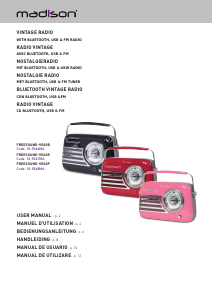
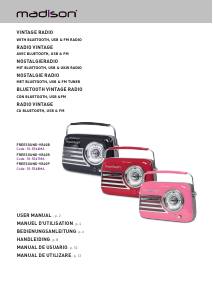
Bedienungsanleitung Madison FREESOUND-VR40P Radio

Benötigen Sie ein Bedienungsanleitung für Ihren Madison FREESOUND-VR40P Radio? Unten können Sie das PDF-Bedienungsanleitung kostenlos auf Deutsch ansehen und herunterladen. Für dieses Produkt gibt es derzeit 2 häufig gestellte Fragen, 0 Kommentare und 0 Stimmen. Wenn dies nicht das von Ihnen gewünschte Bedienungsanleitung ist, kontaktieren Sie uns bitte.

Ist Ihr Produkt defekt und bietet die Bedienungsanleitung keine Lösung? Gehen Sie zu einem Repair Café, wo es gratis repariert wird.

Bedienungsanleitung

Loading…

ENGLISH
2
© Copyright LOTRONIC 2022
RECHARGEABLE VINTAGE RADIO WITH BLUETOOTH, USB & FM RADIO 30W
INSTRUCTION MANUAL
Please read the manual carefully and keep it for future reference.
Accordance with the requirements of CE standard
The product is for indoor use only
Important Safety instructions and danger warnings
All safety instructions and warnings must be adhered to. They are part of the manual and must be kept with
the manual.
The appliance is approved for operation in dry, closed rooms only . Do not operate the device nearby wa-
ter, such as in bathrooms or nearby swimming pools.
The appliance may not be exposed to extreme temperatures (< +5°C / > +35°C) in operation.
The appliance may not be subjected to strong vibrations or heavy mechanical strain.
The appliance may not be exposed to excessive moisture (due to dripping or sprayed water, for example).
Do not place any recipients 󰊟lled with liquids, such as glasses or vases, on top of or directly next to the
appliance. They could fall over, causing water to enter the appliance. Never pour out liquids above the ap
-
pliance. Do not place any small objects, such as coins or paper clips, on the appliance since they could fall
inside the appliance.
Never place the appliance on an unstable or movable surface. Persons could be injured or the appliance da-
maged by it falling down.
Do not place any naked 󰊠ames such as those of burning candles on or next to the appliance.
Only use the appliance in a moderate climate, not in tropical environments.
Contents of the carton
1x vintage radio
1x USB charger lead
1x 3.5mm AUX lead
1x manual
RECOMMENDATIONS FOR BATTERIES
This symbol indicates that used batteries should not be disposed of with household waste but deposited in separate
collection points for recycling.
WARNING
Danger of explosion if battery is incorrectly placed. Only replace by the same or equivalent type.
Keep new and old batteries out of the reach of children.
If the battery compartment doesn't close properly, stop using the product and keep it out of the reach of children.
BEFORE FIRST USE CHARGE THE BATTERY
Plug the mini-USB connector of the USB charging lead into the 5V DC socket on the rear panel of the radio and
the other end into a suitable USB port or a mains adaptor.
NOTE: Please shut down the power switch after you have 󰊟nished using the system.
IMPORTANT NOTE ON LITHIUM-ION BATTERIES
1. PRIOR to using the unit for the 󰅰rst time, please charge fully the battery
2. Charge the battery regularly after each use. Don’t wait until it is discharged!
3. DON’T allow the battery to discharge completely, otherwise it will lose 20% of its capacity or even be totally damaged!
If the voltage becomes too low, the internal circuits are not powered anymore and it will become impossible to recharge the
battery!
4. If you don’t use the unit for a longer period of time, it is recommended to charge it at 40% of its capacity and check/
charge it once per month.
** BATTERIES ARE NOT COVERED BY THE WARRANTY **
We cannot be held responsible for damaged batteries further to the non-observance of these basic rules.
Pairing the speaker with a Bluetooth enabled device
Keep the speaker and the Bluetooth device within 1m of each other during the pairing process. Press the power
button (1) to turn on, a sound will be heard to indicate that the speaker is on. Press the power button (1) to turn
the radio o󰊞. The Bluetooth LED indicator will 󰊠ash quickly in blue. Set your mobile phone or other Bluetooth
enabled device to search for Bluetooth devices. When the Bluetooth device 󰊟nds the device, select “FREE-
SOUND-VR40 ". After successful pairing, a tone will be heard and the Bluetooth LED indicator will slowly 󰊠ash
blue. If a previously paired device is within the range when the speaker is turned ON, the speaker will connect
to it automatically.
Download Bedienungsanleitung auf Deutsch (PDF, 2.72 MB)
(Denken Sie an die Umwelt und drucken Sie diese Bedienungsanleitung nur aus, wenn es unbedingt nötig ist)

Loading…

Bewertung

Teilen Sie uns mit, was Sie über die Madison FREESOUND-VR40P Radio denken, indem Sie eine Produktbewertung verfassen. Möchten Sie Ihre Erfahrungen mit diesem Produkt teilen oder eine Frage stellen? Hinterlassen Sie einen Kommentar am Ende dieser Seite!
Sind Sie mit Madison FREESOUND-VR40P Radio zufrieden?
Ja Nein
Seien Sie die erste Person, die dieses Produkt bewertet
0 Bewertungen

Diskutieren Sie über dieses Produkt mit

Hier können Sie uns Ihre Meinung zu Madison FREESOUND-VR40P Radio mitteilen. Wenn Sie eine Frage haben, lesen Sie zunächst das Bedienungsanleitung sorgfältig durch. Die Anforderung eines Bedienungsanleitung kann über unser Kontaktformular erfolgen.

Mehr zu diesem Bedienungsanleitung

Wir verstehen, dass es schön ist, ein gedrucktes Bedienungsanleitung für Ihr Madison FREESOUND-VR40P Radio zu haben. Sie können das Bedienungsanleitung jederzeit von unserer Website herunterladen und selbst ausdrucken. Wenn Sie ein Originalhandbuch wünschen, empfehlen wir Ihnen, Madison zu kontaktieren. Möglicherweise können sie ein Originalhandbuch bereitstellen. Suchen Sie das Bedienungsanleitung Ihres Madison FREESOUND-VR40P Radio in einer anderen Sprache? Wählen Sie auf unserer Homepage Ihre bevorzugte Sprache und suchen Sie nach der Modellnummer, um zu sehen, ob wir sie verfügbar haben.

Spezifikationen

Marke Madison
Modell FREESOUND-VR40P
Kategorie Radios
Dateityp PDF
Dateigröße 2.72 MB

Alle Anleitungen für Madison Radios
Weitere Anleitungen von Radios

Häufig gestellte Fragen zu Madison FREESOUND-VR40P Radio

Unser Support-Team sucht nach nützlichen Produktinformationen und beantwortet Ihre häufig gestellten Fragen. Sollte Ihnen ein Fehler bei den häufig gestellten Fragen auffallen, teilen Sie uns dies bitte anhand unseres Kontaktformulars mit.

Was ist DAB+? Verifiziert

DAB+ ist der Nachfolger des FM-Signals und steht für "Digital Audio Broadcasting". Es ist ein digitales Signal, das mehrere Kanäle innerhalb der gleichen Bandbreite ermöglicht und ein einfacheres Umschalten zwischen den Kanälen ermöglicht.

Das war hilfreich (301) Mehr lesen

Worin besteht der Unterschied zwischen FM und AM? Verifiziert

FM und AM sind beides Modulationsarten, die zur Übertragung eines Signals verwendet werden. FM steht für "Frequency Modulation" und AM für "Amplitude Modulation". AM ist die älteste Form der Modulation. Der größte Unterschied ist, dass das FM-Signal viel stärker ist als das AM-Signal.

Das war hilfreich (242) Mehr lesen
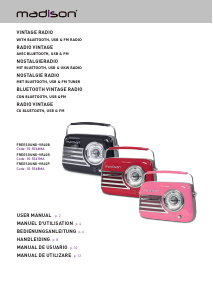
Bedienungsanleitung Madison FREESOUND-VR40P Radio

Verwandte Produkte

Verwandte Kategorien

×
Download