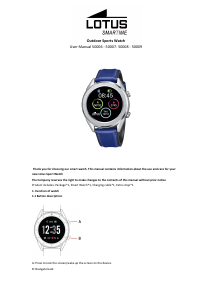
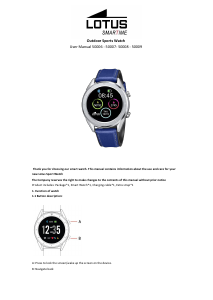
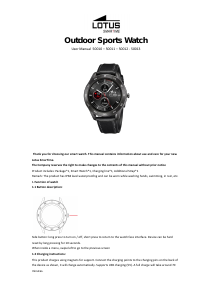
Bedienungsanleitung Lotus 50000 Outdoor Smartwatch

Benötigen Sie ein Bedienungsanleitung für Ihren Lotus 50000 Outdoor Smartwatch? Unten können Sie das PDF-Bedienungsanleitung kostenlos auf Deutsch ansehen und herunterladen. Für dieses Produkt gibt es derzeit 0 häufig gestellte Fragen, 8 Kommentare und 10 Stimmen mit einer durchschnittlichen Produktbewertung von 30/100. Wenn dies nicht das von Ihnen gewünschte Bedienungsanleitung ist, kontaktieren Sie uns bitte.

Ist Ihr Produkt defekt und bietet die Bedienungsanleitung keine Lösung? Gehen Sie zu einem Repair Café, wo es gratis repariert wird.

Bedienungsanleitung

Loading…
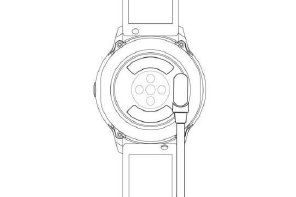
*Only charge the watch in the way shown. Incorrect charging may damage the watch.
Be aware that the two contacts of the USB cable are not allowed to contact the conductor at the same time, or it
will cause the circuit to burn.
1.3 Watch Face in standby mode:
1) Swipe right to open Notifications
2) Swipe down to open the drop-down menu to control brightness, enter settings, and Do not Disturb function.
3) Swipe up to open the main menu.
4) Press and hold the screen while in standby mode to change the watch face design. Select by tapping the
screen.
5) Tap once to display data on heart beats per minute, steps and calories.
1.4 Messages
Swipe right on the main screen to open Notifications. To enable notifications, connect the watch with the Lotus
SmarTime app and enable the relevant permissions. In the app, you can enable App notifications, Call
notifications and SMS notifications. When notifications are received on your phone, they will show up on the
watch, which can display up to 8 notifications.
1.5 Drop-down menu
Swipe down screen interface to open the drop-down menu.
1) The left icon shows Bluetooth connection status
2) Tap the middle icon to toggle Do Not Disturb mode. When Do Not Disturb mode is on, the device only vibrates
for the Find device and Alarms functions.
3) The right icon can be used to adjust the screen brightness.
4) Battery level is shown in the upper part of the screen.
1.6 Step count
The step counter is on by default. This interface displays the current number of steps on the watch. Steps are
counted starting from midnight. Swiping left you can find the data regarding distance covered and calories
burned.
1.7 Sleep
The sleep monitoring time period is from 21:00 to 9:00 the next day. After the sleep pattern has been recorded
on the device, sleep data is sent to the Lotus SmarTime app. Swiping left you can find data on the hours of light
and deep sleep.
1.8 Bluetooth music
Android: after connecting the watch via the phone settings, open the music player, play/pause and switch songs;
(no need to bind in the app, if it is already bound, please unbind it and connect in the phone settings)
IOS: When connected to your phone you can play, pause and switch songs directly via the watch.
1.9 Exercise tracking (walking, running, cycling, hiking, swimming, football, basketball, table tennis, badminton)
1.9.1 Select the exercise and tap the screen to start. After a brief countdown, activity tracking will start. You can
pause the exercise when needed. When you press the "□" icon, the exercise will be stopped and the activity data
is saved.
1.9.2 Activity data is saved for any exercise over 200 meters or lasting longer than 5 minutes. For smaller sessions
the device will prompt “Too little data to be saved”
Download Bedienungsanleitung auf Deutsch (PDF, 1.5 MB)
(Denken Sie an die Umwelt und drucken Sie diese Bedienungsanleitung nur aus, wenn es unbedingt nötig ist)

Loading…

Bewertung

Teilen Sie uns mit, was Sie über die Lotus 50000 Outdoor Smartwatch denken, indem Sie eine Produktbewertung verfassen. Möchten Sie Ihre Erfahrungen mit diesem Produkt teilen oder eine Frage stellen? Hinterlassen Sie einen Kommentar am Ende dieser Seite!
Sind Sie mit Lotus 50000 Outdoor Smartwatch zufrieden?
Ja Nein
30%
70%
10 Bewertungen

Diskutieren Sie über dieses Produkt mit

Hier können Sie uns Ihre Meinung zu Lotus 50000 Outdoor Smartwatch mitteilen. Wenn Sie eine Frage haben, lesen Sie zunächst das Bedienungsanleitung sorgfältig durch. Die Anforderung eines Bedienungsanleitung kann über unser Kontaktformular erfolgen.

Annie BAUDIN 30-10-2022
Erstens kann ich das Dokument nicht auf Französisch herunterladen, dann möchte ich nur meine Uhr pünktlich stellen Danke für Ihre Hilfe

Antworten | Das war hilfreich (9) (Übersetzt von Google)
MICHEL CREBASSA 27-10-2021
Für meinen Lotus MOD 50001 finde ich keinen Artikel zum Stimmen des Vibrators. Kannst du es mir erklären danke

Antworten | Das war hilfreich (8) (Übersetzt von Google)
Marvine 30-09-2022
So stellen Sie Uhrzeit und Datum ein

Antworten | Das war hilfreich (3) (Übersetzt von Google)
Bruno Chantrel 27-12-2021
Sehr gutes Produkt. Sehr schade, dass die Bedienungsanleitungen unzureichend oder gar nicht vorhanden sind.

Antworten | Das war hilfreich (1) (Übersetzt von Google)
Stephanie 31-03-2022
So stellen Sie ein Foto als Hintergrundbild der Uhr ein

Antworten | Das war hilfreich (0) (Übersetzt von Google)
Jean marc 28-05-2022
Hallo Dann erhalten Sie meine E-Mails auf meinem Lotus 50000 Vielen Dank

Antworten | Das war hilfreich (0) (Übersetzt von Google)
Martin Behning 23-12-2022
Die Smartwatch zeigt nur noch wechseln an. Was soll gewechselt werden??

Antworten | Das war hilfreich (0)
Bea 11-01-2023
Ich kann kein niederländisches Handbuch finden

Antworten | Das war hilfreich (0) (Übersetzt von Google)

Mehr zu diesem Bedienungsanleitung

Wir verstehen, dass es schön ist, ein gedrucktes Bedienungsanleitung für Ihr Lotus 50000 Outdoor Smartwatch zu haben. Sie können das Bedienungsanleitung jederzeit von unserer Website herunterladen und selbst ausdrucken. Wenn Sie ein Originalhandbuch wünschen, empfehlen wir Ihnen, Lotus zu kontaktieren. Möglicherweise können sie ein Originalhandbuch bereitstellen. Suchen Sie das Bedienungsanleitung Ihres Lotus 50000 Outdoor Smartwatch in einer anderen Sprache? Wählen Sie auf unserer Homepage Ihre bevorzugte Sprache und suchen Sie nach der Modellnummer, um zu sehen, ob wir sie verfügbar haben.

Spezifikationen

Marke Lotus
Modell 50000 Outdoor
Kategorie Smartwatches
Dateityp PDF
Dateigröße 1.5 MB

Alle Anleitungen für Lotus Smartwatches
Weitere Anleitungen von Smartwatches
Bedienungsanleitung Lotus 50000 Outdoor Smartwatch

Verwandte Produkte

Verwandte Kategorien

×
Download