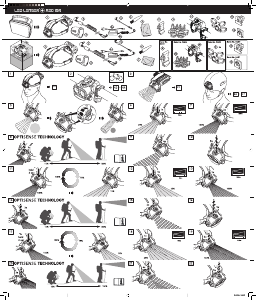
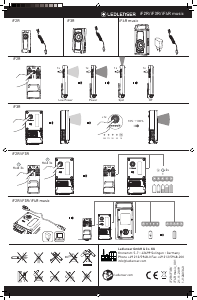
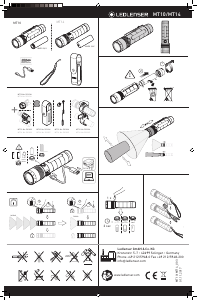
Bedienungsanleitung Led Lenser H14.2 Taschenlampe

Benötigen Sie ein Bedienungsanleitung für Ihren Led Lenser H14.2 Taschenlampe? Unten können Sie das PDF-Bedienungsanleitung kostenlos auf Deutsch ansehen und herunterladen. Für dieses Produkt gibt es derzeit 3 häufig gestellte Fragen, 1 Kommentar und 7 Stimmen mit einer durchschnittlichen Produktbewertung von 71/100. Wenn dies nicht das von Ihnen gewünschte Bedienungsanleitung ist, kontaktieren Sie uns bitte.

Ist Ihr Produkt defekt und bietet die Bedienungsanleitung keine Lösung? Gehen Sie zu einem Repair Café, wo es gratis repariert wird.

Bedienungsanleitung

Loading…

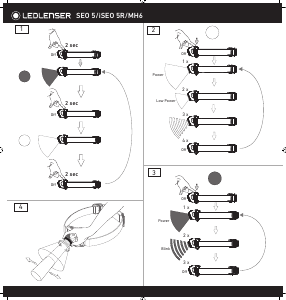
Program, the lamp starts up with the Light
Function ‘Low Power’ (full light) activated when
the front switch is pressed once. Press the front
switch twice within 2 second to turn on the ‘Low
Power’ function (dimmed light). Another press
will turn off the lamp.
5.3 Light program – Signal: In this programme,
the lamp starts up with the Light Function
Power (full light) activated when the front switch
is pressed once. Press the front switch twice
within 2 second to turn on the Light function
Blink (flashing light). Another press will turn off
the lamp.
To adjust the flashing frequency, turn the multi-
function wheel on the battery box to the left to
reduce the frequency, or turn it to the right to
increase the flashing frequency.
NOTE:
In the Low Pwer- and Power- Light Function, you
can also easily adjust infinrtly the brightness by
turning the multi-function "Wheel switch (Dim-
function). A short flash indicates the darkest (5
lumens) or brightest setting.
Attention: If you press the front switch for
5 seconds or longer, then automatically the
transport function (transport lock) will be
activated. Therefore, please read the notes in
section 6.
6. Transport lock
When the H14.2 is off, push the front switch
for approx. 5 seconds until the light goes out
in order to activate the transport lock. The LED
will go off to indicate that you have activated
the transport lock, and then the H14.2 cannot
be turned on again. The H14.2 therefore
cannot be switched on, either intentionally or
unintentionally, nor inadvertently consume
energy. The LED will flash 3 times to remind you
that the light has been locked. To deactivate the
transport lock, simply press the front switch
again for approx. 5 seconds. The headlamp will
now return to the light programme.
Note: After the front switch is pushed for 2
seconds, the lamp will switch on the BOOST
function. Please do not release the switch until
the transport lock function is active.
7. Energy Modes
By selecting one of the two Energy Modes
(Energy Saving or Constant Current), you decide
how the energy contained in the accumulator or
batteries are used. And this function is only for
white LED, the default mode is Energy Saving
mode.
a) Energy Saving: The light output is controlled
by the integrated Smart Light Technology
(SLT). The brightness is adjusted to the realistic
conditions that occur during normal use of the
lamp, thus providing a longer burn time.
b) Constant Current: This Energy Mode allows
the continuous use of all the Light Functions
with a constant light output. This Energy Mode is
preferable when a high brightness level is more
important than a long burn time
7.1 Changing of the Energy Modes
Changing the Energy Modes can only be done
when the flashlight is in Light Program White
and the lamp is turned Off. To change the energy
mode, with the white LED off, press the “Multi-
function Wheel” on the back 8 times, then on the
8th click keep the knob pressed for approx. 2
seconds. This should allow you change between
the “energy mode “and “constant current mode.“
You know which mode you are in when:
a) Energy saving mode: the brightness reduce
gradually to zero.
b) Constant current mode: the brightness
reduces immediately in 2 seconds.
With this procedure, you can switch between
the two Energy Modes. It is not possible to
determine in which Energy Mode the H14R.2
is. To find this out, you must carry out the
procedure. If the H14R.2 is thereafter not in the
desired Energy Mode any more, you must repeat
the procedure again. The flashlight will reset to
energy saving mode if you change the battery or
cut the power.
8. Reset function
If the alkaline batteries are taken out of the
battery compartment, you have reset the H14.2.
You should choose the function that you need
according the procedure described above
(please see section 5.1).
9. Low battery indicator
In “strong light” and “dim light”, 10 minutes
before the battery is empty the white LED will
blink 3 times fast to indicator you that the
battery is about to consume out, please change
to fresh batteries.
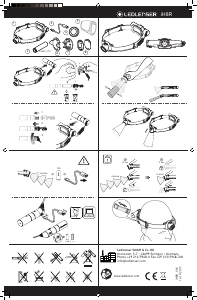
10. Changing alkaline batteries
Switch off the H14.2 before changing the
batteries.
On the back of the battery box, where the
headband is attatched, there is the gate to the
inside of the battery box. Once you open the
battery box, To remove the battery and then
insert a new one. Li-Ion batteries can also
be inserted, but cannot be charger by H14.2!
During insertion, it is always necessary that it is
in the correct direction. Therefore, pay attention
to the polarities (+ and -). Both in the battery box
and also on the batteries.Otherwise, there is a
risk of damage to the batteries and a possible
explosion.
After replacing the batteries, the battery
compartment cover should be put back into
place.
To close the battery compartment, hold the
battery compartment and battery cover against
each other in the same direction, hook the
battery cover above the multi-function switch
󰃩
and then push the cover against the bottom until
you hear a ‘click’ sound. Now the battery cover
is securely closed.
Hint: The micro USB port is not intended for
charging the batteries. It is only for using a
battery extender! To get more information
please check our company website. www.
ledlenser.com
11. Safety instructions Batteries
a) Never use non-rechargeable batteries and
rechargeable batteries together.
b) Always change all of the batteries at the same
time.
03
LED LENSER® * h14.2
Download Bedienungsanleitung auf Deutsch (PDF, 2.23 MB)
(Denken Sie an die Umwelt und drucken Sie diese Bedienungsanleitung nur aus, wenn es unbedingt nötig ist)

Loading…

Bewertung

Teilen Sie uns mit, was Sie über die Led Lenser H14.2 Taschenlampe denken, indem Sie eine Produktbewertung verfassen. Möchten Sie Ihre Erfahrungen mit diesem Produkt teilen oder eine Frage stellen? Hinterlassen Sie einen Kommentar am Ende dieser Seite!
Sind Sie mit Led Lenser H14.2 Taschenlampe zufrieden?
Ja Nein
71%
29%
7 Bewertungen

Diskutieren Sie über dieses Produkt mit

Hier können Sie uns Ihre Meinung zu Led Lenser H14.2 Taschenlampe mitteilen. Wenn Sie eine Frage haben, lesen Sie zunächst das Bedienungsanleitung sorgfältig durch. Die Anforderung eines Bedienungsanleitung kann über unser Kontaktformular erfolgen.

Robert 28-09-2019
Sehr hochwertige, passgenaue Stirnlampe mit erstaunlicher Lichtleistung.

Antworten | Das war hilfreich (0) (Übersetzt von Google)

Mehr zu diesem Bedienungsanleitung

Wir verstehen, dass es schön ist, ein gedrucktes Bedienungsanleitung für Ihr Led Lenser H14.2 Taschenlampe zu haben. Sie können das Bedienungsanleitung jederzeit von unserer Website herunterladen und selbst ausdrucken. Wenn Sie ein Originalhandbuch wünschen, empfehlen wir Ihnen, Led Lenser zu kontaktieren. Möglicherweise können sie ein Originalhandbuch bereitstellen. Suchen Sie das Bedienungsanleitung Ihres Led Lenser H14.2 Taschenlampe in einer anderen Sprache? Wählen Sie auf unserer Homepage Ihre bevorzugte Sprache und suchen Sie nach der Modellnummer, um zu sehen, ob wir sie verfügbar haben.

Spezifikationen

Marke Led Lenser
Modell H14.2
Kategorie Taschenlampen
Dateityp PDF
Dateigröße 2.23 MB

Alle Anleitungen für Led Lenser Taschenlampen
Weitere Anleitungen von Taschenlampen

Häufig gestellte Fragen zu Led Lenser H14.2 Taschenlampe

Unser Support-Team sucht nach nützlichen Produktinformationen und beantwortet Ihre häufig gestellten Fragen. Sollte Ihnen ein Fehler bei den häufig gestellten Fragen auffallen, teilen Sie uns dies bitte anhand unseres Kontaktformulars mit.

Eine der Batterien in meinem Gerät ist oxidiert. Kann ich es dennoch sicher verwenden? Verifiziert

Ja, das Gerät kann weiterhin sicher verwendet werden. Entfernen Sie zunächst die oxidierte Batterie. Tun Sie dies niemals ohne Handschutz. Reinigen Sie daraufhin das Batteriefach mit einem Wattestäbchen, das Sie in Essig oder Zitronensaft getränkt haben. Lassen Sie es trocknen und setzen Sie neue Batterien ein.

Das war hilfreich (110) Mehr lesen

Kann ich Akkus für meine LED-LENSER-Taschenlampen verwenden? Verifiziert

Nein, alle LED-LENSER-Taschenlampen wurden für den Gebrauch mit Einweg-Batterien entworfen.

Das war hilfreich (100) Mehr lesen

Was ist ein Lumen? Verifiziert

Das Lumen ist die Maßeinheit des Lichtstroms und gibt an, wie viel Licht eine Lichtquelle nach allen Seiten abstrahlt.

Das war hilfreich (81) Mehr lesen
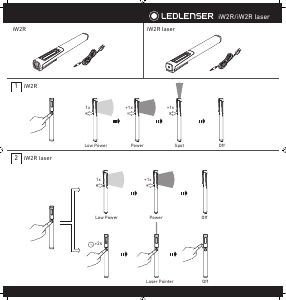
Bedienungsanleitung Led Lenser H14.2 Taschenlampe

Verwandte Produkte

Verwandte Kategorien

×
Download