W
i Baby Monitor
CC 1000
Package Contents
Check the package contents of the camera carefully before putting
the camera into operation. If anything is missing or damaged,
please contact our Service Department.
■ CC 1000 wi baby monitor
■ Power adapter plug
■ Assembly material
■ Quick reference guide
System Requirements
You require a web-capable smartphone which implements the
Android (from 4.4) or iOS (from 7) operating system and the current
version of the "Babyruf" app.
When starting up the camera for the rst time, it must be connected
to the "Babyruf" app and the wi function of your router. The camera
should be positioned close to the router when starting it up for the
rst time.
Pay attention to the following points when selecting an installation
location.
■ The camera must be installed at a sucient height to prevent
unauthorised access to the camera by third parties.
■ The camera must be located within range of your wireless home
network (wi).
■ It is essential to observe local regulations and laws.
Features
Its capability of compiling images, sounds and movements means
that the camera can be deployed for surveillance and communica-
tion in a wide variety of areas.
■ Online Access
You can establish a connection to the camera from any distance
using the Tuya app. This allows you to view live pictures or video
recordings taken by the camera from anywhere in the world.
■ Motion/Sound Detection
You can receive a notication on your smartphone if a motion
or sound is detected in the visual area scanned by the camera.
Activate the video recording feature if the motion/sound detector is
triggered.
■ Joint Access
You can permit free access to your camera and thereby allow trust-
ed persons to view the live images from the camera.
■ Night Vision
Night time mode provides help in the case of poor light conditions
by automatically switching on the infrared lamp.
■ Recording on a Memory Card
You can save video recordings taken by the camera directly on a
memory card (not contained in the package supplied).
■ Two-way Audio Communication
You can listen-in or speak directly into the room being monitored
using the Tuya app.
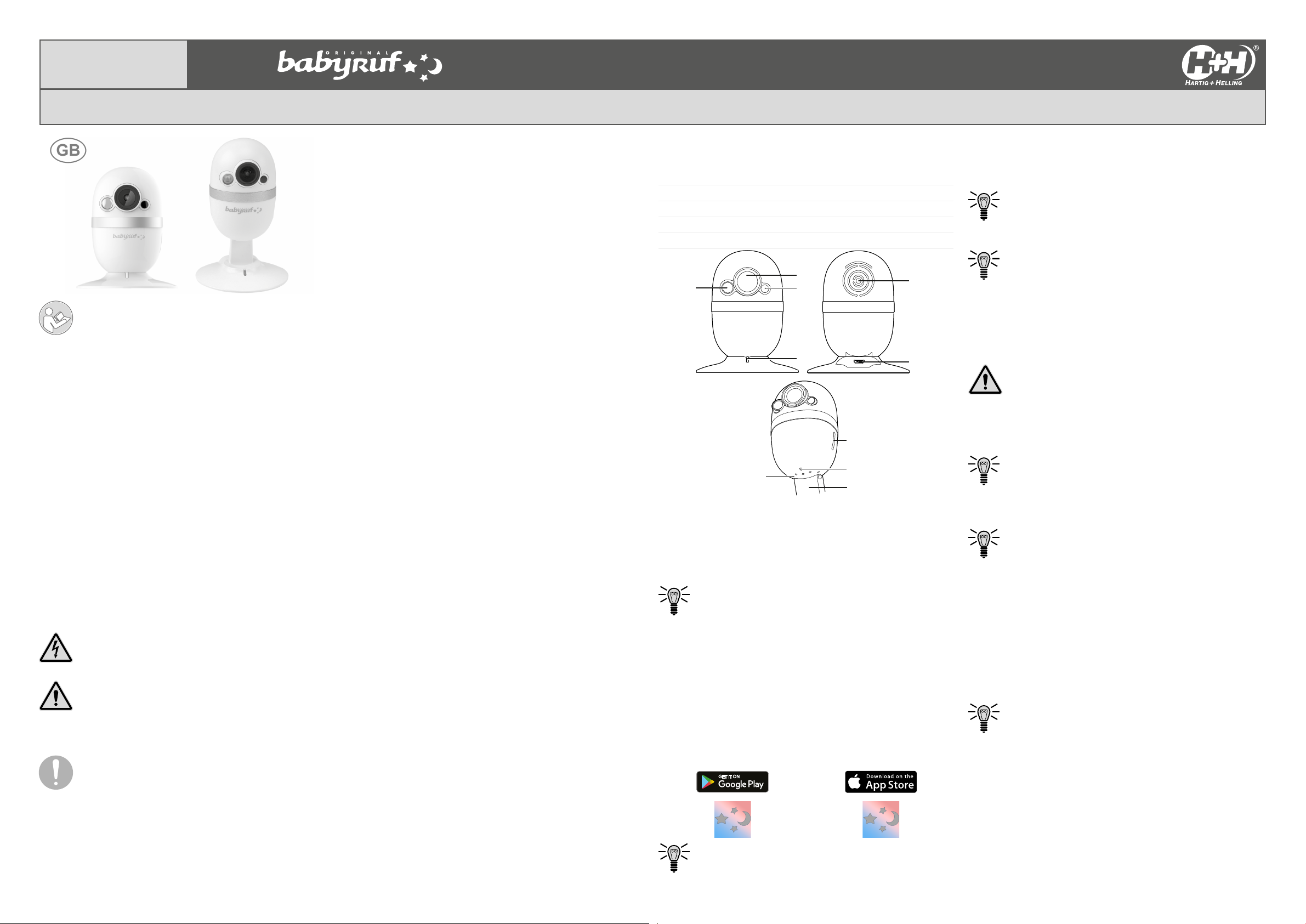
General View
The illustrations show the camera in detail.
1 Infrared LED lamp 6 USB port
2 Lens 7 MicroSD card slot
3 Light sensor 8 Microphone
4 Wi indicator lamp 9 Base
5 Loudspeaker 10 RESET button
2
3
1
4
5
6
10
7
8
9
Connecting the Camera
The camera only works when the power plug is connected correctly.
1. Connect the external power adapter with the USB port (6) on
the camera.
2. Connect the power plug to a properly installed power socket.
The camera switches on automatically. Wait for the voice
messages from the camera. The camera is ready for
connection. The LED (4) lights up blue.
3. Pull the camera out of the telescopic base (9) to align it with the
desired position.
If the camera will not be used for a longer period of time, disconnect
it from the power supply. The camera can also be operated via a
power bank.
Installing the "Babyruf" App
Follow the instruction provided by the "Babyruf" app to set-up the
camera correctly and connect it to your home network (wi).
1. Download the "Babyruf" app from the App Store or Google Play
Store or scan the QR code.
In the case of questions and problems with the "Babyruf"
app, contact www.go-europe.com.
Inserting the MicroSD Card (Option)
Recordings made by the camera can also be saved on an option-
ally available microSD card. A microSD card is not contained in the
package supplied.
When inserting the microSD card, pay attention it is aligned
correctly (see the pictogram on the microSD card slot (7)).
1. Insert the microSD card in the microSD card slot (7).
To remove the microSD card, press on the microSD card.
The microSD card is released and can be removed. The
recordings can also be read out using the USB port (6).
Assembling the Mounting Plate (Option)
The camera can be assembled on a wall with the aid of the mount-
ing plate.
1. Ensure that there are no electric cables, gas or water pipes
near the installation location.
! Risk of fatal injury through electric shock or gas
explosion! During installation, pay attention to the possibili-
ty of electrical cables and gas pipes running in the walls.
Ensure that you do not unintentionally damage electrical
cables or gas pipes.
2. Drill two holes (use the mounting plate as the drilling template).
3. Insert two appropriate dowels.
We recommend the use of special dowels according to the
material on which the camera is being assembled.
4. Fix the mounting plate using two appropriate screws.
5. Position the camera on the mounting plate.
The magnetic base (9) of the camera holds it rmly on the
mounting plate. The telescopic base (9) provides numerous
options for use.
Resetting the Camera
You can reset the camera. Doing so disconnects the camera from
the wi system and "Babyruf" app, and all recordings are lost.
1. Pull out the base (9) of the camera.
2. Pivot the camera to the rear.
3. Press and hold the RESET button (10) and wait for a voice
message from the camera.
4. Pivot the camera to the front.
5. Press the camera downwards onto the base (9).
Wait for the voice messages from the camera. The camera
is reset. The camera is ready for connection. The LED (4)
lights up blue.
Read the operating manual thoroughly and observe the
information contained when using the device. Keep the
operating manual in a safe place for future reference.
Intended Use
The CC 1000 wi baby monitor, subsequently refereed to simlpy as
the camera, has been designed for the video surveillance of indoor
rooms by day and night.
During the installation and selection of the area of use of this cam-
era, you must ensure that the personal rights of third parties and the
respective local regulations and laws are not violated.
A condition for complying with the intended use is that the equip-
ment is installed correctly and the information in this manual is
observed and maintained. Any use other than that described in the
Section "Intended Use" is considered unintended use.
The camera is not suitable for use in wet rooms or areas subject to
explosion hazards.
The surveillance of third parties is not permitted without the respec-
tive, explicit authorisation and violation can result in legal conse-
quences.
Unauthorised modication or reconstruction is not permitted.
The camera is exclusively intended for private use.
Safety Instructions
Avoid any personal injury by paying attention to the following infor-
mation!
! Risk of electric shock! Never attempt to open or
repair the device or components yourself. Never touch
bare contacts with metallic objects. Never plug-in or
disconnect the power plug with wet hands.
! Risk of suocation! Children can swallow small
parts, packaging and protective foils. Keep the product
and packaging out of reach of children!
! Risk of fatal and personal injury! When monitor-
ing babies or small children, pay attention that the device
and cable are out of reach of the children.
! Protect the device from damp, dust, liquids,
chemicals, vapours, heat and direct sunlight. The device is
not waterproof so ensure it is kept dry.
! Only use original accessories. Only connect
accessories approved by the manufacturer.



Diskutieren Sie über dieses Produkt mit
Hier können Sie uns Ihre Meinung zu Hartig and Helling CC 1000 Babyphone mitteilen. Wenn Sie eine Frage haben, lesen Sie zunächst das Bedienungsanleitung sorgfältig durch. Die Anforderung eines Bedienungsanleitung kann über unser Kontaktformular erfolgen.