Bedienungsanleitung GBC CombBind C250Pro Bindegerät

Benötigen Sie ein Bedienungsanleitung für Ihren GBC CombBind C250Pro Bindegerät? Unten können Sie das PDF-Bedienungsanleitung kostenlos auf Deutsch ansehen und herunterladen. Für dieses Produkt gibt es derzeit 0 häufig gestellte Fragen, 0 Kommentare und 0 Stimmen. Wenn dies nicht das von Ihnen gewünschte Bedienungsanleitung ist, kontaktieren Sie uns bitte.

Ist Ihr Produkt defekt und bietet die Bedienungsanleitung keine Lösung? Gehen Sie zu einem Repair Café, wo es gratis repariert wird.

Bedienungsanleitung

Loading…
Location of controls
Punching Handle/Comb Opening Handle
Comb Opening Teeth
De-selectable punching pins
(C250Pro Only)
Punching Slot
Paper Edge Guide
Clippings Drawer
Margin Adjuster (C250Pro Only)
Comb Opening Lock (C250 Pro Only)
4
#
Setting up
Attach the handle to the machine on the right side and thread the
screw into the hole at the end of the square shaft to complete the
installation.
Punching
With the handle in the upright position, insert sheets into machine,
making sure they are flush into the machine. (Use the side guide to
adjust the position of the document before punching (fig. 1).
Pull the handle down to punch. Return the handle to original upright
position. Remove paper (fig. 2).
Note: The black knob on the right side of the machine is used to
select the margin depth. This feature is ideal for thicker documents
that require wider margins for easy page turning and more secure
binding. (C250 Pro Only) (fig. 3).
Binding
Place binding element, open side up, behind metal fingers (fig. 4).
Push handle to the rear to open rings (fig. 5).
Insert paper vertically, front cover facing you (fig. 6).
Lay down paper horizontally (fig. 7).
Return handle to upright position to close rings.
Lift vertically to remove bound document (fig. 8).
Note: The black knob on the left hand side of the machine can be
set to lock in comb opening settings. The handle stops automatically
at the same position each time for quicker operation during long
binding runs. Simply turn the knob clockwise to open, pull handle
to desired opening, then turn the knob counter-clockwise to lock.
(C250 Pro only)
Custom Binding
CombBind C250Pro has 21 de-selectable punching pins which make
it possible to punch virtually any length of document. Simply select or
deselect the pins to adjust the punching pattern as required.
Maintenance
Always remember to regularly empty the drawer of clippings.
Guarantee
Operation of this machine is guaranteed for two years from date of
purchase, subject to normal use. Within the guarantee period, Acco
Brands Europe will at its own discretion either repair or replace the
defective machine free of charge. Defects due to misuse or use for
inappropriate purposes are not covered under the guarantee. Proof
of date of purchase will be required. Repairs or alterations made by
persons not authorised by Acco Brands Europe will invalidate the
guarantee. It is our aim to ensure that our products perform to the
specifications stated. This guarantee does not affect the legal rights
which consumers have under applicable national legislation governing
the sale of goods.
Register this product online at www.accoeurope.com
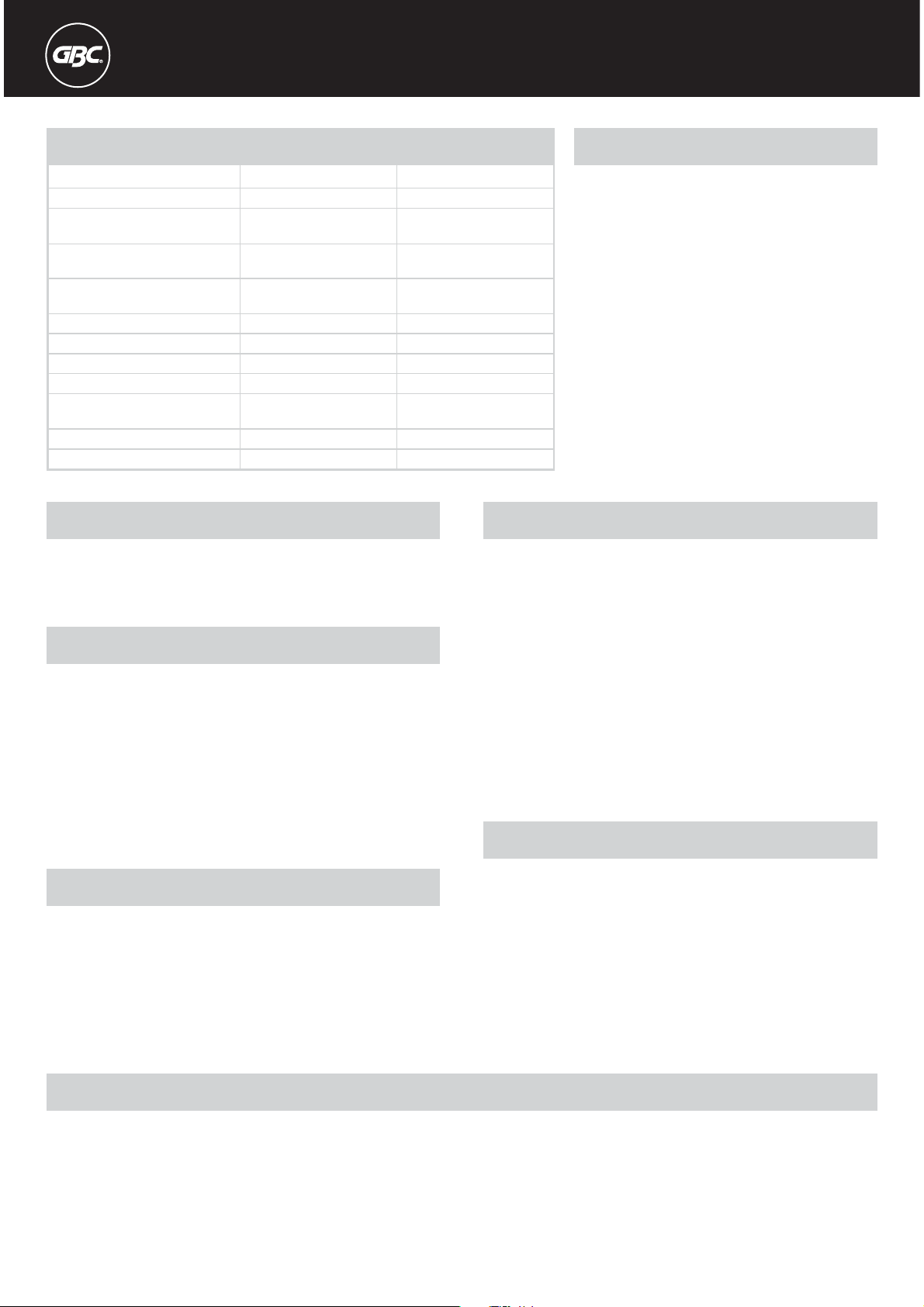
Specifications
Operation Mode
Max. Punch Capacity per lift
(80 gsm)
Max Punch Capacity per lift Foils/
PVC Covers
Max. Approx. Binding Capacity
(80 gsm)
Paper Formats
Max Binding Element Cap
De-Selector Pins
Margin Depth Selector
Machine Dimensions mm
(HxWxD mm)
Weight
Punching capacity, plastic foils
GBC CombBind C250Pro
Manual
20
2 x Foils/PVC Covers (0.2mm)
450
A4, A5, US Letter,
51mm
Full 21 disengageable
380 x 300 x 240
10.4kg
Max 2 foils of 0,2 mm each
GBC CombBind C150Pro
Manual
20
2 x Foils/PVC Covers (0.2mm)
450
A4, A5, US Letter,
51mm
Fixed 21 Ring
Fixed
385 x 300 x 210
8.7kg
Max 2 foils of 0,2 mm each
Download Bedienungsanleitung auf Deutsch (PDF, 0.86 MB)
(Denken Sie an die Umwelt und drucken Sie diese Bedienungsanleitung nur aus, wenn es unbedingt nötig ist)

Loading…

Bewertung

Teilen Sie uns mit, was Sie über die GBC CombBind C250Pro Bindegerät denken, indem Sie eine Produktbewertung verfassen. Möchten Sie Ihre Erfahrungen mit diesem Produkt teilen oder eine Frage stellen? Hinterlassen Sie einen Kommentar am Ende dieser Seite!
Sind Sie mit GBC CombBind C250Pro Bindegerät zufrieden?
Ja Nein
Seien Sie die erste Person, die dieses Produkt bewertet
0 Bewertungen

Diskutieren Sie über dieses Produkt mit

Hier können Sie uns Ihre Meinung zu GBC CombBind C250Pro Bindegerät mitteilen. Wenn Sie eine Frage haben, lesen Sie zunächst das Bedienungsanleitung sorgfältig durch. Die Anforderung eines Bedienungsanleitung kann über unser Kontaktformular erfolgen.

Mehr zu diesem Bedienungsanleitung

Wir verstehen, dass es schön ist, ein gedrucktes Bedienungsanleitung für Ihr GBC CombBind C250Pro Bindegerät zu haben. Sie können das Bedienungsanleitung jederzeit von unserer Website herunterladen und selbst ausdrucken. Wenn Sie ein Originalhandbuch wünschen, empfehlen wir Ihnen, GBC zu kontaktieren. Möglicherweise können sie ein Originalhandbuch bereitstellen. Suchen Sie das Bedienungsanleitung Ihres GBC CombBind C250Pro Bindegerät in einer anderen Sprache? Wählen Sie auf unserer Homepage Ihre bevorzugte Sprache und suchen Sie nach der Modellnummer, um zu sehen, ob wir sie verfügbar haben.

Spezifikationen

Marke GBC
Modell CombBind C250Pro
Kategorie Bindegeräte
Dateityp PDF
Dateigröße 0.86 MB

Alle Anleitungen für GBC Bindegeräte
Weitere Anleitungen von Bindegeräte
Bedienungsanleitung GBC CombBind C250Pro Bindegerät

Verwandte Produkte

Verwandte Kategorien

×
Download