Bedienungsanleitung DoorBird App (iOS)

Benötigen Sie ein Bedienungsanleitung für Ihren DoorBird App (iOS)? Unten können Sie das PDF-Bedienungsanleitung kostenlos auf Deutsch ansehen und herunterladen. Für dieses Produkt gibt es derzeit 0 häufig gestellte Fragen, 0 Kommentare und 0 Stimmen. Wenn dies nicht das von Ihnen gewünschte Bedienungsanleitung ist, kontaktieren Sie uns bitte.

Ist Ihr Produkt defekt und bietet die Bedienungsanleitung keine Lösung? Gehen Sie zu einem Repair Café, wo es gratis repariert wird.

Bedienungsanleitung

Loading…
© by Bird Home Automation GmbH | www.doorbird.com 3
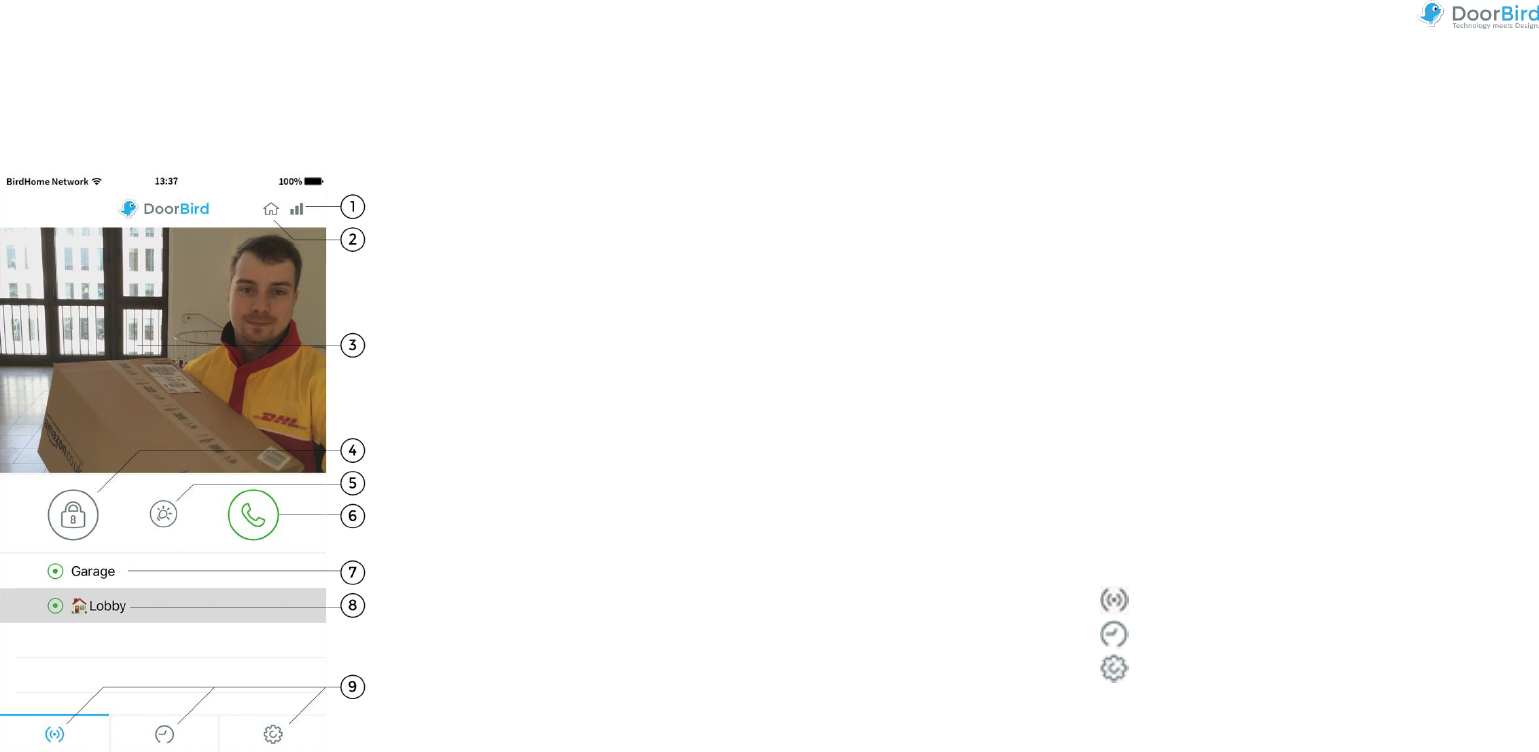
Live-Screen
This screen allows you to speak to your visitors.
1) Connection strength
These bars show the connection strength across the entire
network route from the App right up to the device across
all access points, routers, cables, etc. At the same time,
the strength indicator also indicates data throughput and
the latency of transferred data packets.
2) Connection method
Shows how the App is connected to the video door station.
The house symbol indicates that the App is connected to
your device directly through your LAN. The cloud symbol
indicates that the App is connected to your device through
our highly secure cloud server via the internet.
3) Live picture
The resolution, compression and number of frames per
second depend on the strength of the connection as well
as on the connection method.
4) Door opening button
Tap this button to open the door. You’ll need to ensure
that you’ve connected a door opener to the device first.
5) Light button
Tap this button to activate the infrared LED ring on the
device. Once the infrared LED ring has been activated, the
device switches into night-vision mode, and then the
image sensor will only detect infrared light. This light
switches itself off automatically after a short time.
6) Answering/hanging-up button
Tap this button to start or end voice communications.
7) Connection status
A green dot indicates that the App is able to connect to the
device, either via LAN or through the internet. A red dot
indicates that the App cannot connect to the device. It can
sometimes take a number of seconds before the current
status is displayed on screen.
8) Device list
You can add up to 10 compatible devices to the App.
Furthermore, if an event was triggered recently, because
i.e. someone had rung the device, this will be shown next
to the description of the device on the right-hand side.
9) Main menu
These three items will take you to the following screens.
Live-Screen
History (page 4)
Settings (page 5)
Download Bedienungsanleitung auf Deutsch (PDF, 4.15 MB)
(Denken Sie an die Umwelt und drucken Sie diese Bedienungsanleitung nur aus, wenn es unbedingt nötig ist)

Loading…

Bewertung

Teilen Sie uns mit, was Sie über die DoorBird App (iOS) denken, indem Sie eine Produktbewertung verfassen. Möchten Sie Ihre Erfahrungen mit diesem Produkt teilen oder eine Frage stellen? Hinterlassen Sie einen Kommentar am Ende dieser Seite!
Sind Sie mit DoorBird App (iOS) zufrieden?
Ja Nein
Seien Sie die erste Person, die dieses Produkt bewertet
0 Bewertungen

Diskutieren Sie über dieses Produkt mit

Hier können Sie uns Ihre Meinung zu DoorBird App (iOS) mitteilen. Wenn Sie eine Frage haben, lesen Sie zunächst das Bedienungsanleitung sorgfältig durch. Die Anforderung eines Bedienungsanleitung kann über unser Kontaktformular erfolgen.

Mehr zu diesem Bedienungsanleitung

Wir verstehen, dass es schön ist, ein gedrucktes Bedienungsanleitung für Ihr DoorBird App (iOS) zu haben. Sie können das Bedienungsanleitung jederzeit von unserer Website herunterladen und selbst ausdrucken. Wenn Sie ein Originalhandbuch wünschen, empfehlen wir Ihnen, DoorBird zu kontaktieren. Möglicherweise können sie ein Originalhandbuch bereitstellen. Suchen Sie das Bedienungsanleitung Ihres DoorBird App (iOS) in einer anderen Sprache? Wählen Sie auf unserer Homepage Ihre bevorzugte Sprache und suchen Sie nach der Modellnummer, um zu sehen, ob wir sie verfügbar haben.

Spezifikationen

Marke DoorBird
Modell App (iOS)
Kategorie Software
Dateityp PDF
Dateigröße 4.15 MB

Alle Anleitungen für DoorBird Software
Weitere Anleitungen von Software
Bedienungsanleitung DoorBird App (iOS)

Verwandte Produkte

Verwandte Kategorien

×
Download