GREA
T BRIT
AIN • CUSTOMER SERVICE
tel. 020 8247 9300 e-mail [email protected] internet www.clasohlson.co.ukVer. 20141216
Use
Time display
The clock is showing 12 or 24 hour display. To change between 12 and 24 hour
display, press and hold CLOCK until the display changes the time format.
• At 12 hour display AM or PM is shown on the display.
• At 24 hour display neither AM nor PM is shown on the display.
Set time
Note: The time switch must be in normal mode (time) before setting
of time and week day. Push CLOCK to return to normal mode.
1. Push and hold SET until the week indicator blinks.
2. Push ▲+ to change week day forward, or ▼- to change week day
backwards. The selected week day is shown in the display.
3. Push SET to confirm. The hour setting blinks in the display.
4. Use ▲+ and ▼- to set hours.
5. Push SET to confirm. The minute setting blinks in the display.
6. Use ▲+ and ▼- to set minutes.
7. Push CLOCK to return to normal mode.
Summer/Winter time
Press CLOCK and ▼- at the same time to switch between summer and
winter time. S is shown on the display to indicate summer time.
Installation of programme
1. Push ON/OFF to set the time switch in AUTO mode.
2. When the display is in normal mode, press ▲+ to return to settings mode.
1ON is shown on the display’s bottom left corner.
“1” indicates program number 1 (of 20).
“ON” indicates the time for activation.
“OFF” indicates the time for off activation.
3. Use ▲+ and ▼- to change the program number according to
the following sequence:
1ON → 1OFF → …… 20ON → 20OFF → d ON/OFF (countdown)
4. After selected program, push SET to set week day for on and off activation.
5. Use ▲+ to change week days. The days will be changed in the following
combinations:
MO TU WE TH FR SA SU; MO → TU → WE → TH → FR → SA → SU:
MO WE FR; TU TH SA; SA SU; MO TU WE; TH FR SA;
MO TU WE TH FR; MO TU WE TH FR SA
6. Push SET to confirm. The hour setting blinks in the display.
7. Use ▲+ and ▼- to set hours.
8. Push SET to confirm. The minute setting blinks in the display.
9. Use ▲+ and ▼- to set minutes.
10. Press CLOCK to return to normal mode.
Countdown function
Set the countdown time
The countdown interval is from 1 second to 99 hours, 59 minutes and 59 seconds.
1. When the display is in normal mode, press ▼- to return to the countdown
function. The display shows d ON or d OFF.
d indicates that the countdown function is activated.
2. Push SET until ON or OFF blinks on the display.
3. Use ▲+ and ▼- to switch between ON or OFF.
ON Set the duration for how long the device/output will be ON (the device/
output will be turned off after the countdown). OFF set the duration for how
long the device/output will be OFF (the device/output will be turned on after
the countdown).
4. Push SET to confirm. The timer display blinks.
5. Use ▲+ and ▼- to set hours.
6. Push SET to confirm. The minutes display blinks.
7. Use ▲+ and ▼- to set minutes.
8. Push SET to confirm. The seconds blink.
9. Use ▲+ and ▼- to set seconds.
10. Push SET to confirm and then push CLOCK to return to normal mode.
Start the countdown
1. Set the countdown time according to the instructions above.
2. Connect the device to the time switch and connect the time switch
to a wall socket.
3. Push ON/OFF to set the time switch in AUTO mode.
4. Push CD to start the countdown function. CD will blink to confirm that CD-
mode is activated.
5. When the countdown has come to 00:00:00, the e.g. lamp turns on
or off depending on what has been programmed.
Random on and off activation
1. Connect the device to the time switch and connect the time switch
to a wall socket.
2. Push ON/OFF to set the time switch in AUTO mode.
3. Push RND. An icon with the letter R will appear to confirm that the RND-
mode is activated. The output is now off for 26 to 42 minutes before it
randomly turns on. The output then stays on for 10 to 26 minutes before it
turns off again.
Turning the lamp on and off manually
Push ON/OFF to manually activate or deactivate the time switch.
ON The voltage turns on regardless of the setting and the connected
device can be used.
AUTO The time switch operates according to pre-set program.
OFF The voltage turns off and the connected device cannot be used.
Safety
• The time switch is intended for use indoors and may not be used outdoors!
• Devices connected to the time switch must be constructed for the same
voltage according to the specifications below.
• The built-in batteries are fully charged after approx. 2 hours use.
Disposal
Follow local ordinances when disposing this product. If you are unsure about
the disposal of this product contact your municipality.
Specifications
Mains Supply 230 V AC, 50 Hz
Max load 1800 W
Operating Temperature 0–55 °C
Class IP20
Minimum time interval 1 minute
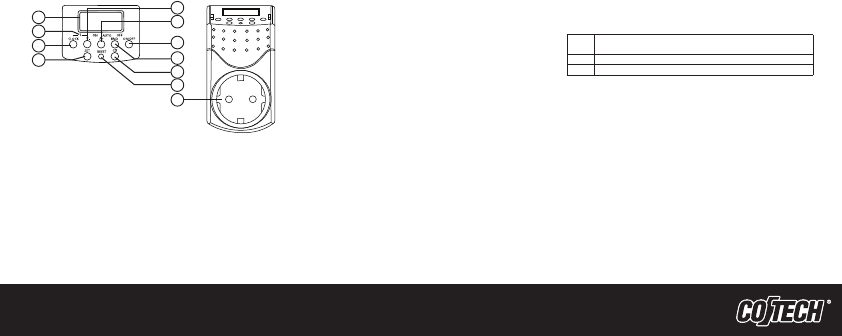
1. LCD-display
2. S – Indication on the display for summer time.
3. CLOCK – Press to return to normal mode (time).
4. SET – Sets time and week day and also confirms settings.
5. ▼- – Adjusts time, week, and program group.
6. ▲+ – Adjusts time, week, and program group.
7. ON/OFF – Changes function on the time switch. ON, AUTO or OFF.
8. RND – Randomly activates on and off when the time switch
is in AUTO mode.
9. CD – Starts or stops the countdown function when the time switch
is in AUTO mode.
10. RESET – Press one time to reset the time switch to factory settings.
11. Plug socket
Digital time switch
Art.no 18-2029 Modell EMT757-UK
18-2175 EMT757-UK
36-2901 EMT757
36-4600 EMT757
36-5035 EMT757x2
Please read the entire instruction manual before using the product and save
it for future reference. We apologise for any text or photographic errors and
any changes in technical data. If you have any questions concerning technical
problems please contact our Customer Service Department.
Product Description
Digital time switch with 20 on/off activations per day.
• CD
• Random function (random on and off activation)
• LCD-display
• Safety shuttered socket
Buttons and Functions
5
6
7
8
9
10
1
2
3
4
11



Diskutieren Sie über dieses Produkt mit
Hier können Sie uns Ihre Meinung zu Cotech EMT757 Zeitschaltuhr mitteilen. Wenn Sie eine Frage haben, lesen Sie zunächst das Bedienungsanleitung sorgfältig durch. Die Anforderung eines Bedienungsanleitung kann über unser Kontaktformular erfolgen.
Antworten | Das war hilfreich (0) (Übersetzt von Google)
Antworten | Das war hilfreich (0) (Übersetzt von Google)
Antworten | Das war hilfreich (0) (Übersetzt von Google)
Antworten | Das war hilfreich (0) (Übersetzt von Google)