English
UNITED KINGDOM • customer service
postal Clas Ohlson Ltd, Aquilla House (First floor), 1 Becketts Wharf, Lower Teddington Road, Hampton Wick, Kingston Upon Thames, KT1 4ER
Positive plate
TO CONVERT WEIGHT UNIT
If the scale is with both measuring system of Metric(kilograms) and
Imperial (pounds, stones), you can convert weight unit as follow:
Condition 1:
if the unit switch is inside battery
case,
A. Open battery case cover on the back
of scale.
B. Pull up and down the unit switch to convert
scale unit between kg-lb-st.
Unit switch
kg/lb/st
Battery
Cover
Unit switch
kg/lb/st
Condition 2:
if the unit switch is on the back of
the scale,
A. Find unit switch on the back of scale.
B. Pull up and down the unit switch to convert
scale unit between kg-lb-st.
kg
kg
BATTERY
TO REPLACE BATTERY
picture 1
Condition 1: Open battery case cover on the
back of scale, if battery case is
the type shown in picture 1,
A. Take out the used battery with the aid of a
cuspidal object, as shown in picture 1.
B. Install new battery by putting one side of the
battery beneath the battery baffle and then
pressing down the other side.
Please take note to the polarity.
Step 2:
Gently step on the scale, then the scale
will be automatically turned on. Stand
evenly on the scale without moving and
wait until your weight shown on display
is stable and locked.
picture 4
Condition 4: Open battery case cover on the
back of scale, if battery case is the
type shown in picture 4,
A. Take out the used batteries (with the aid of a
cuspidal object, if needed)
B. Install new battery by putting one side of the
battery and then pressing down the other side.
Please take note to the polarity.
OPERATION
Type 1
:
3V lithium batteries(CR2032).
Please remove the isolation
sheet from the battery contact
before use.
Type 2: 1.5V AAA batteries (excluded)
Step 1:
To make sure accuracy, place the
scale on a hard, flat floor and avoid
carpet or soft surface.
Remark: If the scale is one of our "slim" series
(indicated on package), make sure to put it on
hard surface such as marble, floor tile etc., and
make sure no foreign bodies beneath the scale
before weighing.
CR2032
battery baffle
battery baffle
AUTOMATIC SWITCH OFF
When you step off the scale, it will automatically
switch off. Auto shut-off occurs if display shows
stable weight reading for approximate 8 seconds.
Condition 2
:
Open battery case cover on the
back of scale, if battery case is
the type shown in picture 2,
A. Pull the black tab outwards and the battery
will come out.
B. Install new battery by putting one side of
the battery beneath the contact and then
pressing down the other side. Please take
note to the polarity.
CR 2 0 32
black tab
contact
picture 2
Unit button
Condition 3:
if the unit switch is on the back of
the scale,
A. Find unit switch on the back of scale.
B. Press the unit conversion button when scale
is power on, LCD shows current weight unit.
Press the button again to convert weight unit.
picture 3
Condition 3: Open battery case cover on the
back of scale, if battery case is
the type shown in picture 3,
A. Press battery gently, the battery will pop up
automatically.
B. Install new battery by connecting one side of
battery to the positive plate first, and then
pressing down the other side. Please observe
the polarity.
Positive plate
TO CONVERT WEIGHT UNIT
If the scale is with both measuring system of Metric(kilograms) and
Imperial (pounds, stones), you can convert weight unit as follow:
Condition 1:
if the unit switch is inside battery
case,
A. Open battery case cover on the back
of scale.
B. Pull up and down the unit switch to convert
scale unit between kg-lb-st.
Unit switch
kg/lb/st
Battery
Cover
Unit switch
kg/lb/st
Condition 2:
if the unit switch is on the back of
the scale,
A. Find unit switch on the back of scale.
B. Pull up and down the unit switch to convert
scale unit between kg-lb-st.
kg
kg
BATTERY
TO REPLACE BATTERY
picture 1
Condition 1: Open battery case cover on the
back of scale, if battery case is
the type shown in picture 1,
A. Take out the used battery with the aid of a
cuspidal object, as shown in picture 1.
B. Install new battery by putting one side of the
battery beneath the battery baffle and then
pressing down the other side.
Please take note to the polarity.
Step 2:
Gently step on the scale, then the scale
will be automatically turned on. Stand
evenly on the scale without moving and
wait until your weight shown on display
is stable and locked.
picture 4
Condition 4: Open battery case cover on the
back of scale, if battery case is the
type shown in picture 4,
A. Take out the used batteries (with the aid of a
cuspidal object, if needed)
B. Install new battery by putting one side of the
battery and then pressing down the other side.
Please take note to the polarity.
OPERATION
Type 1
:
3V lithium batteries(CR2032).
Please remove the isolation
sheet from the battery contact
before use.
Type 2: 1.5V AAA batteries (excluded)
Step 1:
To make sure accuracy, place the
scale on a hard, flat floor and avoid
carpet or soft surface.
Remark: If the scale is one of our "slim" series
(indicated on package), make sure to put it on
hard surface such as marble, floor tile etc., and
make sure no foreign bodies beneath the scale
before weighing.
CR2032
battery baffle
battery baffle
AUTOMATIC SWITCH OFF
When you step off the scale, it will automatically
switch off. Auto shut-off occurs if display shows
stable weight reading for approximate 8 seconds.
Condition 2
:
Open battery case cover on the
back of scale, if battery case is
the type shown in picture 2,
A. Pull the black tab outwards and the battery
will come out.
B. Install new battery by putting one side of
the battery beneath the contact and then
pressing down the other side. Please take
note to the polarity.
CR 2 0 32
black tab
contact
picture 2
Unit button
Condition 3:
if the unit switch is on the back of
the scale,
A. Find unit switch on the back of scale.
B. Press the unit conversion button when scale
is power on, LCD shows current weight unit.
Press the button again to convert weight unit.
picture 3
Condition 3: Open battery case cover on the
back of scale, if battery case is
the type shown in picture 3,
A. Press battery gently, the battery will pop up
automatically.
B. Install new battery by connecting one side of
battery to the positive plate first, and then
pressing down the other side. Please observe
the polarity.
Positive plate
TO CONVERT WEIGHT UNIT
If the scale is with both measuring system of Metric(kilograms) and
Imperial (pounds, stones), you can convert weight unit as follow:
Condition 1:
if the unit switch is inside battery
case,
A. Open battery case cover on the back
of scale.
B. Pull up and down the unit switch to convert
scale unit between kg-lb-st.
Unit switch
kg/lb/st
Battery
Cover
Unit switch
kg/lb/st
Condition 2:
if the unit switch is on the back of
the scale,
A. Find unit switch on the back of scale.
B. Pull up and down the unit switch to convert
scale unit between kg-lb-st.
kg
kg
BATTERY
TO REPLACE BATTERY
picture 1
Condition 1: Open battery case cover on the
back of scale, if battery case is
the type shown in picture 1,
A. Take out the used battery with the aid of a
cuspidal object, as shown in picture 1.
B. Install new battery by putting one side of the
battery beneath the battery baffle and then
pressing down the other side.
Please take note to the polarity.
Step 2:
Gently step on the scale, then the scale
will be automatically turned on. Stand
evenly on the scale without moving and
wait until your weight shown on display
is stable and locked.
picture 4
Condition 4: Open battery case cover on the
back of scale, if battery case is the
type shown in picture 4,
A. Take out the used batteries (with the aid of a
cuspidal object, if needed)
B. Install new battery by putting one side of the
battery and then pressing down the other side.
Please take note to the polarity.
OPERATION
Type 1
:
3V lithium batteries(CR2032).
Please remove the isolation
sheet from the battery contact
before use.
Type 2: 1.5V AAA batteries (excluded)
Step 1:
To make sure accuracy, place the
scale on a hard, flat floor and avoid
carpet or soft surface.
Remark: If the scale is one of our "slim" series
(indicated on package), make sure to put it on
hard surface such as marble, floor tile etc., and
make sure no foreign bodies beneath the scale
before weighing.
CR2032
battery baffle
battery baffle
AUTOMATIC SWITCH OFF
When you step off the scale, it will automatically
switch off. Auto shut-off occurs if display shows
stable weight reading for approximate 8 seconds.
Condition 2
:
Open battery case cover on the
back of scale, if battery case is
the type shown in picture 2,
A. Pull the black tab outwards and the battery
will come out.
B. Install new battery by putting one side of
the battery beneath the contact and then
pressing down the other side. Please take
note to the polarity.
CR 2 0 32
black tab
contact
picture 2
Unit button
Condition 3:
if the unit switch is on the back of
the scale,
A. Find unit switch on the back of scale.
B. Press the unit conversion button when scale
is power on, LCD shows current weight unit.
Press the button again to convert weight unit.
picture 3
Condition 3: Open battery case cover on the
back of scale, if battery case is
the type shown in picture 3,
A. Press battery gently, the battery will pop up
automatically.
B. Install new battery by connecting one side of
battery to the positive plate first, and then
pressing down the other side. Please observe
the polarity.
Positive plate
TO CONVERT WEIGHT UNIT
If the scale is with both measuring system of Metric(kilograms) and
Imperial (pounds, stones), you can convert weight unit as follow:
Condition 1:
if the unit switch is inside battery
case,
A. Open battery case cover on the back
of scale.
B. Pull up and down the unit switch to convert
scale unit between kg-lb-st.
Unit switch
kg/lb/st
Battery
Cover
Unit switch
kg/lb/st
Condition 2:
if the unit switch is on the back of
the scale,
A. Find unit switch on the back of scale.
B. Pull up and down the unit switch to convert
scale unit between kg-lb-st.
kg
kg
BATTERY
TO REPLACE BATTERY
picture 1
Condition 1: Open battery case cover on the
back of scale, if battery case is
the type shown in picture 1,
A. Take out the used battery with the aid of a
cuspidal object, as shown in picture 1.
B. Install new battery by putting one side of the
battery beneath the battery baffle and then
pressing down the other side.
Please take note to the polarity.
Step 2:
Gently step on the scale, then the scale
will be automatically turned on. Stand
evenly on the scale without moving and
wait until your weight shown on display
is stable and locked.
picture 4
Condition 4: Open battery case cover on the
back of scale, if battery case is the
type shown in picture 4,
A. Take out the used batteries (with the aid of a
cuspidal object, if needed)
B. Install new battery by putting one side of the
battery and then pressing down the other side.
Please take note to the polarity.
OPERATION
Type 1
:
3V lithium batteries(CR2032).
Please remove the isolation
sheet from the battery contact
before use.
Type 2: 1.5V AAA batteries (excluded)
Step 1:
To make sure accuracy, place the
scale on a hard, flat floor and avoid
carpet or soft surface.
Remark: If the scale is one of our "slim" series
(indicated on package), make sure to put it on
hard surface such as marble, floor tile etc., and
make sure no foreign bodies beneath the scale
before weighing.
CR2032
battery baffle
battery baffle
AUTOMATIC SWITCH OFF
When you step off the scale, it will automatically
switch off. Auto shut-off occurs if display shows
stable weight reading for approximate 8 seconds.
Condition 2
:
Open battery case cover on the
back of scale, if battery case is
the type shown in picture 2,
A. Pull the black tab outwards and the battery
will come out.
B. Install new battery by putting one side of
the battery beneath the contact and then
pressing down the other side. Please take
note to the polarity.
CR 2 0 32
black tab
contact
picture 2
Unit button
Condition 3:
if the unit switch is on the back of
the scale,
A. Find unit switch on the back of scale.
B. Press the unit conversion button when scale
is power on, LCD shows current weight unit.
Press the button again to convert weight unit.
picture 3
Condition 3: Open battery case cover on the
back of scale, if battery case is
the type shown in picture 3,
A. Press battery gently, the battery will pop up
automatically.
B. Install new battery by connecting one side of
battery to the positive plate first, and then
pressing down the other side. Please observe
the polarity.
Bathroom scale
Art.no. 44-3815 Model EB161H
Please read the entire instruction manual before using the pro-
duct and then save it for future reference. We reserve the right
for any errors in text or images and any necessary changes
made to technical data. If you have any questions concerning
technical problems please contact our Customer Services.
Safety
• This product is a precision instrument and should be
handled with care and protected from knocks and rough
treatment.
• Place the product in the same place every time you use it.
• Always place the product on an even and level surface for
best results. An uneven surface under the scale can cause
the readings to fluctuate.
• Weigh yourself without clothes and shoes at the same time
every day, preferably in the morning before breakfast. Place
your feet in the same place every time you use the scale.
• The displayed readings are rounded up/down to the nearest
100 g.
Batteries
1. Open the battery compartment on the bottom of the scale
and insert 2 x AAA/LR03 batteries (sold separately).
2. Refit the battery cover.
Instructions for use
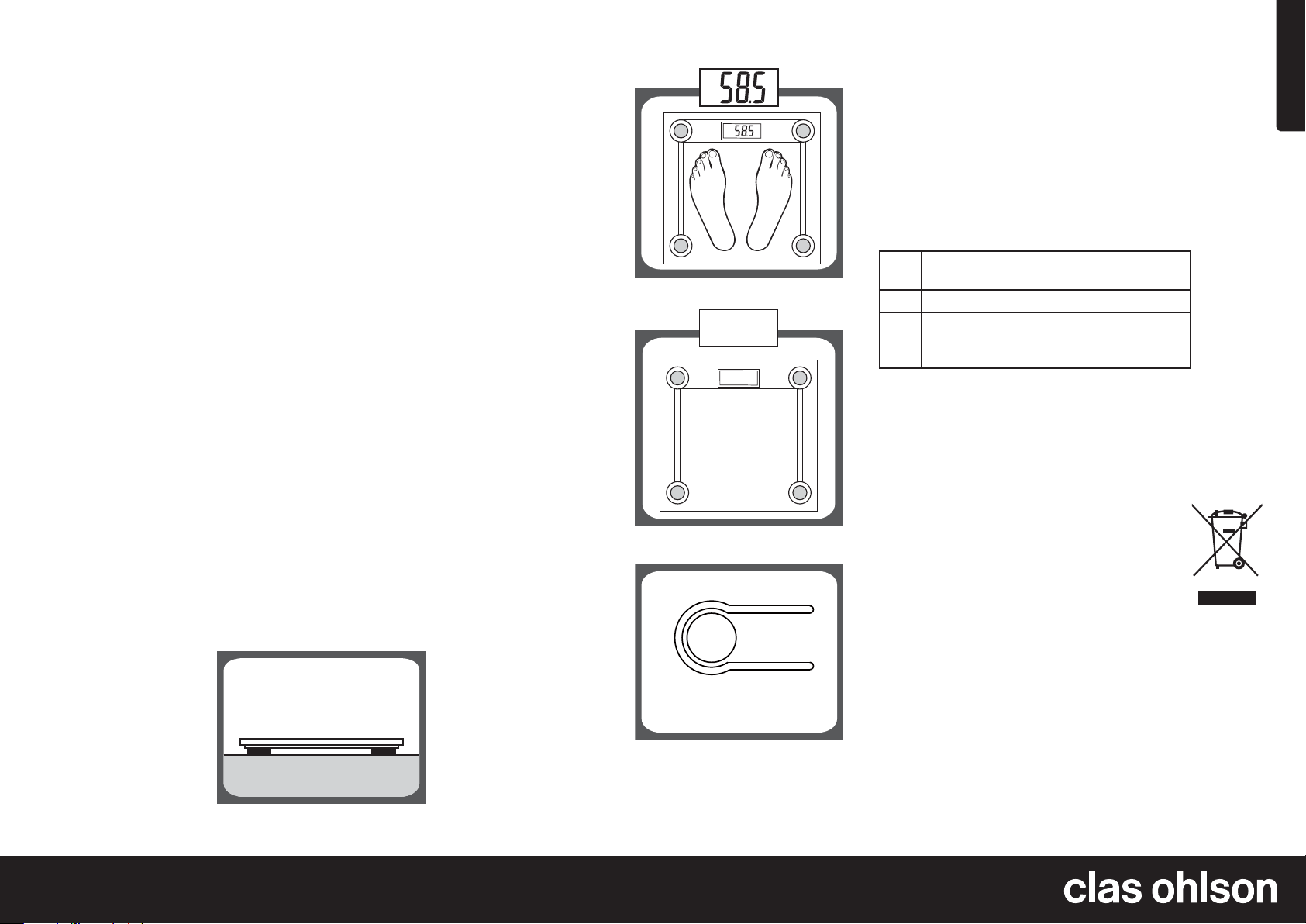
1. Place the scale on an
even, hard surface.
2. Stand on the scale
and it will come
on automatically.
The display will
stop flashing once
weighing is complete.
3. The scale
automatically shuts
off as soon as you
step off it.
4. Press the [Unit
button] on the bottom
of the scale if you
want to change the
unit of measurement.
You can weigh
yourself in kilos (kg)
or pounds (lb) or
stones (st:lb).
Care and maintenance
• Clean the scale by wiping it with a damp cloth. Use only
mild cleaning agents, never solvents or corrosive chemicals.
• Never expose the product to liquids or moisture.
• Remove the batteries from the product if it is not to be used
for a long time.
The following error messages can appear on
the display
Err The weight capacity of the scale has been
exceeded.
Lo The batteries are low. Insert new batteries.
C If a C appears on the display when you
step off the scale, then weighing was not
successful. Weigh yourself again.
If the display does not return to normal or the scale shows an
error message, take out the batteries and wait for 5 seconds for
the electronics to be reset. Insert the batteries again.
Responsible disposal
This symbol indicates that the product should
not be disposed of with general household waste.
This applies throughout the entire EU. In order to
prevent any harm to the environment or health
hazards caused by incorrect waste disposal, the
product must be handed in for recycling so that
the material can be disposed of in a responsible
manner. When recycling your product, take it to your local collection
facility or contact the place of purchase. They will ensure that
the product is disposed of in an environmentally sound manner.
Specifications
Batteries 2 x AAA/LR03 (sold separately)
Max weight 150 kg
Size 300 x 300 x 20 mm
Ver. 20200514



Diskutieren Sie über dieses Produkt mit
Hier können Sie uns Ihre Meinung zu Clas Ohlson EB161H Waage mitteilen. Wenn Sie eine Frage haben, lesen Sie zunächst das Bedienungsanleitung sorgfältig durch. Die Anforderung eines Bedienungsanleitung kann über unser Kontaktformular erfolgen.