Bedienungsanleitung Caliber MCD570 Autoradio

Benötigen Sie ein Bedienungsanleitung für Ihren Caliber MCD570 Autoradio? Unten können Sie das PDF-Bedienungsanleitung kostenlos auf Deutsch ansehen und herunterladen. Für dieses Produkt gibt es derzeit 4 häufig gestellte Fragen, 0 Kommentare und 0 Stimmen. Wenn dies nicht das von Ihnen gewünschte Bedienungsanleitung ist, kontaktieren Sie uns bitte.

Ist Ihr Produkt defekt und bietet die Bedienungsanleitung keine Lösung? Gehen Sie zu einem Repair Café, wo es gratis repariert wird.

Bedienungsanleitung

Loading…
ENGLISH
3
ENGLISH
2
DISC PLAY
PRECAUTIONS
Use only in a 12-volt DC negative-ground electrical system.
Disconnect the vehicle's negative battery terminal while mounting and connecting the
unit.
When replacing the fuse, be sure to use one with an identical amperage rating.
•Using a fuse with a higher amperage rating may cause serious damage to the unit.
•DO NOT attempt to disassemble the unit. Laser beams from the optical pickup are
dangerous to the eyes.
Make sure that pins or other objects do not get inside the unit; they may cause
malfunctions, or create safety hazards such as electrical shock or laser beam exposure.
If you have parked the car for a long time in hot or cold weather, wait until the
temperature in the car become normal before operating the unit.
Keep the volume at a level at which you can hear outside warning sounds (horns
sirens, etc.).
CD NOTES
Playing a defective or dusty CD can cause dropouts in sound.
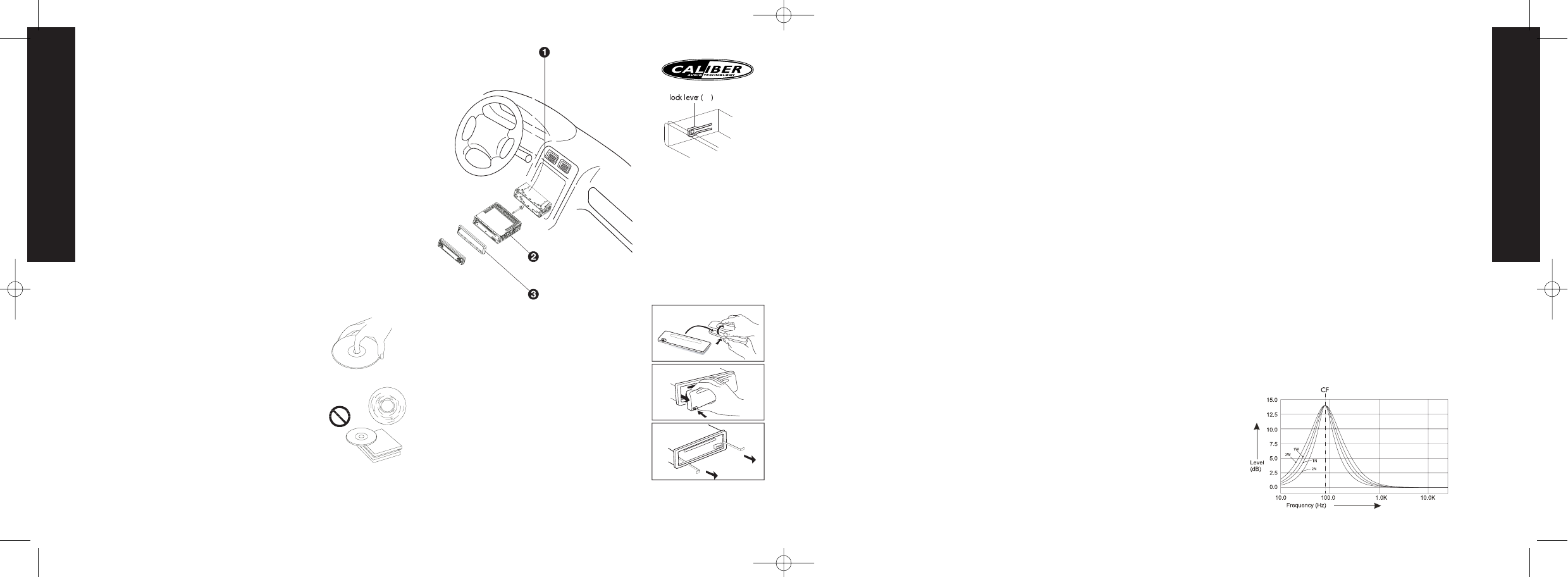
Hold CDs as illustrated.
DO NOT touch the unlabeled side.
DO NOT attach any seal, label or data protection sheet to either side of a disc.
DO NOT expose a CD to direct sunlight or excessive heat.
Wipe a dirty CD from the center outward with a cleaning cloth.
•Never use solvents such as benzine or alcohol.
This unit cannot play 3-inch ( 8cm ) CDs.
NEVER insert a 3-inch CD contained in the adapter
or an irregularly shaped CD.
The unit may not be able to eject it, resulting in a
malfunction.
BEFORE OPERATION
•DO NOT raise the volume level too much, as this
will block outside sounds, making driving dangerous.
Stop the car before performing any complicated
operation.
CAUTION
DO NOT open covers and do not repair by yourself.
Consult the dealer or an experienced technician for help.
Installation procedures
First complete the electrical connections, and then
check them for correctness.
Anti-Theft System
This unit is equipped with a detachable panel.
Removing this panel makes the radio totally inoperable.
Removing the panel
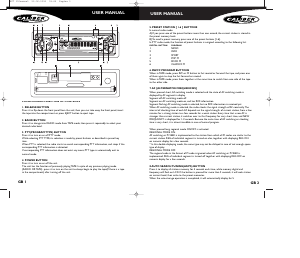
1. Switch off the power of the unit.
2. Remove the detachable panel (REL button).
3. Gently press the button of the case and open the
cover. Place the panel into the case and take it with you
when you leave the car.
Install detachable panel
1.Fix right part of face plate in the right part of panel slot
of the unit.
2.Press down the left side of the face plate until it clicks
into the panel slot of the unit.
Remove the unit
Switch of the power of the unit.
1. Remove the panel and the trim plate.
2. Insert both T-Keys into hole in front of the set until
they lock.
3. Pull out the unit.
BASIC OPERATIONS
ON/OFF
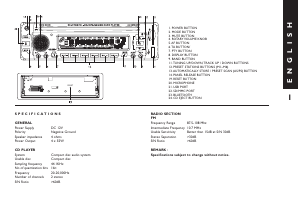
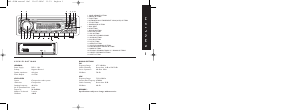
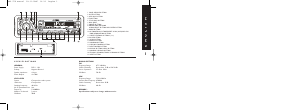
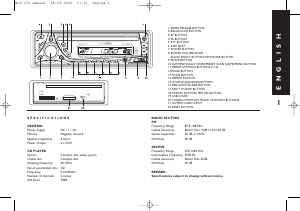
Switch on the unit by pressing POWER button(7) or any other button on the radio
(except eject) when system is on, press POWER button(7) to turn off the unit.
FACEPANEL RELEASE
Press REL button (1) to remove the facepanel.
SOUND ADJUSTMENT
Press the button (2) “MUTE” momentarily to mute the audio volume, and "Mute" will
flash in the display. Press the mute button again to restore volume to the previous setting.
SOURCE
Press button (9) “MODE“ to switch between Tuner, CD, iPod and Aux Line-In.
DISPLAY
Press the button (18) “DISPLAY/MENU” repeatedly to select the following different
Display options:
Spectrum mode 1 -> Spectrum mode 2 -> Spectrum mode 3 -> Default Display
MENU OPERATIONS
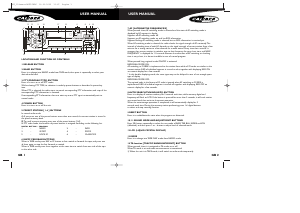
Press the button (18) “DISPLAY/MENU” longer then 3 seconds to access the menu.
Press button (8) “AUDIO” momentarily to move forward to the next option.The
menu can also be navigated by using the buttons (20) Tuning Up or Tuning Down to
move to the next or previous option. Once the desired option appears on the display,
adjust that option by rotating the volume control within 5 seconds. The following
options can be adjusted:
CONTRAST
The contrast level of the display is set at “contrast 05” by default. Rotate the volume
control to adjust the contrast level from 00 to 10.
CLOCK FORMAT
This option allows selection of a 12 hour or 24 hour clock format.“CLK FORMAT 12”
is the default setting. Rotate the volume button to change the 24 hour clock format.
TIME SET
The time on the clock will be set to 12:00 as the default. Program the current time by
rotating the volume button clockwise to adjust the minutes and counterclockwise to
adjust the hours.
PROGRAMMABLE TURN-ON VOLUME (VOL PGM)
This option allows selection of the volume level the radio will automatically assume
when first turned on.“VOL PGM 12” is the default setting, which will turn the radio
on at the volume level selected when the unit was last turned off.To program a
specific volume level for the radio to turn on at, rotate the volume control to select
“VOLUME LEVEL”.Within 5 seconds.
BEEP TONE
You can rotate the volume knob to select the following options:
BEEP ON Beeps when any button is pressed.
BEEP OFF To disable the beep option.
AUDIO OPERATIONS
Press the button (8) “AUDIO” to enter the sound set up. Press button (8) “AUDIO”
momentarily to move forward to the next option.The menu can also be navigated by
using the buttons (20) Tuning Up or Tuning Down to move to the next or previous
option. Once the desired option appears on the display, adjust that option by rotating
the volume control within 5 seconds.The following options can be adjusted:
VOLUME
To increase the volume rotate the volume knob (8) clockwise, to decrease the volume
rotate the volume knob counterclockwise.
SUBWOOFER (SUBWOOFER LEVEL)
Rotate the volume knob (8) to select the desired volume level from “00” to “12”.
NOTE:The subwoofer level control will only appear in the Audio Menu if the
“Subwoofer” function is activated and a subwoofer speaker is connected.
Press button (3) “SUB-W” to activate the subwoofer function. Press again to turn off.
SUB-W LPF (SUBWOOFER LOW PASS FILTER)
Rotate the volume knob (8) to select the desired Low Pass Filter function: Flat, 80Hz,
120Hz or 160Hz.
NOTE :The subwoofer level control will only appear in the Audio Menu if the
“Subwoofer” function is activated and a subwoofer speaker is connected.
IX-BASS (IX-BASS LEVEL)
Rotate the volume knob (8) to select the desired Bass Boost function: low, mid or high.
NOTE :The iX-Bass function will only appear in the Audio Menu if the “iX-Bass”
function is activated. Press button (5) “IX-BASS” to activate the iX-Bass function.
Press again to turn off.
BASS (BASS LEVEL)
Rotate the volume know (8) to select the desired Bass level from “-6” to “+6”.
BASS-CFQ (BASS CENTER
FREQUENCY)
Rotate the volume knob (8)
to select the desired Bass
center Frequency to 60Hz,
80Hz, 100Hz or 200Hz.
BASS-Q (BASS Q FACTOR)
Rotate the volume knob (8)
to select the desired Bass-Q
Factor to 2N, 1N, 1W or
2W.
1. Insert mounting bracket into the
dashboard, and bend the mounting
tabs out with a screwdriver. (Make
sure that lock lever is flush with
the mounting bracket. Not
projecting outward)
2. Secure the rear of the unit After
fixing mounting bolt and power
connector, fix the rear of the unit
to the car body by rubber cushion.
3. Insert trimplate
MCD 570 manual 03-11-2006 14:33 Pagina 2
Download Bedienungsanleitung auf Deutsch (PDF, 1.81 MB)
(Denken Sie an die Umwelt und drucken Sie diese Bedienungsanleitung nur aus, wenn es unbedingt nötig ist)

Loading…

Bewertung

Teilen Sie uns mit, was Sie über die Caliber MCD570 Autoradio denken, indem Sie eine Produktbewertung verfassen. Möchten Sie Ihre Erfahrungen mit diesem Produkt teilen oder eine Frage stellen? Hinterlassen Sie einen Kommentar am Ende dieser Seite!
Sind Sie mit Caliber MCD570 Autoradio zufrieden?
Ja Nein
Seien Sie die erste Person, die dieses Produkt bewertet
0 Bewertungen

Diskutieren Sie über dieses Produkt mit

Hier können Sie uns Ihre Meinung zu Caliber MCD570 Autoradio mitteilen. Wenn Sie eine Frage haben, lesen Sie zunächst das Bedienungsanleitung sorgfältig durch. Die Anforderung eines Bedienungsanleitung kann über unser Kontaktformular erfolgen.

Mehr zu diesem Bedienungsanleitung

Wir verstehen, dass es schön ist, ein gedrucktes Bedienungsanleitung für Ihr Caliber MCD570 Autoradio zu haben. Sie können das Bedienungsanleitung jederzeit von unserer Website herunterladen und selbst ausdrucken. Wenn Sie ein Originalhandbuch wünschen, empfehlen wir Ihnen, Caliber zu kontaktieren. Möglicherweise können sie ein Originalhandbuch bereitstellen. Suchen Sie das Bedienungsanleitung Ihres Caliber MCD570 Autoradio in einer anderen Sprache? Wählen Sie auf unserer Homepage Ihre bevorzugte Sprache und suchen Sie nach der Modellnummer, um zu sehen, ob wir sie verfügbar haben.

Spezifikationen

Marke Caliber
Modell MCD570
Kategorie Autoradios
Dateityp PDF
Dateigröße 1.81 MB

Alle Anleitungen für Caliber Autoradios
Weitere Anleitungen von Autoradios

Häufig gestellte Fragen zu Caliber MCD570 Autoradio

Unser Support-Team sucht nach nützlichen Produktinformationen und beantwortet Ihre häufig gestellten Fragen. Sollte Ihnen ein Fehler bei den häufig gestellten Fragen auffallen, teilen Sie uns dies bitte anhand unseres Kontaktformulars mit.

Was ist DAB+? Verifiziert

DAB+ ist der Nachfolger des FM-Signals und steht für "Digital Audio Broadcasting". Es ist ein digitales Signal, das mehrere Kanäle innerhalb der gleichen Bandbreite ermöglicht und ein einfacheres Umschalten zwischen den Kanälen ermöglicht.

Das war hilfreich (635) Mehr lesen

Worin besteht der Unterschied zwischen FM und AM? Verifiziert

FM und AM sind beides Modulationsarten, die zur Übertragung eines Signals verwendet werden. FM steht für "Frequency Modulation" und AM für "Amplitude Modulation". AM ist die älteste Form der Modulation. Der größte Unterschied ist, dass das FM-Signal viel stärker ist als das AM-Signal.

Das war hilfreich (407) Mehr lesen

Eine CD hat sich in meinem Autoradio verkantet. Was ist zu tun? Verifiziert

Manche Autoradios verfügen über eine Funktion, um verkantete CDs auszuwerfen. Stellen Sie das Auto ab und halten Sie die Knöpfe „on“ (An) und „eject“ (Auswerfen) gleichzeitig zehn Sekunden lang gedrückt. Sollte das Problem weiterhin bestehen, starten Sie das Auto und versuchen Sie es erneut.

Das war hilfreich (387) Mehr lesen

Welche Größe benötigt ein Autoradio, um in mein Auto zu passen? Verifiziert

Es gibt zwei Standardgrößen bei Autoradios: 1-DIN und 2-DIN. 1-DIN ist die schmale Standardversion, während 2-DIN doppelt so groß ist. Bei 2-DIN-Autoradios kann häufig ein Bildschirm installiert werden, um Straßenkarten anzuzeigen oder Filme abzuspielen.

Das war hilfreich (327) Mehr lesen
Bedienungsanleitung Caliber MCD570 Autoradio

Verwandte Produkte

Verwandte Kategorien

×
Download