Bedienungsanleitung Black and Decker KR550K Schlagbohrmaschine

Benötigen Sie ein Bedienungsanleitung für Ihren Black and Decker KR550K Schlagbohrmaschine? Unten können Sie das PDF-Bedienungsanleitung kostenlos auf Deutsch ansehen und herunterladen. Für dieses Produkt gibt es derzeit 3 häufig gestellte Fragen, 0 Kommentare und 0 Stimmen. Wenn dies nicht das von Ihnen gewünschte Bedienungsanleitung ist, kontaktieren Sie uns bitte.

Ist Ihr Produkt defekt und bietet die Bedienungsanleitung keine Lösung? Gehen Sie zu einem Repair Café, wo es gratis repariert wird.

Bedienungsanleitung

Loading…
4
ENGLISH
Features
This tool includes some or all of the following features.
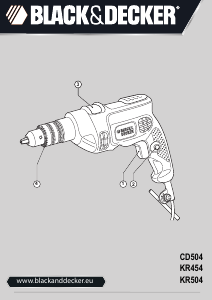
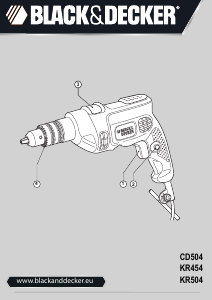
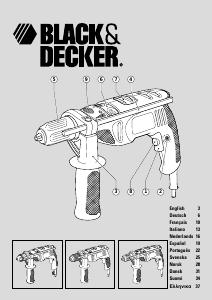
1. Variable speed switch
2. Lock-on button
3. Side handle
4. Depth stop
5. Chuck
6. Drilling mode selector
7. Forward/reverse switch
8. Variable speed control knob
9. Spindle lock button
Assembly
Warning! Make sure that the tool is switched off and unplugged.
Fitting the side handle and depth stop (fig. A)
Turn the grip (10) counterclockwise until you can slide the
side handle (3) onto the front of the tool as shown.
Rotate the side handle into the desired position.
Insert the depth stop (4) into the mounting hole as shown.
Set the depth stop to the desired position. The maximum
drilling depth is equal to the distance between the tip of
the drill bit and the front end of the depth stop.
Tighten the side handle by turning the grip clockwise.
Fitting a drill bit or screwdriver bit
Keyless chuck with spindle lock (fig. B)
Keep the spindle lock button (9) depressed and open the
chuck.
Insert the bit shaft (11) into the chuck and firmly tighten
the chuck.
Keyless chuck (fig. C)
Open the chuck by turning the front part (12) with one
hand while holding the rear part (13) with the other.
Insert the bit shaft (11) into the chuck and firmly tighten
the chuck.
Keyed chuck (fig. D)
Open the chuck by turning the sleeve (14).
Insert the bit shaft (11) into the chuck.
Insert the chuck key (15) into each hole (16) in the side of
the chuck and turn until tight.
Removing and refitting the chuck (fig. E)
Open the chuck as far as possible.
Remove the chuck retaining screw by turning it clockwise
using a screwdriver.
Tighten an Allen key (17) into the chuck and strike it with
a hammer as shown.
Remove the Allen key.
Remove the chuck by turning it counterclockwise.
To refit the chuck, screw it onto the spindle and secure it
with the chuck retaining screw.
Use
Warning! Before drilling into walls, floors or ceilings,
check for the location of wiring and pipes.
Selecting the direction of rotation
For drilling and for tightening screws, slide the forward/
reverse switch (7) forward.
For loosening screws or removing a jammed drill bit, slide
the forward/reverse switch (7) backward.
Warning! Never change the direction of rotation while the
motor is running.
Selecting the drilling mode
For drilling in masonry, set the drilling mode selector (6) to
the position.
For drilling in other materials and for screwdriving, set the
drilling mode selector (6) to the position.
Switching on and off
To switch the tool on, press the variable speed switch (1).
The tool speed depends on how far you press the switch.
If the tool has a variable speed control knob (8), set it to
the required speed range. As a general rule, use low
speeds for large diameter drill bits and high speeds for
smaller diameter drill bits.
For continuous operation, press the lock-on button (2) and
release the variable speed switch. This option is available
only at full speed.
To switch the tool off, release the variable speed switch.
To switch the tool off when in continuous operation, press
the variable speed switch once more and release it.
Accessories
The performance of your tool depends on the accessory used.
Black & Decker and Piranha accessories are engineered to high
quality standards and designed to enhance the performance of
your tool. By using these accessories you will get the very best
from your tool.
Maintenance
Your tool has been designed to operate over a long period of
time with a minimum of maintenance. Continuous satisfactory
operation depends upon proper tool care and regular cleaning.
Protecting the environment
Black & Decker provides a facility for recycling
Black & Decker products once they have reached the
end of their working life.
Download Bedienungsanleitung auf Deutsch (PDF, 0.92 MB)
(Denken Sie an die Umwelt und drucken Sie diese Bedienungsanleitung nur aus, wenn es unbedingt nötig ist)

Loading…

Bewertung

Teilen Sie uns mit, was Sie über die Black and Decker KR550K Schlagbohrmaschine denken, indem Sie eine Produktbewertung verfassen. Möchten Sie Ihre Erfahrungen mit diesem Produkt teilen oder eine Frage stellen? Hinterlassen Sie einen Kommentar am Ende dieser Seite!
Sind Sie mit Black and Decker KR550K Schlagbohrmaschine zufrieden?
Ja Nein
Seien Sie die erste Person, die dieses Produkt bewertet
0 Bewertungen

Diskutieren Sie über dieses Produkt mit

Hier können Sie uns Ihre Meinung zu Black and Decker KR550K Schlagbohrmaschine mitteilen. Wenn Sie eine Frage haben, lesen Sie zunächst das Bedienungsanleitung sorgfältig durch. Die Anforderung eines Bedienungsanleitung kann über unser Kontaktformular erfolgen.

Mehr zu diesem Bedienungsanleitung

Wir verstehen, dass es schön ist, ein gedrucktes Bedienungsanleitung für Ihr Black and Decker KR550K Schlagbohrmaschine zu haben. Sie können das Bedienungsanleitung jederzeit von unserer Website herunterladen und selbst ausdrucken. Wenn Sie ein Originalhandbuch wünschen, empfehlen wir Ihnen, Black and Decker zu kontaktieren. Möglicherweise können sie ein Originalhandbuch bereitstellen. Suchen Sie das Bedienungsanleitung Ihres Black and Decker KR550K Schlagbohrmaschine in einer anderen Sprache? Wählen Sie auf unserer Homepage Ihre bevorzugte Sprache und suchen Sie nach der Modellnummer, um zu sehen, ob wir sie verfügbar haben.

Spezifikationen

Marke Black and Decker
Modell KR550K
Kategorie Schlagbohrmaschinen
Dateityp PDF
Dateigröße 0.92 MB

Alle Anleitungen für Black and Decker Schlagbohrmaschinen
Weitere Anleitungen von Schlagbohrmaschinen

Häufig gestellte Fragen zu Black and Decker KR550K Schlagbohrmaschine

Unser Support-Team sucht nach nützlichen Produktinformationen und beantwortet Ihre häufig gestellten Fragen. Sollte Ihnen ein Fehler bei den häufig gestellten Fragen auffallen, teilen Sie uns dies bitte anhand unseres Kontaktformulars mit.

Was ist der Unterschied zwischen einer Schlagbohrmaschine und einem Bohrhammer? Verifiziert

Schlagbohrmaschinen werden dazu verwendet, Löcher in Backstein- und Mörtelwände zu bohren. Wenn Sie Löcher in Betonwände bohren wollen, benötigen Sie einen Bohrhammer.

Das war hilfreich (132) Mehr lesen

Muss ich Gehörschutz tragen, wenn ich eine Bohrmaschine verwende? Verifiziert

Ja, sollten Sie. Auch wenn sich die Lautstärke einer Bohrmaschine möglicherweise je nach Marke und Modell unterscheidet, kann die Langzeitbelastung durch starken Lärm dauerhafte Gehörschäden verursachen. Aus diesem Grund ist es empfehlenswert, Gehörschutz zu tragen.

Das war hilfreich (23) Mehr lesen

Kann ich Elektrowerkzeuge in einem Schuppen oder einer Garage aufbewahren? Verifiziert

Im Allgemeinen können Sie Elektrowerkzeuge in einem Schuppen oder einer Garage aufbewahren, auch wenn es dort manchmal friert. Für die Lebensdauer des Elektrowerkzeugs ist es jedoch besser, es an einem trockenen Ort ohne große Temperaturschwankungen aufzubewahren. In einem Schuppen oder einer Garage kann es aufgrund von Temperaturunterschieden zur Bildung von Kondenswasser kommen, das Rost verursachen kann. Darüber hinaus halten akkubetriebene Geräte kürzer und laden sich bei sehr niedrigen Temperaturen schlechter auf. Um sicherzugehen, wie Ihr Elektrowerkzeug gelagert werden muss, lesen Sie die Bedienungsanleitung immer sorgfältig durch.

Das war hilfreich (8) Mehr lesen
Bedienungsanleitung Black and Decker KR550K Schlagbohrmaschine

Verwandte Produkte

Verwandte Kategorien

×
Download